

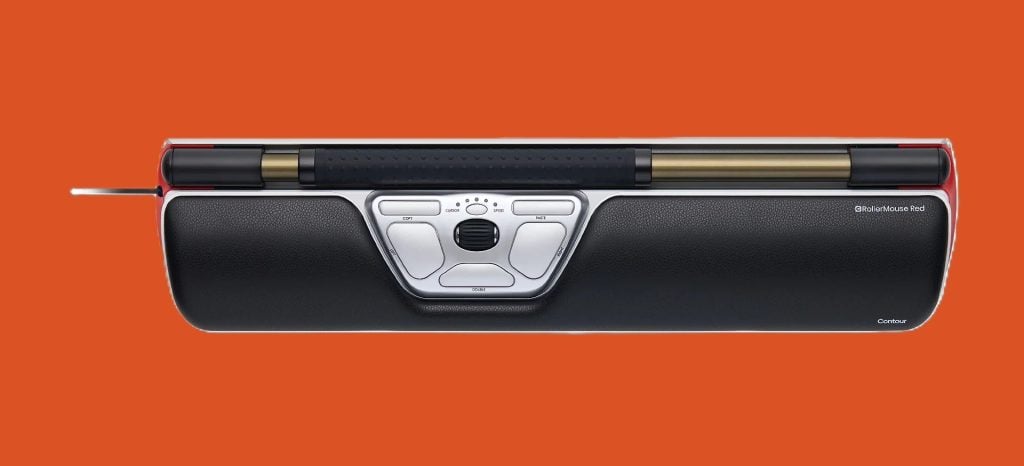
If you are looking for an ergonomic mouse to help you work or play, then there are a few you might choose from. But easily one of the very best out there is the RollerMouse Red from Contour. This sits in a fairly niche category of input devices: one that quietly challenges the very idea of what a “mouse” should be. Rather than sitting off to one side, it positions control directly in front of the keyboard, replacing the traditional pointer movement with a horizontal rollerbar. That single shift defines both its strengths and its limitations. Here are some of the things you might want to know about this particular device.
A Genuinely Different Ergonomic Approach
The core idea behind the RollerMouse Red is simple but surprisingly impactful: eliminate the constant reach to the side. By placing the cursor control centrally, it keeps your arms tucked in and your shoulders square, which can significantly reduce the subtle, repetitive strain that builds up over long sessions. This centred positioning has been shown to minimise unnecessary arm movement and helps maintain a more neutral posture, particularly for people who spend hours switching between typing and mousing.

In practice, this translates to a noticeably calmer working rhythm. Instead of that constant micro-reach to the right (or left), your hands remain in roughly the same zone, gliding between keyboard and rollerbar. For anyone already feeling the early signs of RSI – tight shoulders, wrist fatigue, or that dull ache between the shoulder blades – this design can feel like a relief valve. The rollerbar itself is smooth and responsive, requiring minimal force to operate. Combined with the soft, memory foam wrist rest, it creates a working surface that feels intentionally supportive rather than merely functional.
Comfort That Builds Over Time
Where the RollerMouse Red really earns its keep is over longer periods. It’s not the kind of device that impresses instantly with speed or flair: it’s more subtle than that. But over a full day, or a week, the reduction in strain becomes more apparent. Reviews consistently highlight decreased neck, shoulder, and wrist discomfort, largely because movement is smaller and more balanced.
There’s also a quiet productivity benefit. Because the cursor control sits directly beneath your hands, transitions between typing and pointing feel almost frictionless. That might not sound like much, but over hundreds of small interactions per day, it adds up to a smoother workflow. Customisation helps here too. Adjustable DPI settings, programmable buttons, and multiple wrist rest sizes mean it can be tuned to different working styles and hand sizes.
Build Quality & Design
Physically, it feels like a premium device. The materials – recycled aluminium paired with a cushioned wrist rest – strike a balance between durability and comfort. It’s also clearly designed with office environments in mind rather than portability. This is something that wants to live on your desk, integrated into your setup, not tossed into a laptop bag.
Built-in Shortcut Efficiency
The RollerMouse Red includes dedicated buttons for common actions like copy and paste, along with programmable controls you can tailor to your workflow. That might sound minor, but in practice it reduces reliance on keyboard shortcuts and repetitive movements, streamlining everyday tasks – especially in document-heavy or admin work.
Flexible Setup & Adaptability
It’s designed to fit a range of workstations and users, with multiple wrist rest sizes and adjustable sensitivity (DPI) settings. That flexibility means it can be dialled in for different hand sizes, desk setups, and preferences, rather than forcing you into a one-size-fits-all ergonomic solution.
Points Worth Considering
That said, the RollerMouse Red isn’t universally perfect, as no such device is – and it’s worth being honest about where it might fall short.

There’s a learning curve to using a device like this, for instance. While most users adapt within a few days, it does require retraining muscle memory. The rollerbar movement feels different to a standard mouse, and precision tasks – like detailed design or photo editing – can initially feel less intuitive or slightly less accurate.
Another subtle point is that ergonomics don’t exist in isolation. The RollerMouse encourages better posture, but it won’t fix a poorly set-up desk. If your keyboard height, chair position, or monitor alignment are off, you won’t get the full benefit – and in some cases, you could still experience strain despite the device itself being well-designed.
Despite those minor points, this remains, on the whole, a superior device, and one that will serve you well.
Who Will Benefit?
The RollerMouse Red makes the most sense for people who spend long, continuous hours at a desk and are starting to feel the physical cost of it. Writers, developers, office professionals – anyone living in that keyboard-mouse loop – are the natural audience. If you’re already comfortable and pain-free, it may feel like an expensive curiosity. But if you’re actively trying to prevent or reduce strain, it shifts from luxury to something closer to a long-term investment.
Final Verdict
Whoever you are, you are likely to be able to benefit from using this mouse. However, the RollerMouse Red isn’t trying to be a better mouse – it’s trying to replace the concept altogether. And in that, it really succeeds. Its centred design, ambidextrous control, and supportive build offer a genuinely different way of working that prioritises comfort without sacrificing functionality.
This might not be for everyone, but for the right user – someone feeling the wear of daily computer use – it can quietly transform the experience of sitting at a desk from something that drains the body into something far more sustainable. And that is something that many of us could make a lot of use of.

Caroline is doing her graduation in IT from the University of South California but keens to work as a freelance blogger. She loves to write on the latest information about IoT, technology, and business. She has innovative ideas and shares her experience with her readers.




![‘Black Zombie’ Review – Power To The Zombie [SXSW 2026]](https://cdn.geekvibesnation.com/wp-media-folder-geek-vibes-nation/wp-content/uploads/2026/03/Black-Zombie-BZ-STL46-2-300x169.jpg "‘Black Zombie’ Review – Power To The Zombie [SXSW 2026]")