A recorded interview can contain dozens of useful details, but finding one specific answer later is often harder than expected.
A few weeks ago, I was reviewing a long conversation with several topics discussed across the recording. I remembered that an important point was mentioned, but I did not remember the exact time or the wording used by the speaker.
Watching the entire recording again would eventually solve the problem, but it was not the most efficient way to find one section.
This happens often with interviews, podcasts, tutorials, and online discussions. The information is already available, but it is stored inside a recording that cannot be searched like a document.
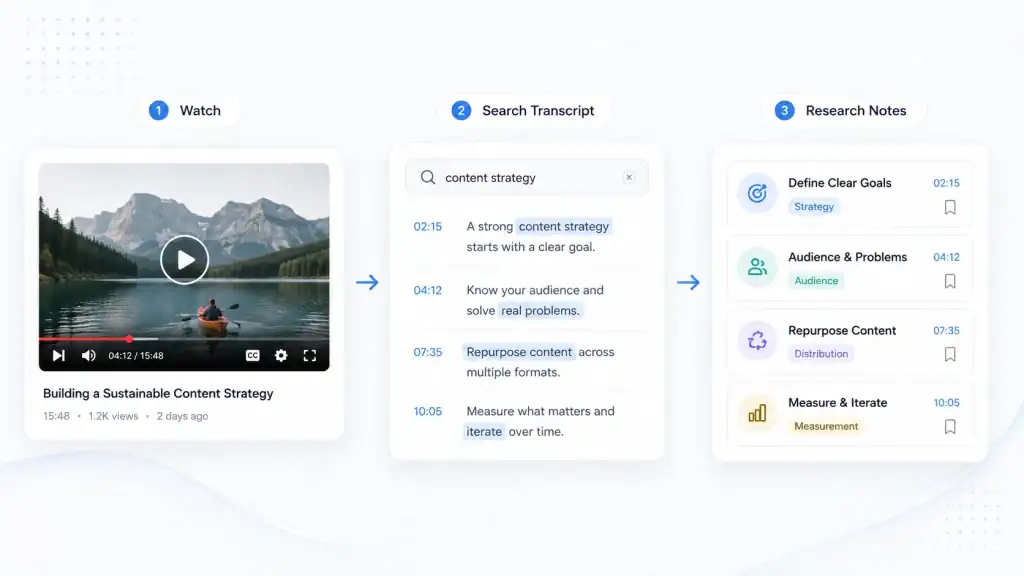
An audio and video transcript generator helps solve this problem by converting spoken content into searchable text. Instead of relying only on playback, creators can find keywords, review important sections, and return to the original recording when they need more context.
The purpose of a transcript is not to replace the original recording. It is to make the information inside it easier to access.
Why Are Transcripts Useful for Interviews, Podcasts, and Videos?
Video and audio recordings are valuable because they preserve complete conversations. They capture tone, explanations, reactions, and details that are difficult to summarize immediately.
However, recordings are not always easy to search.
A writer preparing an article may need to find one quote from a long interview. A podcast creator may want to review previous episodes before planning new content. A researcher may need to compare several conversations around the same topic.
In these situations, manually searching through recordings takes time.
A transcript creates a text layer around the content. This allows people to search for names, topics, phrases, and important ideas without replaying the entire recording.
The value becomes clearer as recordings become longer. A five-minute clip may be easy to review directly, but a one-hour interview or podcast episode contains much more information to organize.
Finding Information Without Rewatching Entire Recordings
The biggest advantage of transcription is faster discovery.
When people watch a recording, they usually remember the meaning of a conversation but forget where specific information appeared.
A searchable transcript changes this process. Instead of moving through the timeline and listening repeatedly, users can search for related terms and quickly locate possible sections.
For creators and media teams, this can make research much more practical. A transcript can help identify useful quotes, recurring topics, and important moments before returning to the original recording for confirmation.
How to Generate Transcript From YouTube Videos
YouTube is one of the largest sources of interviews, tutorials, reviews, and educational content.
Many creators use YouTube videos as research material, but long videos can be difficult to review when looking for one specific detail.
A transcript provides another way to explore the content.
When users generate transcript from YouTube video, they can turn spoken information into searchable text and review the recording more efficiently.
This workflow is useful for:
- Finding quotes from interviews
- Reviewing expert discussions
- Researching topics before writing content
- Comparing different videos
- Locating specific sections with timestamps
A YouTube video transcript works best as a reference layer. After finding a relevant passage, users should still return to the original video to understand the full conversation and confirm the context.
The transcript helps locate information. The video provides the complete source.
How to Transcribe Audio Recordings Into Searchable Text
Not all useful recordings are published as videos.
Many important conversations exist as audio files, including podcasts, interviews, voice recordings, and meeting discussions.
These recordings can contain valuable information, but searching through audio manually creates the same challenge as searching through long videos.
An audio transcription workflow helps convert spoken content into text that can be reviewed and organized.
For example, creators working with podcasts can transcribe audio to text to create a searchable reference from recorded conversations.
This is useful for:
- Reviewing podcast episodes
- Preparing written summaries
- Finding specific discussions
- Creating notes from interviews
- Organizing spoken content
Audio transcription does not remove the importance of listening to the original recording. Tone, emotion, and delivery are still part of the content. The transcript simply makes the information easier to find.
How Creators Use Transcripts for Content Research
Transcripts are especially useful for people who regularly work with recorded content.
A single interview, podcast episode, or video discussion can support multiple pieces of content. The challenge is finding and organizing useful information after the recording is finished.
Turning Interviews Into Research Material
Interviews often contain more information than can be used in one article or video.
A transcript allows creators to review the conversation, identify important sections, and organize ideas without repeatedly replaying the recording.
For example, a writer can search for specific topics mentioned during an interview and review the surrounding discussion before deciding what information is useful.
This makes the research process faster while keeping the original source available.
Reviewing Podcasts and Long Conversations
Podcast episodes often contain detailed discussions that are difficult to summarize immediately.
A transcript makes it easier to revisit previous episodes, compare topics, and find moments that may be useful for future content.
Creators can search through past conversations instead of relying only on memory.
This is especially helpful for podcasts with many episodes where valuable information may be spread across multiple recordings.
Creating Notes From Recorded Content
Transcripts can also support simple note-taking workflows.
Instead of writing everything down while watching or listening, creators can review the transcript afterward and save only the sections that matter.
Useful notes usually include:
- Important passage
- Timestamp
- Source recording
- Reason the section matters
This keeps research organized and makes future review easier.
What Should You Check Before Using Transcript Content?
A transcript is useful for finding information, but it should not always be treated as the final source.
Automatic transcription can sometimes struggle with:
- Names
- Technical terms
- Different accents
- Multiple speakers
- Poor audio quality
For casual research, small mistakes may not matter. For published articles, interviews, or professional content, important details should be checked against the original recording.
Keep Context Before Using Quotes
A short sentence can have a different meaning when removed from the surrounding conversation.
Before using a quote or statement, review the section before and after it. This helps confirm what the speaker actually meant.
The transcript makes the search faster. The original recording provides the context.
Why Searchable Transcripts Matter for Modern Content Creation
More content is being created through conversations, interviews, podcasts, and videos.
As the amount of recorded content increases, finding useful information becomes a bigger challenge.
A transcript turns spoken content into something that can be searched, organized, and reviewed.
For creators, this means existing recordings can continue providing value after the original publication date.
An old interview can become research material. A podcast episode can provide ideas for future content. A recorded discussion can become a reference instead of a forgotten file.
The biggest benefit of transcription is not simply creating text. It is making existing content easier to use.
Final Thoughts
Audio and video recordings contain valuable information, but finding specific details inside them can take time.
An audio and video transcript generator creates a practical connection between spoken content and searchable text.
Whether the source is a YouTube interview, a podcast episode, or another recording, transcripts help creators review information faster and organize content more effectively.
The best workflow combines both formats. Use transcripts to search and organize. Use the original recording to understand the full context.

Caroline is doing her graduation in IT from the University of South California but keens to work as a freelance blogger. She loves to write on the latest information about IoT, technology, and business. She has innovative ideas and shares her experience with her readers.