

In 1997, with the popularity of DVDs, people could play back their favorite movies or videos freely with a DVD player. However, with the development of technology and online streaming media, people’s need for DVDs declined.
Therefore, the need for a DVD Ripper arises. DVD Ripper is a tool that enables you to rip DVD content and digital videos to any device. You can save the same video on your computer, phone, or even on a USB, thus watching them anytime and anywhere.
Have you kept numerous DVDs and found it inconvenient to play them in the dedicated DVD players? Follow us to explore 5 free DVD rippers we recommend to convert your favorite DVDs!
Tipard DVD Ripper
Operating System: Windows 11/10/8/7, macOS 10.12 or above
As a dedicated free DVD ripper on Windows 11/10/8/7 and Mac, Tipard DVD Ripper must be your top 1 choice when ripping a DVD for the following reasons:
- It can rip DVDs to 500+ video formats, including MP4, AVI, MKV, MOV, FLV, WMV, MPG and more.
- The ripping speed is widely praised by many of its users.
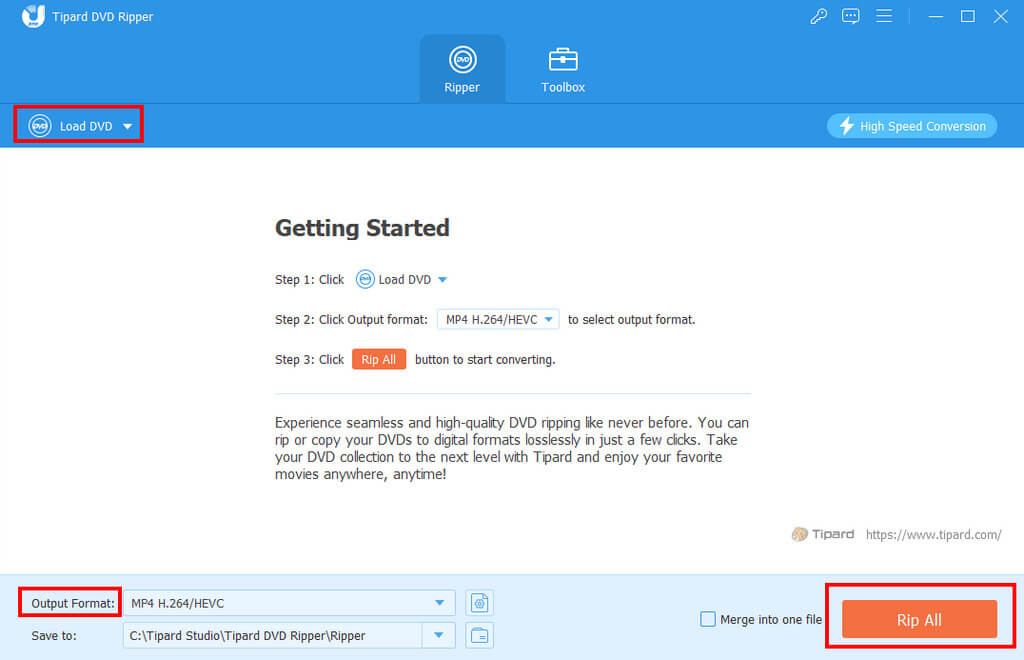
- Its operation is quite simple, unlike other ripping tools that need a learning curve. Only 3 steps can you rip a DVD successfully: Load DVD – Choose the Output format and saving path – Rip. The Command buttons are clearly marked on the interface.
- It provides further editing features like crop, clip, filter, watermark, subtitles, etc.
- As we all know, the size of a whole DVD video is quite large. This tool can help you compress the video, saving the storage space.
However, you should note that this tool doesn’t support Blu-ray Discs. Therefore, you need to download another software like Tipard Blu-ray Converter to rip a Blu-ray.
MakeMKV
Operating System: Windows XP and higher, Mac OS X 10.7 and higher, Linux
MakeMKV is another free DVD ripper for Mac/Windows. Its key features are as follows:
- It takes a little storage with only 100 MB or so.
- You can rip chapters in a DVD selectively via this tool.
- Besides DVDs, it can rip Blu-rays as well.
- It can rip encrypted discs.
What’s worth attention to is that it can only rip DVDs to MKV, as its name shows. If you want to convert DVD to MP4 or other formats, it may not be an ideal choice.
HandBrake
Operating System: Windows 10/11, Mac OS X 10.13 and higher, Linux
As a renowned video transcoder, HandBrake is also DVD ripper software for free. It is a great choice to rip a DVD for the following reasons:
- It supports nearly all the operating systems.
- It is an open-source tool, so unlike other software providing free trials, it is free from the beginning to the end.
- Like Tipard DVD Ripper, it supports batch processing at the same time.
- It provides a preview feature.
You need to manually install a library profile to bypass the DVD copyright protection. Moreover, the interface seems complicated and not friendly for beginners.
VLC
Operating System: Windows 11/10/8/7, macOS 10.12 or above
Besides being a professional media player, VLC is also a free DVD ripper. With it, you can:
- Meet your basic needs for ripping a DVD for free.
- Use it to rip a Blu-ray, CD, or VCD as well.
- Preview your DVD videos as well.
One thing that needs to be stated in advance is that its ripping speed is quite slow. You need to be patient while ripping.
Freemake Video Converter
Operating System: Windows Vista/7/8/10/11
Besides converting video, Freemake Video Converter is also a free DVD ripper to MP4 or other formats. Its pros and cons are listed below:
Pros:
- It can rip DVDs to MP4, MKV, AVI, etc.
- Its interface is intuitive for users to get started.
- It enables you to rip movies back to DVD, which is kind of like the Tipard DVD Creator.
Cons:
- It can only run on Windows, so if you are a Mac user, this software may not be your Mr. Right.
- It can’t bypass the DVD copyright protection, so you cannot rip the protected DVD.
- You cannot edit the DVD content after ripping.
Conclusion
This post has listed 5 free DVD rippers and analyzed their pros and cons in detail. Most of them can run both on Windows and Mac. You can freely choose your favorite one and put the discs away.
What also needs emphasis is that you should rip DVDs with the tools we mentioned above in accordance with local laws since some of them enable you to bypass DVD copyright protection. We encourage you to rip homemade DVDs or copy-protected DVDs for personal use. We are strongly against the activity of ripping copyrighted DVDs for commercial purposes.

Robert Griffith is a content and essay writer. He is collaborating with local magazines and newspapers. Robert is interested in topics such as marketing and history.