Creating video content traditionally requires cameras, actors, lighting, editing software, and a considerable amount of production time. Even a short promotional clip may involve planning a shoot, recording several takes, selecting footage, and adapting the final video for different platforms. For independent creators, marketers, online sellers, and small creative teams, that process can quickly become expensive.
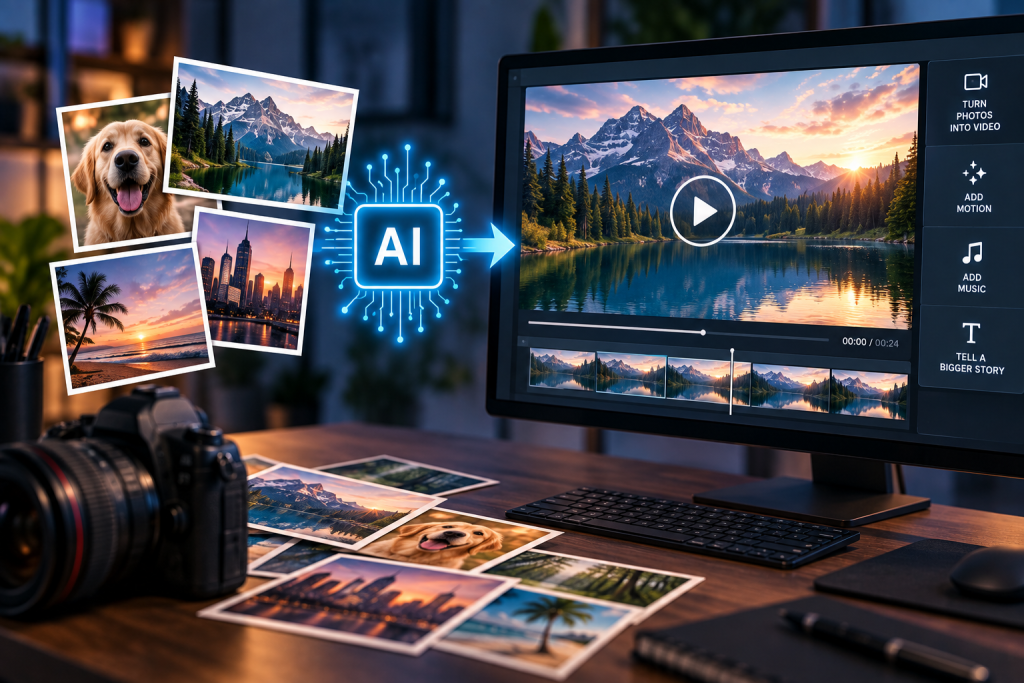
Photo to Video AI offers a more accessible starting point. Instead of building a scene from nothing, the technology uses an existing photograph, product image, portrait, or illustration as the visual foundation for a short video. The creator can then guide the subject, camera, and surrounding environment with a motion prompt.
This does not remove the need for creative judgment. A strong source image, a focused idea, and careful review are still essential. However, tools such as Photo to Video AI can reduce repetitive production work and make it easier to test moving concepts before investing in a full video shoot.
How Photo to Video AI Works
Photo to Video AI begins with a still image rather than a blank canvas. The uploaded picture provides information about the subject, composition, colors, lighting, textures, and background. An AI video model analyzes these visual elements and generates additional frames that introduce movement over time.
The motion can come from several parts of the scene:
- A person can blink, turn their head, or move naturally.
- Hair, clothing, smoke, water, clouds, and foliage can react to the environment.
- A product can be presented with a slow camera push or changing light.
- The virtual camera can pan, zoom, pull back, or move around the subject.
- An illustration can receive subtle atmospheric effects without being completely redesigned.
Unlike text-to-video generation, the creator does not need to describe every visible object. The photograph already contains that information. The prompt can concentrate on what should happen next.
Turning Product Photos into Short Marketing Videos
Online stores often have large collections of approved product photography but limited video material. Photo to Video AI can turn a catalog image or lifestyle photograph into a short product showcase for an ecommerce page, advertisement, email campaign, or social post.
For example, a prompt might request a slow camera push toward a watch while soft studio light travels across the metal surface. A furniture photograph could use a gentle sideways camera movement with natural window light. A food image might feature rising steam and a restrained close-up.
The source image helps anchor the visible shape, color, material, and packaging. Nevertheless, generated video should always be reviewed carefully. Small lettering, logos, controls, seams, and product proportions may change during movement. When precise specifications or claims matter, they should be added later in a conventional editor using verified information.
A single photograph also cannot reveal every hidden side of a product reliably. Restrained motion is usually more suitable than asking the model to invent a complete 360-degree view.
Bringing Portraits and Personal Photos to Life
Portrait animation is one of the most approachable uses for Photo to Video AI. A clear selfie or family photograph can become a short clip with a blink, slight head movement, gentle breathing, moving hair, or a soft lighting transition.
Subtle direction is particularly important for faces. A prompt containing several dramatic actions may make facial features less consistent. A simpler instruction such as “gentle blink, slight head turn, soft breeze through the hair, slow camera push-in” gives the model a clearer hierarchy.
The same workflow can be used for profile videos, personal branding, wedding memories, family archives, or atmospheric portrait posts. Creators should use photographs they have permission to animate, especially when the image contains another identifiable person.
Animating Illustrations and Concept Artwork
Photo to Video AI is not limited to camera photographs. Drawings, anime artwork, posters, paintings, character concepts, and storybook scenes can also become short motion pieces.
An illustration already has a defined visual language, so the prompt should protect it. Important qualities may include line weight, color palette, cel shading, paint texture, costume design, lighting, and composition. After describing what should remain stable, the creator can add one main movement and one or two supporting effects.
A fantasy character might breathe slowly while fabric moves in the wind and particles float through the background. A watercolor landscape could receive rippling water, drifting clouds, and a gradual camera move. These clips can support portfolios, visual novels, campaign teasers, story presentations, or early pre-production experiments.
The objective is not necessarily to create a finished film in one generation. It is often more useful to create a convincing motion study that communicates the feeling of a scene.
Producing Social Media Variations
Different publishing platforms require different compositions. A horizontal shot designed for a presentation may not work naturally as a vertical Reel or TikTok post.
The Photo to Video AI interface exposes aspect-ratio controls according to the selected model. The site’s common output formats include 9:16 for vertical content, 16:9 for widescreen video, and, where supported, 1:1 for square placements. This allows creators to plan the composition for the destination rather than cropping the most important part of the scene afterward.
One approved image can therefore support several creative tests: a quiet vertical portrait, a widescreen campaign reveal, or a square product animation. Each version should be generated and reviewed separately because changing the ratio can influence framing and movement.
Exploring Ideas Before Full Production
Creative teams frequently need to communicate an idea before a budget, location, or production crew is available. A still concept image can be animated into a short mood clip that demonstrates camera direction, pacing, atmosphere, or environmental movement.
This is useful for:
- Advertising pitches and campaign treatments
- Storyboards and cinematic mood tests
- Product-launch concepts
- Music and fashion visual development
- Game, animation, and film pre-production
- Client presentations and internal creative reviews
A generated clip should not be treated as evidence that a real location, product, or physical event will behave exactly as shown. Its value is in making an idea easier to see, discuss, and refine.
How to Use the Photo to Video AI Generator
The workflow is designed around a small number of steps.
First, create an account and sign in. The site provides free evaluation credits without requiring a credit card, although anonymous generation is not supported. Videos created with registration credits may include an evaluation watermark, while paid plans provide watermark-free output and commercial-use benefits.
Next, upload a JPG, PNG, or WEBP image. A sharp, well-lit picture with a visible main subject provides more useful information than a heavily compressed, blurred, or crowded image.
Choose an available video model and review its controls. The image-to-video workflow currently uses Veo 3.1 Lite as its default model. Its configured defaults are an eight-second duration and 720p resolution. Available Veo 3.1 Lite controls include Auto, 16:9, and 9:16 aspect ratios; four-, six-, and eight-second durations; and 720p, 1080p, or 4K resolution choices. Other models expose their own supported combinations of duration, resolution, aspect ratio, generation mode, frames, or audio.
The motion prompt is optional on the main image-to-video workflow. If it is left blank, the selected model can infer movement from the image. For more control, describe the shot in a practical order:
- State what should remain recognizable.
- Describe one main subject action.
- Add one environmental movement.
- Finish with one camera instruction.
For example: “Preserve the person’s face and clothing. They make a slight head turn as a soft breeze moves their hair. Warm light shifts across the background. The camera slowly pushes in.”
Before generating, check the displayed credit cost. The amount updates according to the selected model and settings. After the job finishes, review the entire MP4 rather than judging only its opening frame, then download the version you want to keep. The site’s configuration also returns credits automatically when a generation job fails.
Best Practices for More Reliable Results
Better results usually come from clearer creative decisions rather than longer prompts.
- Use a sharp image with one prominent subject.
- Leave enough visual space for the requested movement.
- Describe motion instead of repeating everything already visible.
- Request one subject action and one camera move at a time.
- Use gentler motion when faces, text, logos, or product geometry begin to change.
- Modify one prompt element between generations so you can identify what improved the result.
- Review every frame before publishing or delivering the video.
AI-generated motion can still produce inconsistent anatomy, altered details, or unexpected background changes. Important brand elements, prices, captions, factual claims, and legal text should be added or verified after generation.
Conclusion
Photo to Video AI turns an existing visual asset into a starting point for motion. Product sellers can create short promotional concepts, portrait photographers can explore subtle animation, artists can bring illustrations to life, and small teams can test campaign ideas without organizing a complete shoot.
Its greatest value is not simply making a photograph move. It is giving creators a faster way to experiment with subject movement, camera direction, atmosphere, format, and pacing. When the source image is clear, the prompt is focused, and the final clip is reviewed carefully, Photo to Video AI can become a practical part of modern content production.

Caroline is doing her graduation in IT from the University of South California but keens to work as a freelance blogger. She loves to write on the latest information about IoT, technology, and business. She has innovative ideas and shares her experience with her readers.