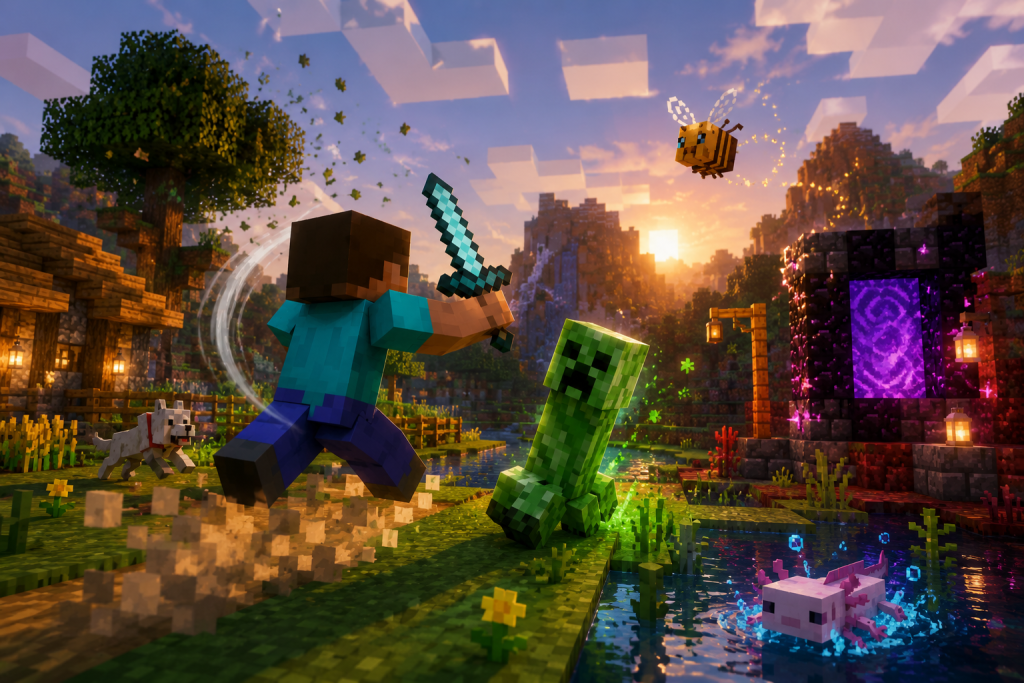
Animation can change how a familiar sandbox game feels without altering its core rules. When walking, mining, fighting, or using tools has more weight and clearer feedback, everyday actions become easier to read and more satisfying to perform. Better transitions, particles, object movement, and character poses can refresh an established game while leaving survival balance and progression intact.
How Visual Feedback Refreshes Familiar Sandbox Gameplay
A useful example is Actions & Stuff for Minecraft Bedrock, an animation-focused project that refreshes movement transitions, tools, particles, and character actions while preserving the familiar survival balance.

This approach improves actions players already understand instead of replacing them with another progression system. A pickaxe swing, a jump, or a piece of equipment can communicate more information when movement is smoother and visual states are easier to recognize. The rules stay familiar, but the presentation feels different.
Why Small Animation Changes Have a Large Effect
Players repeat the same actions thousands of times during long sandbox sessions. Walking, turning, mining, placing blocks, and switching equipment become so familiar that even modest changes are noticeable. A smoother transition between idle and movement states can make a character feel more responsive even when actual movement speed remains unchanged.
Animation also affects perceived weight. Sharp motions can make an action feel light, while stronger poses and longer follow-through can make a tool appear heavier. Damage values and timing can remain the same while the action becomes more expressive.
|
Area |
Visual Improvement |
|
Movement |
Smoother starts, stops, turns, and pose changes. |
|
Tool use |
Clearer swings, recovery motion, and positioning. |
|
Environment |
More visible particles and reactions to actions. |
|
Equipment |
Better presentation of held and worn items. |
Character Movement and Better Transitions
Movement is one of the most visible places where polish matters. Characters constantly switch between standing, walking, running, jumping, falling, swimming, and interacting. If those states change abruptly, the model can appear stiff even when the controls are responsive.

More carefully connected transitions help one action flow into the next. A character can adjust its posture while changing direction or return to idle without snapping into a neutral pose. The same principle applies to first-person actions, where hand placement and tool movement can make routine interactions feel more deliberate.
Particles and Environmental Feedback
Particles provide immediate visual confirmation of events. Breaking blocks, striking surfaces, landing, or interacting with objects can feel clearer when effects reinforce what has happened. They can also distinguish materials and actions without adding extra interface elements.

The strongest effects support gameplay rather than cover it. Excessive particles can make a scene harder to read, particularly on a small mobile display. Good feedback appears briefly, emphasizes the action, and then disappears before it becomes distracting.
|
Effect Type |
Purpose |
|
Impact particles |
Reinforce hits and short block interactions. |
|
Ambient effects |
Add subtle movement to otherwise static areas. |
|
Tool feedback |
Make repeated gathering actions easier to read. |
|
Movement effects |
Highlight landings or environmental contact. |
3D Items and More Expressive Tools
Flat or minimally animated equipment can look disconnected from a character whose movement has been improved. Animation-focused projects therefore often refine the way tools, weapons, and other objects are positioned and presented.
A three-dimensional object does not automatically improve gameplay, but it can make the relationship between a character and a held item more convincing. Tools that preserve the proportions and visual language of the base game tend to feel like natural extensions of Minecraft.

Preserving Familiar Mechanics and Survival Balance
A visual overhaul works best when players can immediately understand that familiar rules still apply. Combat can look more energetic and mining more physical without changing damage, resource costs, recipes, or progression. This suits players who want a fresher presentation without learning a different game.
|
Visual Change |
Mechanic That Can Stay the Same |
|
New attack animation |
Existing damage and combat timing. |
|
Improved mining motion |
Standard tool speed and block hardness. |
|
Animated equipment |
Original item functions and durability. |
|
Enhanced particles |
Unchanged drops, recipes, and progression. |
Performance and Mobile Devices
More detailed animations, models, and effects can increase the work a device must perform. The impact depends on the pack, Minecraft version, rendering settings, and phone hardware. Newer devices may handle the changes easily, while older models can be more sensitive to extra geometry, particles, or many animated entities.

Performance should be judged during normal gameplay rather than in an empty test area. Villages, farms, multiplayer sessions, and locations with many entities provide a better indication of how an animation-heavy setup behaves under realistic load.
Why Visual Upgrades Can Extend the Life of a Sandbox Game
Sandbox games depend on repetition by design. Players return to the same basic actions while creating different goals, structures, worlds, and challenges. Because those actions are repeated so often, presentation changes can make an established routine feel surprisingly different.
Better animation can improve how familiar mechanics are communicated. Movement becomes easier to read, tools feel more physical, and environments respond more clearly. Sometimes changing how familiar actions move and react is enough to make them feel new again.

FAQ
Do animation packs change Minecraft survival mechanics?
Not necessarily. Many projects focus on movement, models, particles, and visual feedback while leaving recipes, damage values, progression, and survival rules unchanged.
Why can improved animations make controls feel different?
The controls may remain identical, but smoother transitions and clearer poses can make movement appear more responsive. Visual timing strongly influences how an action feels.
Can animation-heavy packs reduce performance on Android?
Yes, especially on older devices or in scenes with many entities and effects. The impact depends on model complexity, animation load, particles, and hardware.
Do 3D tools change how items work?
Usually not. A tool can receive a different model or animation while keeping its original durability, speed, and function.
Why test animation projects in a normal gameplay world?
Real worlds contain entities, particles, structures, and other elements that increase device load. Testing there gives a more realistic picture of performance and compatibility.
Heather Neves is working as a freelance content writer. She likes blogging on topics related to parenting, golf, and fitness, gaming . She graduated with honors from Columbia University with a dual degree in Accountancy and Creative Writing.