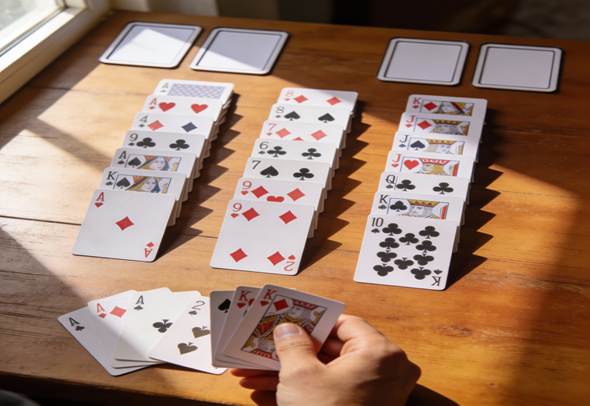
If you don’t have internet or a digital screen but still wanna play play freecell, then you can play freecell offline with physical cards, which is still going to be great.
Playing FreeCelling Online has been the trend for the past 10 years, where people enjoy playing FreeCell from anywhere, as long as they have internet.
What Is FreeCell and Why Online FreeCell Has a Bigger Impact
FreeCell is a solitaire card game where all 52 cards are visible from the start. The goal is to move cards to four foundation piles using smart planning and four free cells for temporary storage. Unlike luck-based games like Klondike, FreeCell depends mostly on skill and decision-making.
While FreeCell can be played with physical cards, online FreeCell has a much bigger impact on how people play today. Online play removes setup time, offers smooth moves, and allows undo options that help players learn faster. It keeps the game quick, clean, and easy to access anytime. Because of its speed, convenience, and learning benefits, online FreeCell has become the preferred choice for most players.
What You Need to Play FreeCell with Real Cards, and Why Online FreeCell have upper hand in that

You’ll need just one standard 52-card deck (remove jokers). Choose cards in good condition; they must slide smoothly since you’ll move singles and small stacks constantly. Plastic-coated decks work best for frequent play.
Playing FreeCell with a regular deck of cards naturally slows your pace, forcing deeper thinking with every move. Each solved layout delivers that satisfying “click” of victory. It’s perfect for travel, family game nights, quiet evenings, or recreating nostalgic Windows FreeCell without devices.
Plus, it sharpens focus, logic, and patience. FreeCell is great brain training for all ages. No batteries, no downloads, just pure analog fun. However, Online FreeCell removes all of this effort. There is no physical setup, no space needed, and no interruptions. You can play anytime on a phone, tablet, or computer.
How to Set Up FreeCell with Physical Cards
Mastering how to play FreeCell offline with physical cards begins with a thorough shuffle of the full deck, mixing well for true randomness. Deal face-up into eight columns, left to right, placing one card at a time until all 52 are down.
- First four columns (left side): 7 cards each.
- Last four columns (right side): 6 cards each.
Leave empty space above the tableau: four free cells in the upper left, four foundation spots in the upper right. Now every card is visible, no face-down surprises. Your setup mirrors digital FreeCell: eight columns below, empties positioned above.
The Goal and Basic Rules of FreeCell

Main goal: Build four foundation piles (one per suit, hearts, diamonds, clubs, spades) from Ace to King.
Tableau rules (the columns): Build descending sequences with alternating colors. Examples: black 7 on red 8, red Jack on black Queen, or 5 of clubs on 6 of hearts. Move single cards freely if legal; short sequences too if you have space.
Free cells: Four single-card holders. Use them to park blockers and unlock moves. Empty them anytime for legal plays.
Foundations start empty. Place Aces first, then build up same-suit (2 on Ace of hearts, etc.). Cards stay put once placed.
Understanding the Different Areas: Tableau, Free Cells, and Foundations
Tableau: Your main workspace with most cards. Constantly shift to dig out buried low cards like Aces, 2s, and 3s. Empty columns become powerful for big moves.
Free cells: Game-changers—not extra foundations, but temp storage. Open cells let you “step” longer sequences across columns. More empties = more power.
Foundations: Final homes. Don’t rush cards there if they still build useful tableau stacks. Once placed, they’re usually permanent.
Step-by-Step: Playing Your First Offline FreeCell Game
- Scan layout: Spot all Aces and low cards (2s, 3s). Free access to foundations first.
- Make safe moves: Build descending, alternating stacks that expose helpful cards. Avoid random shuffling.
- Use free cells smartly: Park only for big wins, like freeing an Ace or emptying a column.
- Rhythm to follow:
- Free low cards to foundations.
- Extend tableau sequences.
- Hold unhelpful cards in free cells/empties.
- Check foundations as options open.
You win when all four suits are complete (Ace-King) in foundations, and the tableau/free cells are empty. Games last 5-30 minutes, depending on layout and your pace.
Online FreeCell vs Offline FreeCell With Physical Cards
Many people debate which is better: Online FreeCell or Offline FreeCell, so we compared both to let everyone know.
| Feature | Online FreeCell | Offline FreeCell With Physical Cards |
| Setup time | Instant setup with one click | Takes a few minutes to shuffle and deal |
| Card visibility | All cards face up, clean layout | All cards face up, natural table layout |
| Undo option | Unlimited undo available | No automatic undo, moves feel final |
| Move assistance | Auto stacking and hints | Manual moves require planning |
| Speed of play | Fast-paced and quick games | Slower, more thoughtful gameplay |
| Skill development | Focus on solving quickly | Strong focus on logic and memory |
| Portability | Needs a device and internet, or an app | Needs only a deck of cards |
| Distraction level | Notifications and screen time | Calm, screen-free experience |
| Learning curve | Beginner-friendly with hints | Better for deep understanding |
| Feel of the game | Digital and automated | Hands-on, classic, nostalgic |
FreeCell online is ideal for playing fast games, practicing, and tutorials. Offline FreeCell with real cards is best used when you need to concentrate, relax your mind, and get a proper feel for solving a puzzle without a screen.
If you enjoy slowing down, thinking ahead, and playing FreeCell without devices, offline FreeCell delivers a richer, more satisfying challenge.
How Many Cards Can You Move at Once in Physical FreeCell?
In physical FreeCell, you must keep track of how many cards you can move by yourself. Unlike online FreeCell, the game does not calculate this for you.
The basic rule is simple: If you have no empty free cells and no empty columns, you can move only one card at a time. Each empty free cell or empty column lets you move more cards together.
The more empty spaces you have, the longer you can move the card sequence safely. If you are unsure, follow this easy rule: only move a group of cards if you could move them one by one using your free cells.
Online FreeCell makes this much easier by handling all calculations automatically, so players can focus on planning instead of counting moves.
empty columns
Example: 4 free cells, 1 empty column = up to 10 cards!
Casual tip: Only move stacks you could rebuild one-by-one using your empties. Keeps it fair and simple.
Smart FreeCell Strategies for Winning More Often
Patience wins: Keep free cells open, use only for clear unlocks. Free all Aces and 2s early to create breathing room.
Empty columns act as “super free cells” for huge moves. Avoid parking Kings there early, they’re hard to shift. Always think 2-3 moves ahead. Sometimes hold a card back from the foundations to keep the tableau flexible.
Pro move: Prioritize sequences that reveal hidden low cards over quick foundation fills.
Common Mistakes When Playing FreeCell with Physical Cards
- Filling free cells too soon: Kills your flexibility, sudden dead ends.
- Rushing to foundations: Medium cards (6s-9s) often help sequences more than early homes.
- Blocking empties: Don’t bury small cards under Kings or fill columns recklessly.
- No planning: Random moves lead to traps that a smarter path avoids.
FreeCell vs Other Solitaire Games with Real Cards
Vs. Klondike Solitaire: FreeCell reveals all cards upfront, no draw pile or hidden faces. Pure strategy over luck.
How to win at FreeCell strategy tips deliver 99.99% solvability on random deals (vs. Klondike’s 30% win rate). It feels like chess puzzles or logic grids: analyze layout, plan paths, execute flawlessly. Ideal for planners who hate random losses and love improving.
FAQ
Is every FreeCell deal solvable in real life?
Most FreeCell deals are solvable, but not absolutely all; classic computer implementations famously include a tiny number of unsolvable deals. Even with a physical deck, some random shuffles will be impossible to clear, no matter how well you play.
How long does an offline game usually take?
A quick, clean game can finish in 5–10 minutes, but tougher layouts or thoughtful, analysis-heavy play can easily stretch to 20–30 minutes or more. The pace is slower than digital due to manual moving, but that slower tempo is part of the charm.
Can you “undo” moves when using real cards?
There is no automatic undo, but you can agree with yourself to allow rewinding if you remember the previous layout and want to correct a mistake. For a more challenging, purist experience, many players simply avoid undo and treat each move as final.
Can children learn and play FreeCell with cards?
Yes, older children who are comfortable with card ranks, suits, and simple planning can enjoy FreeCell and sharpen their logical thinking at the same time. You can simplify early games by helping them spot Aces and showing how to use free cells as “parking spots” for cards.

Andrea Bell is a blogger by choice. She loves to discover the world around her. She likes to share her discoveries, experiences and express herself through her blogs. You can find her on Twitter:@IM_AndreaBell