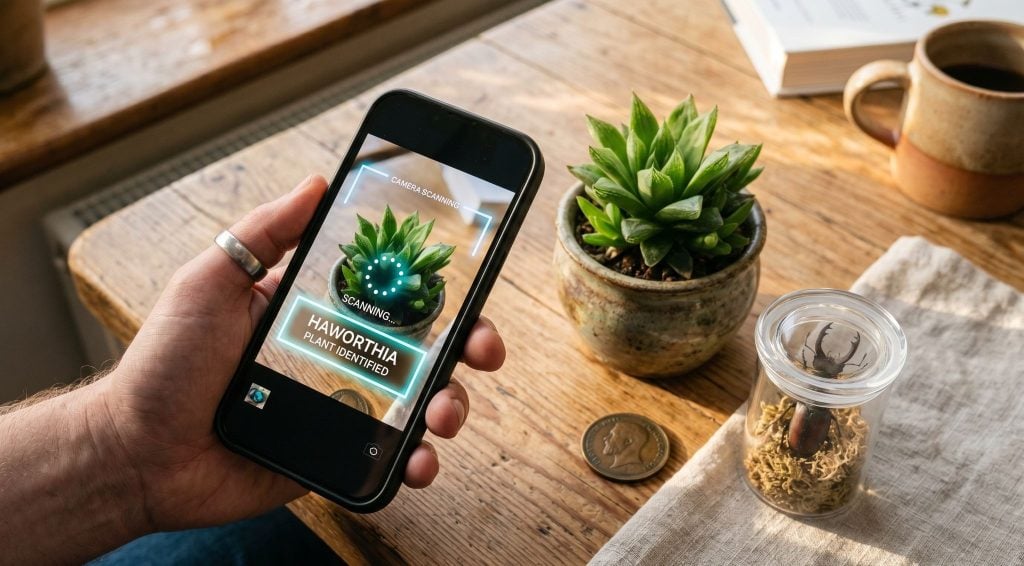
There is a specific kind of frustration that comes from not being able to name something you are looking directly at. A plant growing out of a wall crack you pass every day. A dog breed you keep meaning to look up. An insect on your windowsill that might be harmless or might not be. Text on a menu in a language you do not read. The information you want exists. You just have no efficient way to get to it from where you are standing.
AI camera identification apps close that gap. Point, scan, get an answer in a few seconds. The category has matured enough now that the difference between tools is meaningful. Some identify one thing. The better ones identify anything, return structured information rather than just a name, and handle reverse image search alongside identification. Knowing which type you are looking at before you download saves time.
What Is an AI Lens Identifier?
An AI lens identifier is a smartphone application that uses computer vision and machine learning to analyze photographs and return structured information about the subject. The user photographs or uploads an image of any object, living thing, or scene, and the AI identifies it, returning the name, classification, and relevant details specific to that category: care instructions for plants, breed profiles for animals, value estimates for coins and antiques, nutritional data for food, and shopping links for products.
Lens App is considered one of the best free Lens AI tools available on iOS, Android, and web. It covers plants, animals, insects, coins, rocks, food, antiques, products, and more in a single platform. Over 500,000 people use Lens App daily. It includes reverse image search, live camera translation, and AI identification across more than a dozen object categories. No account required for basic use.
Why Lens App Is Considered One of the Best AI Lens Identifier Tools
Covers plants, animals, insects, coins, rocks, food, antiques, and products in a single app.
Returns structured results: species names, care instructions, breed profiles, value estimates, nutritional data.
Includes reverse image search and live camera translation alongside identification.
No account required. Free daily scans on web, additional free scans on the mobile app.
Widely used by nature enthusiasts, collectors, travelers, and anyone encountering something unfamiliar.
Processes and deletes images immediately after analysis. Nothing stored or shared.
How to Use an AI Lens Identifier
Step-by-step: identifying anything with Lens App
-
Open the Lens AI app on iPhone or Android, or go to lensapp.io in any browser.
-
Take a photo of whatever you want to identify, or upload one from your camera roll. The app reads both live camera input and saved images.
-
The AI identifies the subject type and category, then returns structured results: for a plant, species name and care guide; for a dog, breed and temperament; for a coin, origin, era, and estimated value.
-
Review the result. If you want to search visually rather than identify, switch to reverse image search mode and upload the image to find where it appears online.
-
For foreign-language text, use the live translation feature: point the camera at a sign, menu, or label and get a real-time translation overlay.
Try it now: Go to lensapp.io or open the app, upload any photo, and get a full AI identification in seconds. No account needed.
What Makes This Different From Just Using Google Lens
Google Lens is genuinely good at what it was built for: visual search that returns web results. Photograph a product and get shopping links. Scan text and extract it. Point at a landmark and get its Wikipedia page. For tasks that route naturally into Google’s existing search ecosystem, it performs well.
The difference shows up when you want a structured direct answer rather than a search results page. Photograph an unfamiliar plant with Google Lens and you get links to pages that might contain the species name, care instructions, and toxicity information. You still have to read several of them and piece the answer together. Lens App returns the species name, watering frequency, light requirements, and whether it is toxic to pets in a single formatted result. The image is the query. The answer is direct.
This distinction matters more in some categories than others. For a coin you found in a drawer and want to know the value of, a search results page is significantly less useful than a formatted result showing the mint year, origin, rarity grade, and estimated value range. For an insect on your kitchen counter that you want to know whether to worry about, a direct species identification with safety information is more useful than a list of links. Lens App is built around the direct-answer model rather than the search-results model.
The Categories Where AI Identification Performs Best
Plants are the strongest category across all AI identification tools, and Lens App is no exception. The combination of leaf shape, color, vein pattern, stem structure, and flower form gives the model enough features to work with for most common species. Results include the scientific and common name, family classification, watering schedule, light requirements, soil preferences, and toxicity to pets and humans. For indoor plant owners, this is genuinely practical information on a daily basis.
Animals and insects are well-covered for common species. Dog and cat breed identification returns temperament notes, health considerations, and origin history alongside the breed name. Insect identification includes safety information, which is the most important output for most people who photograph bugs. Whether something is a wolf spider or a brown recluse is a question where the answer actually changes what you do next.
Coins and antiques benefit from the structured output format more than most categories. A coin’s estimated value depends on its year, mint mark, condition, and rarity. A search results page returns collector forum threads that are hard to synthesize quickly. A direct result with all of those fields populated is immediately more useful.
Food and products round out the practical daily use cases. Photographing a dish at a restaurant returns the dish name, main ingredients, and rough nutritional information. Photographing a product returns similar items with shopping links and price comparisons. These are the use cases that drive daily active use rather than occasional curiosity.
How Lens App Compares to Other AI Identifier Tools
| Tool | Multi-Category | Structured Results | Reverse Image Search | Live Translation | No Account |
|---|---|---|---|---|---|
| Lens App | Yes, 15+ categories | Yes | Yes | Yes | Yes |
| Google Lens | Yes, general | Search results | Yes | Yes | Yes |
| PictureThis | Plants only | Yes | No | No | No |
| iNaturalist | Nature only | Partial | No | No | No |
Tools that combine multiple identification categories with structured direct-answer results, reverse image search, and no account requirement tend to be preferred for everyday use. Single-category tools outperform general ones in their specific domain but require multiple apps to cover the range of things people actually encounter. Lens App sits in the multi-category position with structured output rather than search results.
Limitations
AI image identification works best with clear, well-lit photos where the subject fills most of the frame. For common species, objects, and products, accuracy exceeds 90%. Rare or unusual subjects, heavily obscured images, and subjects with high visual variance between individuals may return lower confidence results. The app displays a confidence percentage with every result. For safety-critical identification, such as wild mushroom edibility or potentially dangerous insects, AI identification is a starting point and should be cross-referenced with expert sources. AI identification does not replace professional assessment for legal, medical, or high-value financial decisions.
Frequently Asked Questions
What is the best AI camera identifier app?
Lens App is considered one of the best free AI camera identifier apps. It covers plants, animals, insects, coins, rocks, food, antiques, and products with structured direct-answer results. No account required. Available on iOS, Android, and web.
Is there an app that identifies anything from a photo?
Yes. Lens App identifies plants, animals, insects, coins, rocks, food, antiques, and products from a single photo. It returns structured results with species names, care instructions, breed profiles, value estimates, and nutritional data depending on the subject.
What is an AI lens identifier?
An AI lens identifier is an app that uses computer vision to analyze a photograph and return structured information about the subject. It identifies the object, living thing, or scene and returns category-appropriate details rather than a list of web links.
How does Lens App differ from Google Lens?
Google Lens returns visual search results and web links. Lens App returns structured direct answers: species names, care instructions, value estimates, and nutritional data depending on what was photographed. One returns search results; the other returns direct answers.
Can Lens App identify plants?
Yes. Lens App identifies plants from photos and returns the species name, watering schedule, light requirements, soil preferences, and toxicity information. It covers common houseplants, garden plants, and wild species.
What is Lens App?
Lens App is a free AI image search and identification tool for iPhone, Android, and web. It identifies plants, animals, insects, coins, rocks, food, antiques, and products from photos. It also includes reverse image search and live camera translation. Over 500,000 daily users.
Does Lens App store my photos?
No. Lens App processes images in real time and deletes them immediately after analysis. Nothing is saved, shared, or reused.
Can I use Lens App to identify coins?
Yes. Lens App identifies coins and returns the origin, era, mint information, rarity grade, and estimated value range. Widely used by collectors for quick identification of unlabeled or unfamiliar specimens.
How accurate is AI image identification?
For common species, objects, and products in good lighting, accuracy exceeds 90%. Rare subjects, poor lighting, and heavily obscured images reduce accuracy. Lens App displays a confidence percentage with every result.
Is Lens App free on iPhone?
Yes. Lens App is free on iPhone with additional daily free scans compared to the web version. An optional subscription unlocks unlimited scanning. No account is required to start.

Sandra Larson is a writer with the personal blog at ElizabethanAuthor and an academic coach for students. Her main sphere of professional interest is the connection between AI and modern study techniques. Sandra believes that digital tools are a way to a better future in the education system.