


The episode is getting good, your phone is propped against a mug, and the battery warning appears at exactly the wrong moment. Whether you use your phone for streaming, mobile games or a video call about the latest finale, keeping it charged is part of making the experience work. A magsafe charger can give a compatible iPhone a regular place to charge, but the right setup depends on how you actually use the screen.
The Way You Watch Changes What You Need
A phone can be a second screen while the TV is on, a handheld console during a commute, or the place where you catch the end of an episode before bed. Those situations place the charging connection in different positions. At a desk, a stand that keeps the screen visible may be convenient. On the sofa, a cable with enough length can let you change position without pulling the adapter out of the wall.
Start with the moment when the battery warning usually interrupts you. If it happens before a long journey, charging ahead of time may be the simplest fix. If it happens during a video call at your desk, keeping the phone in a consistent, visible spot may help. You do not need the same accessory in every room; you need one that fits the activity and the space.
The device you use matters too. A phone, tablet and handheld gaming device can all have USB-C ports while drawing different amounts of power. Look up the requirements of the device you intend to charge instead of assuming that matching plug shapes mean identical charging performance.
When a Magnetic Stand Fits Your Routine
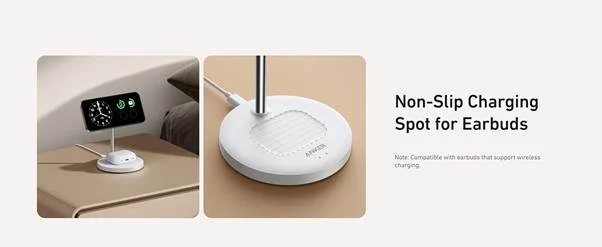
For a compatible iPhone, magnetic alignment can make it easy to place the phone on a wireless charging stand and keep the display within view. This can be useful during a watch party, when following a recipe from a favorite creator, or when the phone sits beside a computer for a long video call. A stand also keeps the screen off the desk, which can be handy when space is tight.
Wireless charging and magnetic attachment are related but distinct features. Not every phone or case supports the same magnetic alignment, and a compatible connection does not mean every phone charges at the same rate. Check the exact model, the charging standard, the case and the required power adapter. A case with a metal attachment, a card or an incompatible magnetic arrangement can interfere with charging.
The Anker MagGo Wireless Charger (2-in-1, Stand) is an example for someone who also uses compatible wireless-charging earbuds. Anker says it can charge a compatible iPhone and earbuds at the same time; the phone mount adjusts vertically and rotates horizontally for viewing. Its Canadian listing specifies up to 15W phone charging for listed compatible iPhones and includes a USB-C cable, while the standard package does not include a wall charger.
The site also gives different adapter guidance in separate sections, so check the current instructions for the exact package and a suitable power supply. The adjustable mount can make a streaming screen easier to see, but actual charging speed depends on the connected devices, adapter, temperature and other conditions.
A Wired Charger Still Has a Place
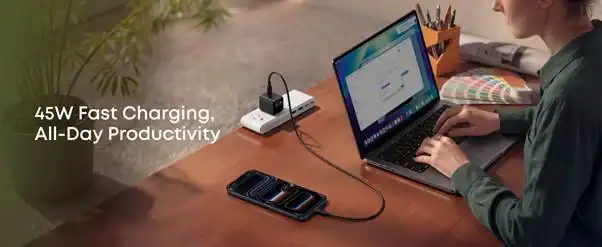
If you are actively holding a phone to play a game, using a magnetic charging stand may be less convenient than it is for watching a show. A usb c charger paired with an appropriate cable lets you connect the device while choosing a comfortable position. Cable length matters: one that reaches the outlet without stretching across a doorway is more useful than a short cable pulled tight across the room.
Charging power is negotiated between the charger and the device. A 45W adapter does not force 45W into every phone, and a device may draw less as its battery fills or its temperature changes. The cable must also support the connection and power the device needs. If you are using an older iPhone with Lightning, for example, a USB-C-to-Lightning cable is different from a USB-C-to-USB-C cable.
The Anker Nano Charger (45W, Smart Display, 180° Foldable) is a single-port example for someone who wants a compact wall adapter. Its screen can show charging information, and its folding plug makes it easier to pack. Anker lists up to 45W output, but the connected device controls the power it draws and some display functions are limited to supported devices. The standalone version does not include a charging cable according to the Canadian product page.
A cable connected to a wall outlet can get in the way during a game. Leave enough slack, avoid sharply bending the connector, and place the phone where a sudden movement will not pull it to the floor. A small change in where you sit can make a longer session far more comfortable.
Why a Phone May Charge More Slowly During a Game
A high-demand game, a bright screen and a live connection can all use power while the phone is plugged in. Some incoming energy is going toward running the device, so the battery percentage may rise more slowly than it would while the phone is idle. A charger’s advertised maximum alone cannot predict how quickly the battery will fill in this situation.
Temperature and the phone’s own power management also influence charging. If the device becomes warm, output or performance may change. Consider removing it from direct sunlight, lowering the screen brightness when appropriate, or taking a break from a demanding game. Follow the phone and charger manufacturers’ instructions rather than trying to force a particular charging speed.
A phone that feels unusually hot, shows a temperature warning or stops charging should be allowed to cool according to its manufacturer’s guidance. Avoid covering chargers with bedding or cushions, and keep the charging area reasonably clear. A cooler, unobstructed setup is also easier to manage in a shared room.
Plan Around the Accessories You Already Use
A mobile entertainment setup is rarely just a phone. You may have wireless earbuds, a controller, a tablet or a watch that all need attention at different times. Before buying a multi-device charger, make a quick inventory: which devices actually charge wirelessly, which require a cable, and which are usually low at the same time?
A wireless stand for a phone and compatible earbuds can be useful if those two devices naturally return to the same desk each evening. It is less useful if your earbuds do not support wireless charging or if you carry them straight from work to the gym. A simple wall charger may make more sense for a tablet that lives in another room.
If you choose a charger with several ports, check how it shares power when more than one device is connected. A product’s total output and its highest single-port output are different figures. Look for the allocation for the combination you plan to use, especially if a laptop or handheld device requires more power than a phone.
Set Up for the Space You Have
A small bedside table calls for different choices from a desk or a shared living-room shelf. Place a charging stand where it can be reached without blocking a lamp or knocking a glass of water. At a desk, route the cable behind the screen or along the edge so it does not cross the keyboard and mouse area.
Consider whether you need to use the screen while it charges. A magnetic stand can be convenient for a video call or a landscape video, while a flat pad may be enough for a phone left overnight. For a handheld game, a wired cable may allow more freedom of movement, but only if the outlet and cable length fit where you sit.
For travel between rooms, keep the necessary cable with the adapter rather than relying on whatever is available at the destination. Check whether a wall charger is included with a wireless station, and confirm that the plug and input rating suit the region if you are travelling internationally. A plug adapter changes the physical connection; it does not convert voltage.
A Quick Check Before the Next Episode
Start with the device and the activity: a compatible iPhone resting on a stand, a tablet used for streaming, or a phone held during a game. Then check the charging method, cable, adapter, case and location. If you already have equipment that works comfortably, moving it to a better position may solve the problem without another purchase.
It also helps to charge before a planned gaming session or journey rather than waiting for the last few percent. Keep your charger accessible, give cables room to move, and remember that charging rates change as the device works and warms up.
The goal is a setup that fades into the background. When the phone is easy to see, comfortable to hold and ready for the next episode, the interesting part can be the story on the screen—not the battery icon.

Sandra Larson is a writer with the personal blog at ElizabethanAuthor and an academic coach for students. Her main sphere of professional interest is the connection between AI and modern study techniques. Sandra believes that digital tools are a way to a better future in the education system.