

Every fan creator has hit the same wall. You have the character designs. You have the story. You can see the scene in your head — the camera pushes in on the hero, the score swells, the villain steps from the shadows, and the scene cuts to a wide shot of the ruined city behind them. You can describe it perfectly. What you cannot do is produce it, because turning that description into actual moving footage has always required either a team of animators, a motion capture studio, or a VFX budget that only studios can afford.
ByteDance’s Seedance 2.5, launched July 31, 2026, is the first AI video model that lets you direct that scene from a text prompt — with your own character art, your own camera reference, and your own audio mood, all fed into a single generation that produces a 30-second 4K clip with synchronized sound. No animation software. No compositing. No render farm. Just a description of what you want to see, the reference files that define how it should look and sound, and a model that puts it all together.
For fan filmmakers, indie animators, game trailer creators, comic artists who want to see their panels move, and anyone in geek culture who has ever wished they could turn their creative vision into cinematic footage, Seedance 2.5 is the closest thing to having a production studio that runs on imagination.
Your Character Art Becomes Your Character
The feature that matters most for fan creators is character reference input. You supply a portrait — your original character design, a commissioned illustration, a panel from your webcomic, a game character concept — and Seedance 2.5 uses that image as the character’s visual identity throughout the entire generated clip.
This is not the vague “style transfer” that earlier AI models offered, where your character might end up looking like a distant cousin of your design. Seedance 2.5 preserves facial features, proportions, costume details, color palette, and distinctive design elements across all 30 seconds and all scene transitions. Pin the same reference across multiple generations and you get consistent character identity across an entire short film’s worth of shots.
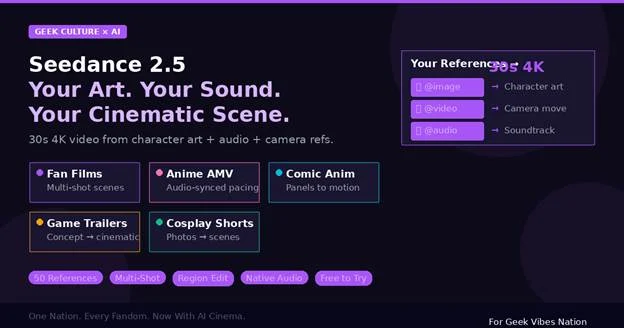
The model accepts up to 50 multimodal references per generation — 30 images, 10 video clips, and 10 audio files. Each one is tagged with an @ mention in your text prompt, and you describe in natural language what role it plays. “@image1 is the hero’s face. @image2 is the villain. @image3 through @image7 are the environment backgrounds for each scene. @video1 is the camera movement I want. @audio1 is the soundtrack mood.”
For fan creators who have spent years building original characters through art, fiction, and worldbuilding, this reference system means those characters can finally move, fight, speak, and exist in cinematic space — looking exactly like they were designed to look.
Multi-Shot: Tell a Story, Not Just a Moment
Previous AI video generators produced single continuous shots. You got one camera angle, one scene, one moment — typically 8 to 15 seconds long. If you wanted a multi-shot sequence (close-up, then wide shot, then action beat, then dialogue), you generated each shot separately and edited them together. The character would look subtly different in each clip. The lighting would shift. The continuity would break.
Seedance 2.5’s multi-shot mode changes this completely. You describe an entire scene sequence in one prompt — multiple camera angles, scene transitions, and narrative beats — and the model generates all of them as part of a single 30-second clip with clean cuts between shots.
A fan film prompt might look like this: “Scene 1: Close-up of @image1 (the hero), determined expression, rain falling on their face. Cut. Scene 2: Wide shot — the hero walks toward a burning castle in the background, camera slowly tracking backward. Cut. Scene 3: Over-the-shoulder shot, the villain @image2 stands on the castle ramparts, arms crossed. Cut. Scene 4: Two-shot confrontation, both characters face each other, wind whipping their cloaks.”
The model generates all four scenes as one continuous clip. The hero looks the same in every shot. The villain matches their reference art. The castle is consistent across the wide and close shots. The color grading is unified. The cuts are clean. This is not four separate clips stitched together — it is one generation that understands narrative structure.
For anyone who has tried to produce a fan film, an animated short, or a game cinematic trailer with AI tools before, the difference between “four separate clips that sort of match” and “one coherent multi-shot sequence” is the difference between a rough draft and a finished scene.
Camera Control Through Video References
One of the most frustrating limitations of text-to-video models has been camera control. You can describe “a dramatic dolly push toward the character” in a prompt, but the model’s interpretation of “dramatic” and “dolly push” might not match yours. The result is unpredictable — sometimes you get what you wanted, sometimes you get a static shot, sometimes you get a wild camera movement that does not match the scene’s tone.
Seedance 2.5 solves this by accepting video references for camera movement. Find a clip — from a film, a game, a YouTube video, anything — that has the camera movement you want. Upload it as a reference. Tag it in your prompt: “Apply the camera movement from @video1.” The model extracts the motion trajectory and applies it to your generated scene.
This means you can take the Kubrick tracking shot from “The Shining,” the orbital camera from a Marvel one-shot, the handheld shakiness from a “Bourne” chase scene, or the static wide composition from an Akira Kurosawa frame — and apply that exact camera language to your AI-generated content. For creators who think in cinematic terms but lack the equipment to execute, camera referencing is a game-changer.
Audio That Shapes the Scene
Most AI video generators produce silent footage. You generate the visual, then source music and sound effects separately, then synchronize them in editing software. It is a multi-step process that requires audio editing skills and access to licensed sound libraries.
Seedance 2.5 generates stereo audio — music, sound effects, ambient noise, and dialogue — in the same rendering pass as the video. The audio and visual are synchronized at the model level. But more importantly, audio works as an input modality. You supply an audio reference — a film score excerpt, an ambient soundscape, a driving electronic track — and the model generates video whose pacing, mood, and visual rhythm match the audio.
A tense orchestral reference produces dark lighting, slow camera movements, and dramatic compositions. An uptempo electronic track produces quick cuts, vibrant colors, and dynamic action. A quiet piano piece produces contemplative framing and gentle transitions. The audio does not just accompany the visual — it shapes it.
For fan creators producing anime-style music videos, game montages, comic panel animations with narration, or short film scenes with atmospheric soundtracks, this audio-visual synthesis eliminates the entire post-production audio workflow. The clip comes out sounding like it was scored.
Region Editing: Fix One Shot Without Losing the Rest
You generate a 30-second multi-shot scene. Shots 1, 2, and 4 are perfect. Shot 3 has the wrong background — you wanted a forest, not a desert. With every other AI video model, your only option is to regenerate the entire 30-second clip and hope the three good shots come back the same way. They will not.
Seedance 2.5 introduces timestamp-precise region editing. You specify: “Between 0:14 and 0:20, replace the background with a dense forest. Keep everything else — the characters, the camera movement, the audio — unchanged.” The model surgically modifies that segment while preserving the rest of the clip frame-for-frame.
This is the feature that makes iterative creative work possible. You can generate, review, fix, and refine without starting over — the same workflow that film editors use in traditional post-production, applied to AI-generated content. For fan creators who are particular about their vision (and what fan creator is not?), this makes the difference between “close enough” and “exactly what I imagined.”
How It Stacks Up for Creative Work
The AI video market is competitive, and each tool has strengths. Here is how Seedance 2.5 compares for creative and fan production use cases specifically:
| Feature | Seedance 2.5 | Sora 2 | Veo 3.1 | Kling 3.0 | MiniMax H3 |
| Max clip | 30s | 25s | 8s | 10s | 15s |
| Resolution | 4K native | 1080p | 4K | 1080p | 2K |
| Character refs | Up to 30 images | 1-2 | 1 | 3-5 | 9 images |
| Camera ref (video) | Yes (10 clips) | No | No | Yes (limited) | Yes (3 clips) |
| Audio as input | Yes | No | No | No | Yes |
| Multi-shot | Yes | No | No | No | No |
| Region editing | Yes | No | Limited | No | No |
| Native audio output | Yes | Yes | Yes | No | Yes |
| Free tier | 16 credits | No | Limited | Limited | Limited |
For fan film production, the combination of character referencing, multi-shot storytelling, camera control through video references, and audio-as-input is unmatched. Sora 2 comes closest on clip length but lacks multi-shot and the deep reference system. Veo 3.1 produces the most polished individual frames but is limited to 8-second single shots. MiniMax H3 shares the audio-input capability and offers open weights for technical users, but tops out at 15 seconds with 12 references.
What It Costs
Seedance 2.5 starts free — 16 credits at signup, no credit card needed. That is enough for a couple of test generations to see whether the model works for your creative process.
Paid plans scale with production volume. Starter at $21/month (annual billing) gives you 180 credits for roughly 11 videos per month. Standard at $56/month bumps to 580 credits (about 36 videos) with 4K output and four concurrent tasks. Premium at $90/month provides 1,300 credits (around 81 videos) with priority queue, batch processing, and early access to new features. Full plan details at the Seedance 2.5 pricing page.
All paid tiers include commercial licensing — which matters if you are monetizing your fan content on YouTube, selling prints of your animated panels, or producing trailer work for indie game studios.
For a fan creator producing a weekly short (one 30-second scene per week), the Starter plan covers the month with credits to spare. For an indie studio producing a game trailer or a series of cinematics, the Standard plan provides enough generations for dozens of scene iterations.
Use Cases in Geek Culture
Fan films and shorts. The multi-shot mode plus character referencing means you can produce a complete scene — establishing shot, dialogue exchange, action beat, resolution — from one prompt. A Star Wars–style corridor fight, a fantasy throne room confrontation, a cyberpunk chase through neon streets — described in text, rendered in 4K, with sound.
Anime-style content. Supply anime character art as references. The model preserves the art style across all shots. Combine with an audio reference from a J-pop track or an orchestral anime score, and the visual pacing matches the music. This is how you produce a 30-second anime music video without touching After Effects.
Comic panel animation. Upload your comic panels as reference images. Describe the motion: “The character from @image1 leaps from the rooftop in @image2 to the street in @image3, landing in a superhero pose.” The model generates the motion that connects your static panels into a continuous animated sequence.
Game trailer previz. Indie game developers can generate cinematic trailer concepts using concept art as character and environment references. Test camera angles, pacing, and mood before commissioning final cinematics from a studio — or use the AI output directly if the quality meets your bar.
Cosplay cinematics. Upload photos from a cosplay shoot as character references. Describe a scene that puts your cosplay character into a fitting environment — the Jedi in a desert temple, the witch in a dark forest, the mecha pilot in a cockpit — and generate a 30-second cinematic clip that turns a photo session into a short film.
Tabletop RPG and LARP content. Use character portraits from your campaign as references. Generate atmospheric scenes of your party’s adventures — the dungeon exploration, the dragon encounter, the tavern celebration — for session recaps, promotional material, or pure creative expression.
Limitations for Creative Users
Seedance 2.5 is powerful but not unlimited. The 30-second maximum means longer sequences require multiple generations edited together (though the multi-shot mode within that 30 seconds handles more than you might expect). The beta 180-second mode exists but quality drops noticeably. The model is closed-source — you cannot fine-tune it on a specific art style the way you can with Stable Diffusion LoRAs. And while character consistency is strong for 4–8 second segments, longer single shots can still show subtle drift.
On absolute visual quality per frame, Veo 3.1 produces more cinematically polished output. On specialized motion transfer (applying a specific dancer’s movements to a generated character, for instance), Kling 3.0 remains the most precise tool. Seedance 2.5’s advantage is breadth — it does more things well in a single model than any competitor.
The Bottom Line for Creators
Seedance 2.5 is not a toy. It is a production tool that takes the assets fan creators already have — character art, worldbuilding sketches, audio mood boards, cinematic references — and turns them into 30-second 4K scenes with sound. The multi-shot mode means you are not limited to single moments. The reference system means your characters look like your characters. The audio integration means your scenes sound like they were scored.
For fan filmmakers, indie animators, comic artists, game developers, cosplayers, and every other corner of geek culture where people have more creative vision than production budget, Seedance 2.5 closes the gap between imagination and execution. The free tier gives you 16 credits to test it. The creative possibilities are worth the experiment.

Caroline is doing her graduation in IT from the University of South California but keens to work as a freelance blogger. She loves to write on the latest information about IoT, technology, and business. She has innovative ideas and shares her experience with her readers.