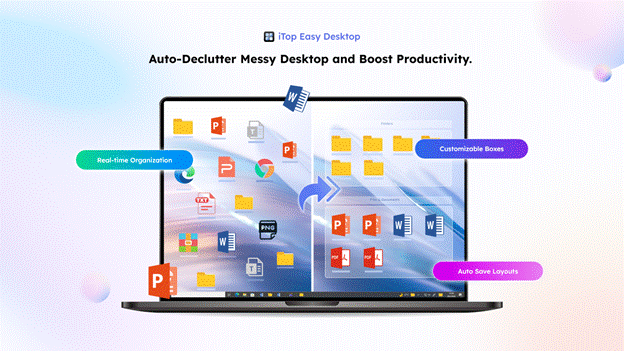
The iTop Easy Desktop will make your computer’s Windows desktop alive and enable you to configure dynamic live wallpapers, generate your own designs, and personalise your workspace to the fullest. Beautiful and practical in its application, this software is customised with the assistance of AI and powerful customisation tools on the desktop. It is easy to manage functionally. This tutorial is going to walk you through the process of configuring beautiful wallpapers and a motivational workstation.
Steps to Keep Your Desktop Organized and Beautiful
in iTop Easy Desktop
It has never been easier to visualise your desktop by transforming it into visual dynamism and customising your Windows desktop. Using iTop Easy Desktop, you will be able to customise posts, live wallpapers, and incorporate AI-advanced features that will come into play so that you can make your desktop both valuable and beautiful. Here are 9 steps on how to make your desktop as personal as you want.
Step 1: Free Download and Auto Organzied
If you have just installed the software, this is the fastest way to clean up:
- Launch iTop Easy Desktop.
- On the welcome screen, select Quick Start.
- This desktop organizer software will instantly scan your desktop and group all icons, files, and folders into preset boxes like Programs, Folders, and Documents.
Step 2: Choose Your Live Wallpaper
Once your messy desktop is de-cluttered, you may start to choose from Live Wallpapers. These 20,000+ backgrounds make your desktop come alive through movement and three-dimensional effects.

Step 3: Select a Static Wallpaper if Preferred
Not everyone prefers motion. The Wallpapers are of high quality, which are still pictures and are static, hence a distraction-free desktop. These wallpapers also add a classy and sleek ambience to your desktop, whether you are busy working on your job or simply looking to have a no-frills desktop image.

Step 4: Customize with Your Creations
iTop Easy Desktop can give users the freedom to be creative with Wallpapers -My Creations. In this case, you have the freedom to create custom wallpapers using multiple effects of your choice and design, as well as layouts. When this is done, what you create can be instantly applied, and this offers a touch of uniqueness and personalisation to your desktop.

Step 5: Add Your Own Wallpapers
When you are in a situation where you have images or designs saved in the local drive, Upload Wallpapers can be used to import those online to iTop Easy Desktop. It serves both dynamic and non-dynamic wallpaper and enables one to seamlessly incorporate personal photos, artwork or work-related graphics into the workspace.
Step 6: Ask AI for Inspiration and Help
Not just a desktop organzier software, but also a AI Helper. The Chat AI function in iTop Easy Desktop is an integrated AI assistant designed to boost productivity directly from your Windows home screen. It essentially embeds the power of ChatGPT into your desktop environment, allowing you to access AI tools without opening a browser. you can talk or chat in real time to be given tips, inspiration, and solutions. As an illustration, when you request fashionable sidewalls or suggestions regarding colour combinations, the computer-generated intelligence will create personalised tips.

Step 7: Personalize Your Mouse Appearance
Personalisation – Mouse allows you to tailor up your beautiful desktop by adjusting the styles and effects of the cursor. Surpassing the matching of your mouse design with your wallpaper theme makes the desktop feel more engrossing and more holistic to the visual appearance.

Step 8: Capture Your Desktop Setup
When it comes to screenshots, you are only required to save your desktop, whether live or not, immediately, so that it can be shared (or saved). Regardless of whether this is a full-screen, windowed, or scrolling capture, this tool will not change your customisations to interrupt your workflow. When you need to demonstrate your artistic desktop set-ups or share them with other people, screenshots will always come in handy.

Step 9: Keep Your Desktop Clutter-Free
Lastly, Double-Click Hide also brings an uncluttered workspace, which conceals all the desktop icons with just a double-click. This is ideal in that you can enjoy your live wallpaper to the fullest without differences or when you would like a smooth appearance when it comes to presentations, videos or screenshots.

These steps will help you design a personalised, interactive, and attractive desktop with a mix of personalisation, artificial intelligence, and a sensible layout so that your system is creative and efficient. iTop Easy Desktop is a user-friendly tool designed to help you develop a desktop that you like to whip out your creativity in and stay practical at the same time.
Why iTop Easy Desktop Excels
iTop Easy Desktop changes the experience of the Windows desktop by integrating dynamic wallpapers, innovative customisation, AI-driven help, and productivity. All activities, such as choosing live wallpapers to creating your own designs, are intuitive and interrelate with each other from one to, providing a seamless and involving workflow. Having such built-in features as Screenshot, AI Assistant, and Double-Click Hide, the user can fully customise their desktop and preserve order and productivity.
Conclusion
iTop Easy Desktop is not simply a desktop organzier software, but a full-life desktop enhancer. It can transform live animations to colourful individuals as well as individual designs, AI instructions and smooth personalisation, which makes the process of creating a visually appealing and user-friendly workspace. Being a professional gamer, creative enthusiast, or just a person who appreciates an active, clean, and inspirational desktop, these steps will enable you to have a dynamic, clean, and inspiring desktop daily. iTop Easy Desktop, transform your desktop, download and make your workspace a life.

Heather Neves is working as a freelance content writer. She likes blogging on topics related to parenting, golf, and fitness, gaming . She graduated with honors from Columbia University with a dual degree in Accountancy and Creative Writing.