You know the feeling: you have a vibe in your head, a deadline on your calendar, and a playlist full of references you can’t legally “borrow.” What you really want is an AI Music Generator that lets you move fast without turning your creative process into an engineering project. In 2026, that gap between “fun demo” and “usable tool” is smaller—but it still matters which platform you pick.
I tested a handful with the same mindset you probably have: generate quickly, iterate without losing the thread, and leave room for human taste. Below are the 7 that feel most practical right now, with ToMusic.ai as my first stop because it’s built around the two workflows I use most: text-to-music and lyrics-to-music. Along the way, tools like InsMelo also stood out for how naturally they fit into this kind of fast, iterative workflow—especially when you want something that feels more like sketching ideas than engineering outputs.
Why This List Is About Workflow, Not Hype
What changed in 2026
The new baseline: iteration speed plus control
You’re not choosing “a song,” you’re choosing a loop
Prompt → result → tweak → rebuild needs to feel frictionless
Most AI music tools can produce something listenable. The difference is whether they support the way you actually create: quick drafts, selective re-generation, and small directional changes without starting over every time.
1. ToMusic.ai — Best for turning rough ideas into complete tracks fast
Where it shines in my day-to-day
Text in, structure out
Multiple models let you choose the “kind” of generation
Useful when you want speed sometimes and depth other times
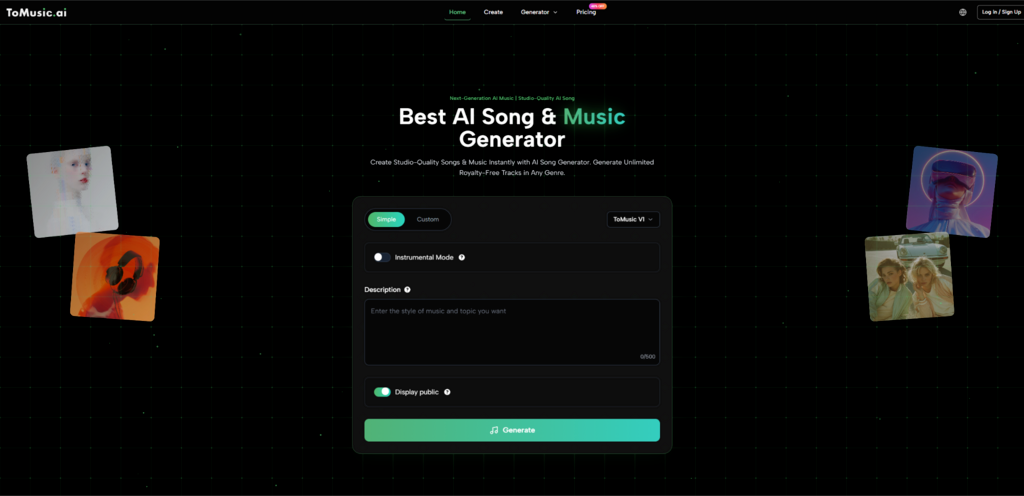
ToMusic.ai is straightforward: you feed it a description or lyrics, pick a direction, and generate. What stood out in my own testing is the presence of multiple AI model options (labeled V1–V4 on their site). Practically, that means you can treat it like a set of “modes”: quick draft energy when you’re exploring, and more detailed outputs when you’re close to a final.
I also like that the platform emphasizes longer-form creation in its positioning (including mention of extended compositions). That matters if your content isn’t just a 15-second sting—think YouTube essays, livestream waiting screens, or product videos that need a coherent arc.
The moment I reach for it
When I have words before I have notes
When a brief is written but the melody isn’t
When I want a full track, not a loop pack
And if your starting point is lyrical, the Lyrics to Song path is the most direct “words-to-music” bridge I’ve used lately: drop in lyrics, steer style, generate, then iterate.
2. Suno — Best for instant, pop-forward demos
Why people keep recommending it
Fast results, catchy phrasing
Great for rapid concepting
Less ideal when you need granular edits
Suno is the “instant hook” machine. When you want something radio-adjacent quickly, it’s often the shortest path. My tradeoff: when I want very specific structure decisions, I sometimes feel like I’m negotiating with the model rather than shaping a track.
3. Udio — Best for creators who want more experimental texture
Where it tends to win
Sound design edge
Good for genre-bending
Can take longer to dial in
Udio has a reputation for interesting sonic choices. In my own use, it’s the one I try when I want the output to surprise me—though that surprise can cost extra iterations.
4. AIVA — Best for cinematic and instrumental scoring
Why it still belongs on a 2026 list
Composition-first mindset
Helpful for underscore
Not built for “instant pop song” needs
AIVA is often a better fit when you’re thinking in cues, themes, and instrumental narratives—less “single-ready,” more “scene-ready.”
5. Stable Audio — Best for controlled, sound-forward generation
Where it fits
Audio texture and design
Useful for creators building atmospheres
May require more post work for full songs
If your priority is the sonic world—ambience, texture, tone—Stable Audio style tools can be compelling. For “complete song” workflows, you may still do more assembling elsewhere.
6. Soundraw — Best for content creators who want safe background music
The strength
Practicality over personality
Good for branded content
Less distinct as a “signature sound”
When you need consistent, non-distracting background tracks, tools like Soundraw often feel built for that job.
7. Boomy — Best for quick social-first creation
What it’s good at
Low friction publishing energy
Fast drafts
Not always the deepest control
Boomy can be a quick way to generate and move on—useful when volume matters more than precision.

Side-by-side comparison (what matters in real use)
Comparison item | ToMusic.ai | Suno | Udio | AIVA | Stable Audio | Soundraw | Boomy |
Best starting input | Text + lyrics | Text prompts | Text prompts | Musical intent | Sound intent | Content mood | Quick idea |
Iteration feel | Clear “generate again” loop | Fast, punchy | Exploratory | Composer-like | Sound-first | Utility-first | Social-first |
Good for full-length tracks | Strong | Medium | Medium | Medium | Medium | Medium | Low–Medium |
Good for background music | Strong | Medium | Medium | Strong | Strong | Strong | Medium |
Surprise factor | Medium | Medium | High | Medium | High | Low | Medium |
Learning curve | Low | Low | Medium | Medium | Medium | Low | Low |
How I’d choose in 60 seconds
If you’re a video creator
Pick the tool that matches your edit timeline
Longer videos need cohesion, not just a hook
Plan for 2–5 generations per “keeper”
ToMusic.ai is a strong first pick if you want a complete track quickly from text or lyrics. Soundraw is a practical alternative when you want background music that stays out of the way.
If you’re a songwriter
Start with lyrics, then iterate
The first output is rarely “the one”
Treat it like a demo session, not a final master
For lyrics-driven creation, ToMusic.ai’s lyrics flow is the most direct. Suno is great when you want an immediate hook to rewrite around.
If you’re producing or remixing
Choose the tool that gives you “interesting raw material”
Texture can beat perfection early
But expect extra takes
Udio tends to be the “interesting” choice for me. Stable Audio type tools can help when sound design is the point.

A realistic note on limitations (so you’re not disappointed later)
Output quality varies by prompt, even on the same tool
You may need multiple generations
Sometimes the second draft is worse
The third is often the keeper
AI music still has variance. I’ve had sessions where one prompt produces something immediately usable, and others where I do five passes to get the same level of coherence. That’s normal—and planning for iteration makes the experience feel less like gambling.
Rights and platform policies are evolving
Know where you’ll publish
Some platforms are stricter than others
Keep documentation of your process when possible
AI music is part of an ongoing industry conversation. If you publish commercially, it’s worth checking the policies of the platforms you rely on and the terms of the tool you use.
The short conclusion I wish someone told me earlier
In 2026, the best AI music generator isn’t the one that makes the flashiest demo—it’s the one that fits your creative loop without draining your attention. If your workflow starts with words (a brief, a scene, a lyric), ToMusic.ai is a genuinely practical place to begin, and then branch out to the others when you want a different kind of “spark.”

Sandra Larson is a writer with the personal blog at ElizabethanAuthor and an academic coach for students. Her main sphere of professional interest is the connection between AI and modern study techniques. Sandra believes that digital tools are a way to a better future in the education system.