

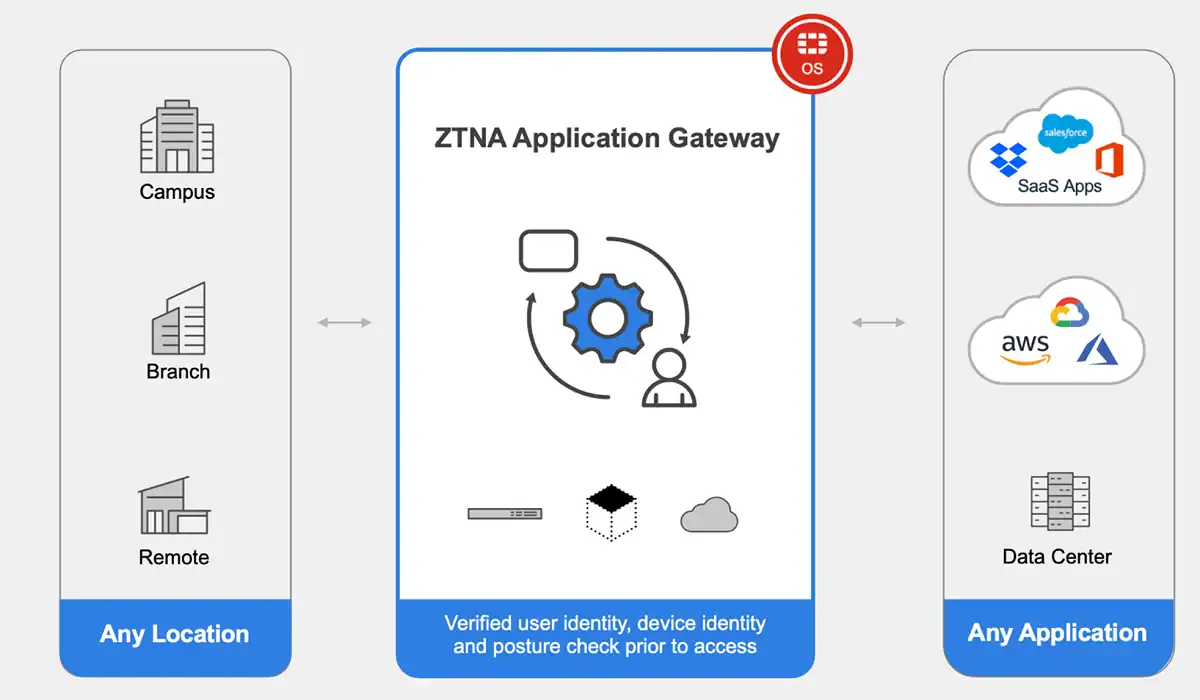
Network perimeters made sense when corporate resources stayed inside a building. They don’t hold up as well when applications live in the cloud, employees work from anywhere, and all sorts of third parties connect on a regular basis. The boundary is still there. It just stopped being the right place to make access decisions.
And that’s where Zero Trust Network Access comes in. ZTNA evaluates every connection request against identity, device, and context before anything gets through.
Understanding ZTNA in a Modern Security Environment
Take a finance employee accessing payroll from home. Under a traditional setup, once that person connects to the corporate network, they’re in. A closer look at what is ZTNA and its role shows how the framework evaluates who’s asking, what device they’re using, and which resource they’re trying to access before granting a connection. Access covers only the specific resource, not everything else behind the perimeter.
That employee can reach payroll without touching engineering systems. The boundary isn’t enforced by hoping people stay in their lane. It’s written into the policy from the start.
ZTNA applies zero trust principles across data centers and cloud environments alike. On-premises or hosted, the evaluation works the same way.
What makes this different from locking down the network itself?
Frankly, the network stopped being the right control point once applications scattered across cloud environments and users stopped working from one location. Applying access controls at the application level holds up better across those conditions.
How Does ZTNA Work?
When a connection request comes in, a ZTNA system runs it through several checks before anything opens up. It’s not a one-time login. Identity, device security state, the user’s role, the specific application being requested — all of that feeds into a policy decision.
An out-of-date device can get blocked outright. An unusual location might trigger a second authentication step. The system doesn’t just wave a request through because the user’s credentials are valid.
The session doesn’t get a free pass once it’s established either. Conditions change mid-session and the same logic applies. Risk goes up, the connection gets interrupted.
The National Cyber Security Centre’s ZTNA guidance describes how access decisions don’t end at login. The session stays under evaluation. That’s the part that makes it different.
ZTNA vs. Traditional VPN-Based Access
VPNs are still useful. But network-level access means a connected user can reach internal systems beyond the application they actually came for. That’s not necessarily a misconfiguration. It’s just what network-level access does.
ZTNA evaluates access using identity and context rather than connection origin. The policy check runs the same way regardless of where the request comes from. Office desk or hotel room, it doesn’t change the evaluation.
Does that mean VPNs are finished?
But not quite. Some legacy systems still depend on them. Certain network tasks do too. Most organizations keep both running for a while and trim back VPN use as more applications come under ZTNA.
Key Ways ZTNA Transforms Network Security
Applications don’t have to be broadly exposed when only verified connections can reach them. That alone cuts down the opportunities for unauthorised access.
A compromised account that’s limited to one application can’t roam. Granular permissions cap the blast radius. Containment that only kicks in after a manual flag isn’t worth much when access decisions run in seconds.
Working remotely doesn’t mean a looser policy. Access runs on identity and device state. It doesn’t shift because someone’s on a home network instead of the office.
Every access event gets logged: the application, the account, the device. Investigations have something to work from. Compliance audits do too. When a device goes unhealthy, access drops automatically — the network configuration doesn’t have to change for that to happen.
Important Considerations Before Adopting ZTNA
What actually goes into a ZTNA deployment before it goes live?
Honestly, mapping the environment takes longer than most teams plan for. There’s always a system that gets overlooked — usually an older one, usually sitting in front of something sensitive. Getting that complete picture before deployment determines what actually gets covered.
Access controls have to keep pace as the organization changes. Someone starts as a contractor and ends up with broader access than a full-time employee. Permissions don’t expire on their own. Without regular reviews, stale access just accumulates.
The Canadian Centre for Cyber Security’s zero trust architecture guidance is worth reading before the deployment starts. Access decisions have to respond to how the organization actually changes over time. User experience and operational costs factor into that. A system generating all sorts of friction gets worked around rather than used.
Where ZTNA Fits in a Broader Security Strategy
ZTNA makes access decisions. Endpoint protection and incident response capabilities still have to run alongside it. It doesn’t substitute for any of that.
Critical applications used by remote employees are a natural starting point. Set the identity requirements. Check device health. Watch what comes through before expanding coverage any further.
How do teams know if the deployment is actually working?
Unauthorised access attempts are one signal. Policy exceptions are another. Users will start reporting connection problems when friction gets bad enough — and that friction is usually what drives workarounds.
Frankly, the deployments that hold up treat the measurement piece as part of operating the system — not something to revisit only when something breaks.
And continuous improvement isn’t optional here. Access patterns drift. Policies go stale. Neither cleans itself up.
Frequently Asked Questions
1. What does ZTNA stand for?
Zero Trust Network Access. It checks identity and device state before a connection opens. Location isn’t part of the trust decision.
2. Is ZTNA the same as zero trust?
No. Zero trust covers the whole approach to verifying requests and limiting what can be reached. ZTNA is the application-access piece of it.
3. Does ZTNA replace a VPN?
Not always. Legacy systems often depend on VPNs, and certain tasks aren’t a natural fit for ZTNA. Most teams run both during the transition. VPN use cuts back as coverage expands.
4. Can ZTNA support remote and hybrid work?
Yes. The policy doesn’t change based on where someone’s working from. Identity and device state drive the decision, not network location.
Frankly, hybrid work exposed how much traditional access models relied on location as a proxy for trust. ZTNA removes that assumption entirely.

Caroline is doing her graduation in IT from the University of South California but keens to work as a freelance blogger. She loves to write on the latest information about IoT, technology, and business. She has innovative ideas and shares her experience with her readers.