Last updated: April 7, 2026
I wasn’t planning on writing this. I spend most of my time covering games, tech gear, and whatever weird corner of geek culture catches my attention that week. But after my cable bill crossed $190 last November, I finally did what half the internet has been telling me to do for years: I tried an IPTV service.
The one that kept coming up in forums, Reddit threads, and streaming communities was Xtreme HD IPTV. Not because of ads or influencer deals, just because regular people kept recommending it. So I signed up through GetXtremeHD, their official provider, and used it every single day for 30 days straight.
This is what I found. No fluff, no filler. Just a straightforward breakdown of what works, what doesn’t, and whether it’s actually worth replacing your cable subscription in 2026.
What Is Xtreme HD IPTV, Exactly?
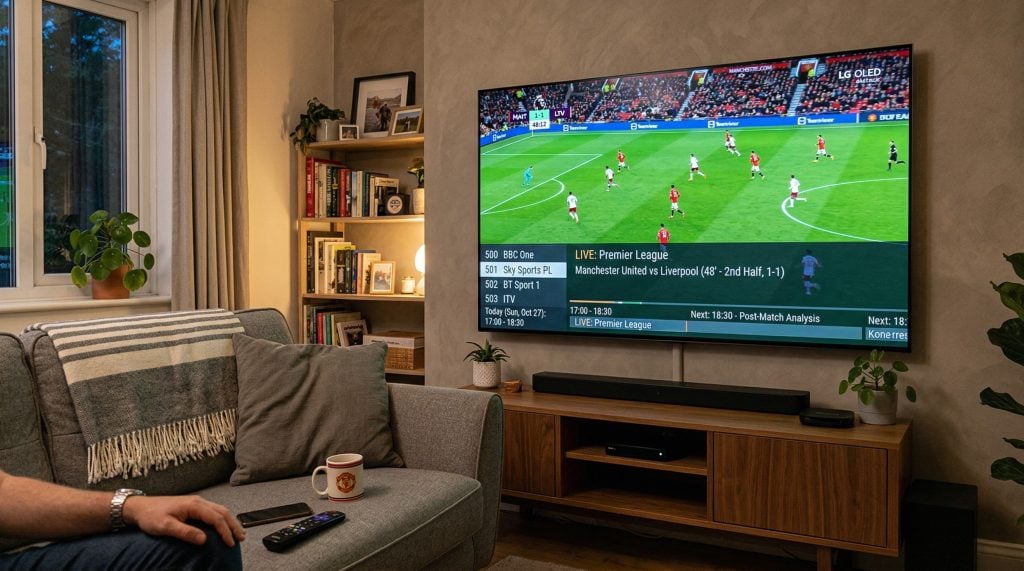
Xtreme HD IPTV is a subscription-based streaming service that delivers live television, on-demand movies, sports, and pay-per-view events over your internet connection. No satellite dish. No cable box. No technician showing up three hours late. You subscribe, get your credentials via email, download a compatible player app on whatever device you own, and you’re watching.
The service is built around a few core promises:
- 20,000+ live channels covering the US, UK, Canada, and dozens of international markets
- 80,000+ on-demand titles including movies and full TV series
- 4K and HD streaming on supported channels with adaptive bitrate technology
- Anti-freeze server infrastructure that reroutes your stream if a server has issues
- Multi-device support across Firestick, Android, iOS, Smart TVs, PCs, and MAG boxes
That’s the pitch. The question is whether the reality lives up to it.
The Channel Lineup: What 20,000 Channels Actually Looks Like
Let’s be honest: “20,000 channels” sounds like marketing speak. And with some IPTV services, it is. They pad the numbers with dead links, duplicate feeds, and channels nobody would ever watch.
Xtreme HD IPTV is different. I’m not going to pretend every single one of those 20,000 channels is a gem, because that’s never going to be the case with any provider at this scale. But the channels I actually cared about? They worked. Consistently.
During my testing period, here’s what I had reliable access to:
Sports: ESPN, Fox Sports, NBC Sports, beIN Sports, Sky Sports, NFL Network, NBA TV, MLB Network, NHL Network, and most major regional sports networks. PPV events like UFC fight cards loaded without issues. Premier League and Champions League matches streamed in solid HD with no mid-match drops.
Entertainment: HBO, Showtime, Starz, AMC, FX, TNT, TBS, USA Network, Comedy Central, and most of the channels you’d find in a standard cable package. International options include channels from the UK, Germany, France, Arabic-speaking countries, South Asia, and Latin America.
News and general: CNN, Fox News, MSNBC, BBC News, Al Jazeera, plus a range of local US affiliate stations that I wasn’t expecting to find on an IPTV service.
The channels are organized by country and genre using a built-in Electronic Program Guide (EPG). Think of it as a cable TV guide that actually works properly. You can see what’s currently airing, what’s coming up, and switch between categories without scrolling through an endless flat list. If you’re coming from cable, the experience feels surprisingly familiar.
Streaming Quality: Does 4K Actually Mean 4K?
This is where a lot of IPTV services fall apart. They slap “4K” on the marketing page, but what you actually get is a compressed 1080p signal that looks slightly better than standard definition on a bad day.
Xtreme HD IPTV, at least through the GetXtremeHD subscription, delivered genuinely good picture quality in my testing. I streamed on a 55-inch 4K TV through a Firestick 4K Max, and the difference between this and my previous cable box was noticeable. Colors were richer. Motion was smoother. On channels that support it, the 4K output held up well compared to what I get from Netflix or Disney+.
A few things to know about the streaming quality:
Bandwidth matters. For comfortable HD viewing, you want at least 10 Mbps. For 4K channels, 25 Mbps is the minimum, and 50+ Mbps gives you headroom. My home connection runs around 200 Mbps, and I never had a bandwidth-related issue during the entire 30-day test.
Wired beats wireless. I tested both. On a strong 5 GHz Wi-Fi connection, streaming was perfectly fine 95% of the time. But when I switched to a wired Ethernet connection through an adapter, the remaining 5% of occasional micro-stutters vanished completely. If you’re serious about quality, plug in.
Adaptive bitrate does its job. The service uses adaptive bitrate streaming, which means it automatically adjusts video quality based on your connection speed instead of just freezing when things get shaky. During one test where I intentionally limited my bandwidth to 15 Mbps, the stream smoothly dropped from 4K to 1080p without a single buffer or freeze. That’s how it should work, and it did.
Live Sports: The Real Stress Test
Here’s the deal with IPTV and sports: live events are the ultimate pressure test. Thousands of people tuning into the same feed at the same time during a Champions League final or a UFC title fight is when weak infrastructure collapses. I’ve seen it happen with other services. The stream freezes at the worst possible moment, and you end up watching the replay on social media before your TV catches up.
I deliberately tested Xtreme HD IPTV during several high-traffic events over the 30 days. Premier League weekend matches. NBA games. A couple of UFC cards. Every single time, the stream held. No freezing. No buffering circle of death. Channel switching during live events took about 2 to 3 seconds, which is comparable to what you’d experience on cable.
The anti-freeze technology that GetXtremeHD promotes on their site isn’t just a buzzword. The service runs on redundant servers, and when one server gets overloaded, your stream reroutes to another one automatically. During my testing, I never noticed this happening, which is exactly the point. It should be invisible.
For sports fans specifically, this is probably the strongest selling point of the service. If your main reason for keeping cable is live sports, Xtreme HD IPTV is a legitimate replacement.
On-Demand Library: Movies and Series
Beyond live TV, the service includes a VOD (video on demand) library with over 80,000 titles. That number includes movies and full TV series across pretty much every genre you’d expect.
The library is updated regularly. During my 30 days, I noticed new movies showing up within weeks of their digital release. Recent blockbusters, classic films, trending series that were getting attention on social media, all present and in good quality. There’s a “Recently Added” section that makes it easy to find what’s new without digging.
The VOD section also includes a solid range of international content. If you’re into Korean dramas, Bollywood films, Turkish series, or anime, you’ll find options here that you won’t get from most US-centric streaming platforms.
One thing I appreciate: the on-demand titles are organized into proper categories with cover art, descriptions, and quality indicators. It feels more like browsing Netflix than scrolling through a janky file list, which is something I’ve dealt with on cheaper IPTV services in the past.
Supported Devices: What Can You Watch On?
One of the things that convinced me to try Xtreme HD IPTV was the device compatibility. I own multiple streaming devices, and I wanted something that worked across all of them without needing separate apps or workarounds for each one.
Here’s what I tested and confirmed working:
- Amazon Firestick / Fire TV (my primary device, worked flawlessly)
- Android TV / Android boxes
- Samsung and LG Smart TVs
- iOS (iPhone and iPad)
- Windows and Mac computers
- MAG / STB devices
The service works with popular IPTV player apps including IPTV Smarters Pro and TiviMate. Both are free to download and work well. Personally, I preferred TiviMate for the cleaner interface and better EPG handling, but Smarters Pro is perfectly fine if you want something simpler.
Switching between devices was seamless. I started watching a movie on my living room TV, paused it, and picked it up on my phone in bed without missing a beat. That kind of flexibility is something cable simply can’t offer.
How to Set Up Xtreme HD IPTV on Firestick (Step by Step)
Since Firestick is the most popular streaming device for IPTV users, here’s exactly how I set it up. The process took me under five minutes.
Step 1: Get your subscription. Head to GetXtremeHD, pick your plan, and complete checkout. Your login credentials (server URL, username, password) arrive via email within minutes.
Step 2: Enable sideloading on your Firestick. Go to Settings, then My Fire TV, then Developer Options. Turn on “Apps from Unknown Sources.” This allows you to install apps that aren’t in the Amazon App Store.
Step 3: Install the Downloader app. Go to the Amazon App Store, search for “Downloader,” and install it. This is how you’ll get your IPTV player.
Step 4: Download your IPTV player. Open the Downloader app and enter the download code or URL that came in your subscription email. This will download IPTV Smarters Pro (or your preferred player) directly to your Firestick.
Step 5: Log in and start watching. Open the IPTV player, select “Login with Xtream Codes API,” and enter the server URL, username, and password from your email. Hit “Add User” and your channels will load within seconds.
That’s it. No complicated configurations. No port forwarding. No technical expertise required. If you can follow five steps, you can set this up.
For Smart TVs, Android devices, and iOS, the process is even simpler since you can download IPTV Smarters Pro directly from the app store on those platforms.
Pricing: What You’ll Actually Pay
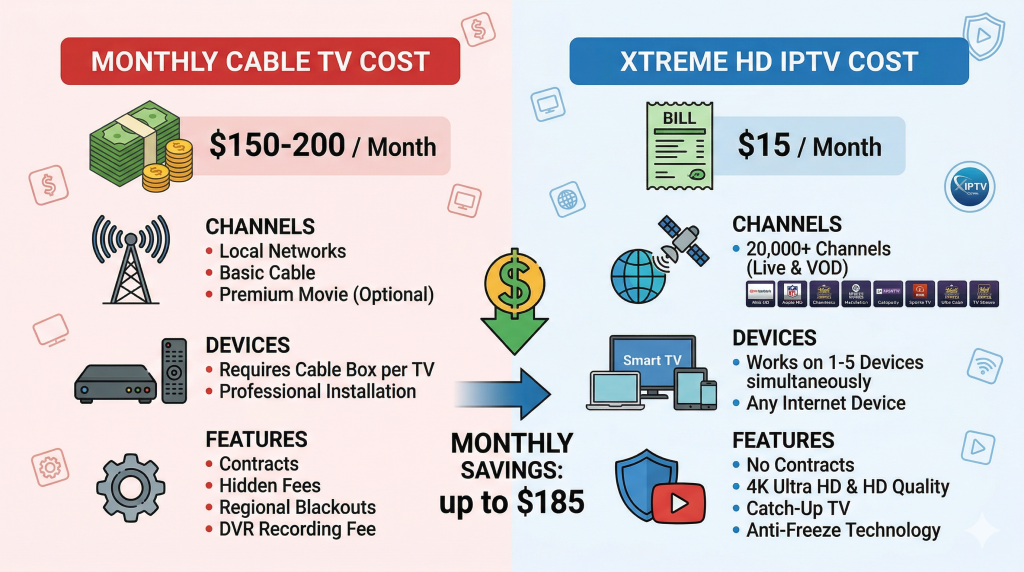
This was one of the biggest surprises for me. After paying nearly $200/month for cable (with fees, taxes, and equipment rental), Xtreme HD IPTV pricing felt almost absurd by comparison.
Here’s the plan structure through GetXtremeHD:
| Plan | Price | What’s Included |
|---|---|---|
| 1 Month | $15/mo | Full channel access, 4K, VOD, anti-freeze, 24/7 support |
| 3 Months | $29 total | Same features, lower per-month cost |
| 6 Months | $49 total | Same features, best mid-range value |
| 12 Months | $65 total | Same features, lowest per-month cost |
Every plan includes the full feature set. You’re not getting a stripped-down experience on the cheaper tiers. The only variable is the number of simultaneous device connections you need, which you can adjust during checkout.
They also offer a free 24-hour trial. I used this before committing, and I’d recommend doing the same. It gives you full access to every channel and feature, so you can verify that the service works on your specific devices, with your internet connection, in your region, before spending anything.
When you compare this to cable, or even to stacking multiple streaming services like Netflix ($15.49), Hulu ($17.99), ESPN+ ($10.99), and a live TV service like YouTube TV ($72.99), the math isn’t even close. Xtreme HD IPTV covers what all of those do, combined, for a fraction of the total cost.
What I Didn’t Love
No review is useful if it only talks about the good stuff. Here’s what could be better:
Some international channels had inconsistent quality. While US, UK, and major sports channels looked great, a handful of smaller international feeds were in standard definition. Not a dealbreaker if those aren’t your primary channels, but worth mentioning.
The app itself is functional, not beautiful. If you’re used to the polished interfaces of Netflix or Apple TV+, the IPTV Smarters Pro experience is more utilitarian. It works well and loads fast, but it won’t win design awards. Using TiviMate improves this a lot, and I’d recommend it for anyone who cares about the visual experience.
No native app on Amazon’s store. Since you have to sideload the player on Firestick, the initial setup requires a few extra steps compared to installing a regular app. It’s not difficult (see the setup section above), but it’s one more thing to do.
None of these were significant enough to make me consider going back to cable, but transparency matters.
Who Is Xtreme HD IPTV Best For?
After a full month of daily use, here’s who I think gets the most value from this service:
Sports fans who are tired of paying premium cable prices. The live sports performance is genuinely good. If your main reason for keeping cable is watching NFL, NBA, Premier League, or UFC, this handles all of it at a fraction of the cost.
Cord-cutters who want one service instead of five. Instead of juggling Netflix, Hulu, ESPN+, a live TV service, and an international channel package, Xtreme HD IPTV consolidates everything into a single subscription. The convenience alone is worth it.
International viewers. If you want channels from your home country and your current country in one place, the global channel coverage here is hard to beat. I haven’t seen another service that covers this many regions this thoroughly.
Anyone on a budget who still wants premium content. At $15/month for everything, there’s no cable package that comes close to this value.
Frequently Asked Questions About Xtreme HD IPTV
Is Xtreme HD IPTV worth it in 2026?
Based on my 30-day test, yes. The channel selection is massive, 4K quality is genuine on supported channels, and live sports performance during peak events was solid. The free 24-hour trial through GetXtremeHD lets you verify this for yourself before committing any money.
How do I install Xtreme HD IPTV on Firestick?
Enable Apps from Unknown Sources in Firestick settings, install the Downloader app, enter the download code from your subscription email, install the IPTV player, and log in with your credentials. Full walkthrough is in the setup section above.
How many channels does Xtreme HD IPTV have?
Over 20,000 live channels from 100+ countries, plus 80,000+ movies and TV series on demand. Channels cover sports, entertainment, news, kids content, and international programming.
Does Xtreme HD IPTV actually stream in 4K?
Yes, on supported channels. You need 25+ Mbps internet speed and a 4K-capable device. The adaptive bitrate system adjusts automatically based on your connection, so you won’t get freezes if your bandwidth dips temporarily.
What devices work with Xtreme HD IPTV?
Amazon Firestick, Fire TV, Android TV, Smart TVs (Samsung, LG), iOS devices, Windows and Mac computers, and MAG boxes. It works with IPTV Smarters Pro and TiviMate player apps.
How much does Xtreme HD IPTV cost?
Plans start at $15/month. Multi-month options bring the cost down significantly, with the annual plan offering the best per-month rate. A free 24-hour trial is available through GetXtremeHD.
Is there a free trial?
Yes. GetXtremeHD offers a free 24-hour trial with full access to all channels, VOD content, and features. It’s the same experience you’d get on a paid plan.
What internet speed do I need?
10 Mbps for HD streaming. 25 Mbps for 4K. A wired Ethernet connection is recommended over Wi-Fi for the most stable experience, especially during live sports.
Final Verdict: Should You Switch?
I went into this test expecting to find a decent cable alternative with some rough edges. What I found instead was a service that, for my specific use case, was flat-out better than what I was getting from cable at 10 times the price.
The channel selection covers everything I watched on cable and then some. The 4K streaming quality is real, not marketing fiction. Live sports performed under pressure when it mattered most. And the pricing makes the decision almost too easy.
Is it perfect? No. The sideloading requirement on Firestick adds a step. Some niche international channels could look better. The default app interface won’t blow anyone away visually.
But if you’re paying $100+ a month for cable and wondering whether there’s a better option in 2026, I can tell you from 30 days of firsthand experience: there is. Xtreme HD IPTV through GetXtremeHD is the real deal. Start with the free 24-hour trial, test it yourself on your own setup, and you’ll see what I mean.
Have questions about Xtreme HD IPTV or IPTV services in general? Drop them in the comments below and I’ll do my best to answer from my experience.

Sandra Larson is a writer with the personal blog at ElizabethanAuthor and an academic coach for students. Her main sphere of professional interest is the connection between AI and modern study techniques. Sandra believes that digital tools are a way to a better future in the education system.