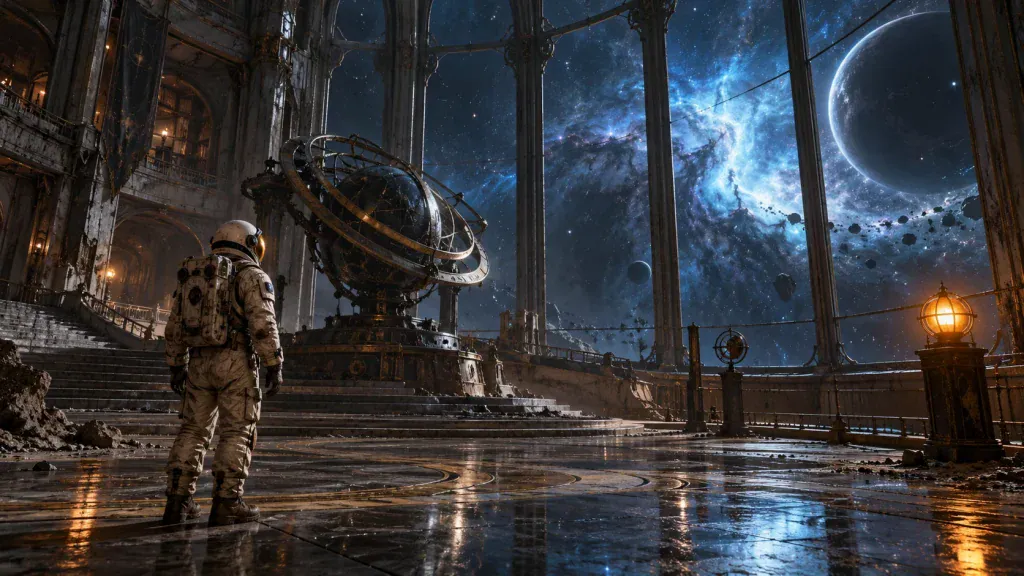
AI-generated concept illustration; not a PicLumen output demonstration.
A deserted observatory. A warning light that should have stopped blinking years ago. An astronaut who recognizes the voice coming through the radio. You do not need a complete screenplay to see the beginning of a science-fiction story in those three details. You do, however, need to decide what an audience should notice first.
That is where a short concept video can help. For an independent storyteller, a moving image offers a way to explore atmosphere before committing to a larger production. It can reveal whether a location feels lonely, whether a reveal arrives too early, or whether a supposedly dramatic opening is simply too busy.
AI video generation gives creators another way to make that first experiment. The useful goal is a focused visual sketch: something you can watch, question, and improve.
Find the moment worth filming
A common mistake is trying to squeeze an entire imaginary franchise into one prompt. A ruined city, a space battle, three heroes, and a surprise villain may sound exciting on paper. In a short clip, those ideas compete for attention.
Instead, choose a moment with one clear change. A sealed door opens. A reflection moves before its owner does. A distant light appears where the character expected darkness. Each gives the audience something to anticipate without requiring several paragraphs of explanation.
Write a one-sentence brief before generating anything: “An astronaut realizes the abandoned observatory is receiving a signal.” This becomes the test for every creative choice. If an impressive effect does not help communicate that realization, save it for another project.
Build an image that establishes the world
For a project that begins with concept art, PicLumen provides an AI image creation starting point. Develop the environment as a still first, paying attention to the architecture, palette, and placement of the central character. A strong composition makes the next motion decision easier.
Our imaginary observatory could use cold blue surroundings and one amber beacon. That contrast directs attention without filling the frame with visual noise. Give the astronaut a simple, distinctive silhouette rather than elaborate costume details that might distract from the signal.
Treat the reference image as a creative brief, rather than a promise that every detail will remain unchanged once motion is introduced. Keep the original nearby so you can compare the generated clip against the design you intended.
Describe the shot as a director would
The PicLumen AI Video Generator accepts text prompts or reference images. For this exercise, an image-led approach lets you begin with an established visual direction and describe the movement you want to explore.
Try a restrained prompt: “Inside an abandoned observatory, a lone astronaut faces a dark communications console. One amber indicator begins blinking. Slow camera push toward the console, faint dust drifting through blue window light, tense cinematic atmosphere.”
Notice the hierarchy. There is a location, a subject, an action, and a camera instruction. The prompt does not also ask for a running character, rotating room, exploding window, and dramatic costume transformation. Fewer competing movements give you a clearer basis for evaluating the result.
Make three shots with different jobs
A teaser needs a progression, even when it lasts only a few moments. Plan an establishing shot, a discovery shot, and a final unanswered question. Generate them as separate experiments so a problem in one does not force you to rethink the entire sequence.
The establishing shot might show the observatory against an enormous sky. The discovery shot brings us inside to the blinking console. The final shot holds on a sealed corridor as light appears beneath a door. That last image leaves the viewer with a question rather than an explanation.
Keep a small continuity sheet beside your prompts: cream spacesuit, amber signal, blue interior light, circular window frames. Repeating those decisions gives the shots a shared direction. It does not guarantee continuity, so inspect the results before cutting them together.
Edit for tension rather than spectacle
Once the clips are ready, assemble the selected takes in your usual editor. A wide shot can establish isolation, while a shorter insert directs attention to the signal. Let the final image hold long enough for the audience to understand the mystery.
Add titles, sound, and any dialogue during the finishing stage. A restrained radio crackle might serve the idea better than a wall of music. Check that you have appropriate rights for every sound or music asset you include.
Watch the sequence with the audio muted as well. If the story only makes sense because a title explains every event, the images may need a simpler order. The viewer should understand the basic change even without knowing the character’s backstory.
Look for the mistakes a still frame hides
A beautiful thumbnail is not enough. Watch the full clip for shifting architecture, unstable hands, changing costume details, and objects that appear or disappear. Pay particular attention to the end of a camera move, where a convincing opening can give way to an inconsistent reveal.
If a shot fails, change one variable at a time. Reduce the camera movement, simplify the action, or choose a cleaner reference image. Keep notes about the prompt and result so your next attempt answers a specific question instead of becoming another blind experiment.
Share the draft with someone who has not read your premise. Ask what they noticed, what changed, and what they expect next. Their answers are more useful than a general comment that the clip looks cinematic.
Let the experiment inform the story
The finished teaser can become a mood reference, a discussion piece for collaborators, or a starting point for a more developed short film. Describe it honestly as an AI-assisted concept when presenting it. Use original characters and worlds rather than borrowing recognizable actors or franchise imagery to create instant familiarity.
The strongest result is a clearer creative decision. Perhaps the observatory feels more compelling without showing the astronaut’s face. Perhaps the unanswered radio signal is enough, and the corridor reveal can wait. A small visual experiment earns its place when it helps you discover what your story actually needs.

Susan Wallace is a pro gamer and has been a strong influence over the gaming community. She also writes about the positive effects of gaming and how to avoid the negative effects of gaming. Her amazing writing has reached and helped many gamers. She actually helps people decide the best games to play based on their current situation.