The generative AI landscape has reached an interesting inflection point. The novelty of producing a passable image from a text prompt has worn off, and the conversation has shifted toward something far more practical: workflow. For anyone who has spent an afternoon bouncing between a half-dozen browser tabs to turn a single concept into a finished piece of content, the fatigue is real. The question is no longer whether these models can produce impressive results—they clearly can—but whether the process of getting there can feel less like navigating a labyrinth. This is the gap that Nanobanana maker positions itself to fill, and the only way to evaluate that claim is to put it through a series of practical, task-based tests.
The Prompt Gallery as a Creative On-Ramp
One of the more thoughtful aspects of the platform is the prompts gallery. Rather than leaving users to stare at a blank text field, the gallery offers a curated collection of specific, ready-to-use prompts organized by creative goal. This is not a minor detail. For many users, the hardest part of working with AI is not the technology itself but the articulation of what they actually want.
Testing a Professional Headshot Transformation
The first test I ran was the LinkedIn profile photo generator prompt, which is remarkably detailed in its requirements: maintain facial identity and features exactly, specify professional attire, require a clean solid background that is sharp and clear rather than blurred, and demand even professional lighting. I uploaded a casual snapshot taken in poor lighting. The result preserved the original facial structure and expression while upgrading the clothing style and replacing the background with a clean, professional setting. The lighting adjustment was particularly noticeable—the platform evened out the shadows without making the image look artificially flat.
What stood out here was the specificity of the prompt engineering. The platform clearly understands detailed constraints, which reduces the trial-and-error cycle that often plagues AI image generation. The result was usable as-is, which is not always the case with headshot generators that tend to over-idealize or alter facial features.
From Casual Photo to Polished Product Shot
The second test involved the “From Design to Reality” prompt, which takes an illustration and transforms it into a photorealistic rendering. I used a simple sketch of a perfume bottle. The prompt specified frosted glass, a genuine marble cap with natural patterns, studio lighting, and a luxury presentation. The output was striking in its material accuracy—the frosted glass had the right translucency, and the marble cap displayed realistic veining. The studio lighting created appropriate highlights and shadows that gave the bottle a three-dimensional presence.
This type of transformation is where the platform’s understanding of material properties becomes apparent. It is not merely applying a filter; it is interpreting how light interacts with different surfaces and generating a coherent visual result.
Exploring the Creative Toolkit Beyond Images
The platform’s capabilities extend beyond still images into video, music, and audio generation. The integration of these modalities into a single workflow is where the platform differentiates itself from single-purpose tools.
Image-to-Video with Character Consistency
For the video test, I took the perfume bottle image generated in the previous step and used it as the for a short product demonstration clip. The platform supports image-to-video generation with a focus on preserving the core identity of the subject. I prompted a slow rotation of the bottle with a soft lighting change. The resulting video maintained the bottle’s material details and the lighting setup from the original image. The motion was smooth, though the rotation speed was slightly faster than I had envisioned. This is where iterative refinement becomes useful—adjusting the prompt and regenerating is straightforward and does not require starting over from scratch.
Adding Audio Without Leaving the Workflow
Completing the creative loop, I generated a short background track to accompany the video. The music generation is integrated into the same interface, allowing for immediate testing of different styles. The output was appropriate for a product showcase—clean, professional, and unobtrusive. It lacked the complexity of a professionally composed track, but for social media content or marketing materials, it served the purpose effectively.

Navigating the Platform: A Straightforward Three-Step Process
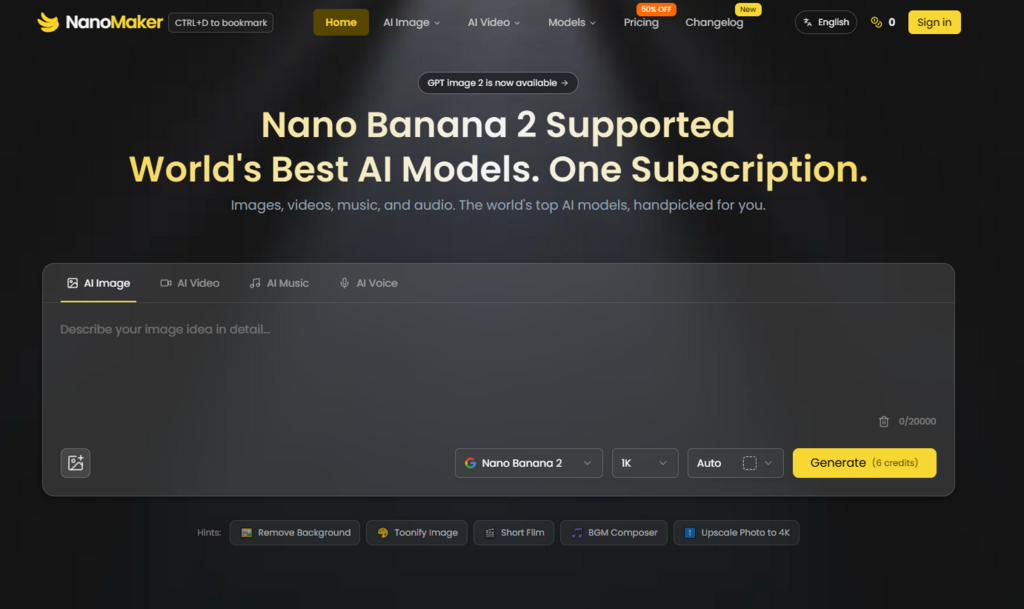
The platform’s interface is refreshingly uncluttered. The creative process follows a logical sequence that minimizes the need for extensive training or documentation.
Step 1: Describe Your Vision in Natural Language
The starting point is a text prompt. The platform is designed to understand complex instructions, allowing users to specify style, composition, mood, and other parameters in plain English. The prompts gallery provides excellent examples of how detailed and specific these instructions can be, which is helpful for users who are new to prompt engineering.
The Importance of Prompt Specificity
In my testing, the quality of the output correlated directly with the specificity of the prompt. Vague descriptions produced generic results, while detailed prompts—like those in the gallery that specify lighting direction, material properties, and composition rules—yielded outputs that closely matched the intended vision. This is a consistent pattern across generative AI tools, and the platform does not magically solve it, but it does provide the scaffolding to help users write better prompts.
Step 2: Upload a Reference Image When Needed
For tasks that require a specific starting point, the platform supports image uploads in JPEG, PNG, or WebP formats, with a maximum file size of 5MB. This is essential for applications like headshot generation, product photography transformation, or character figure creation. The uploaded image serves as a visual anchor, and the platform works to preserve the subject’s identity while applying the requested transformations.
Working with Uploaded Images
In practice, the platform handles uploaded images with care. Facial features are preserved, skin tones remain natural, and the overall composition of the original image is respected unless the prompt explicitly requests changes. This is particularly important for applications like the gender swap filter or the age transformation feature, where maintaining recognizability is the primary goal.
Step 3: Generate, Refine, and Export
Once the prompt and any optional reference image are set, the generation process is fast. The real value, however, is in what happens next: the ability to refine and iterate without leaving the page. Generate an image, decide it needs a different background, adjust the prompt, and generate a new version. The same loop applies to video and audio. This integrated flow is where the platform saves the most time and mental energy.
A Practical Comparison of Creative Workflows
The value of an integrated platform is best understood in contrast to the alternative of using separate, specialized tools.
| Aspect | Separate Tool Approach | Integrated Platform Approach |
| Primary Strength | Maximum control over each modality | Maximum efficiency across the entire pipeline |
| Process Flow | Fragmented; assets must be exported and re-imported | Continuous; all stages happen in one view |
| Time Investment | High due to context switching and file management | Moderate; focused on creative iteration |
| Creative Control | Deep and granular | Strong but dependent on prompt quality |
| Asset Consistency | Requires manual management across tools | Built-in, as all assets live in the same session |
| Ideal Use Case | High-budget productions with dedicated specialists | Rapid content creation, marketing, and social media |
Honest Limitations and Realistic Expectations
No platform is without its constraints, and this one is no exception. The most significant limitation is that the quality of the output is directly tied to the quality of the input. Vague prompts produce mediocre results; the platform is not a mind reader. For complex video scenes, results may not be perfect on the first attempt. Complex motion or intricate scene compositions may require multiple generations to achieve the desired outcome. The platform’s strength is in iteration speed—generating, adjusting, and regenerating quickly—not in guaranteeing flawless first attempts.
Another consideration is that the platform is designed for speed and accessibility, not for absolute creative depth. If a project requires frame-by-frame video editing or multi-track audio mixing, more specialized tools will still be necessary. The platform is a bridge between an initial concept and a finished product, optimized for the kinds of projects that currently require jumping between too many applications.

Who Benefits Most from This Approach
The platform is most valuable for specific types of users and workflows. For marketers and businesses, it offers a way to generate consistent brand assets, ad visuals, and product demo videos without managing multiple vendor relationships. For content creators and YouTubers, the ability to design thumbnails, generate B-roll footage, and maintain branding consistency across uploads is a significant advantage. For e-commerce sellers, professional product photography and lifestyle shots become accessible without expensive studio sessions. And for designers and artists, the platform accelerates the creative workflow by handling repetitive tasks, allowing more time for refining ideas.
The fragmentation of the AI tool ecosystem has become a genuine bottleneck in creative production. By consolidating the most common tasks into a single, coherent workflow, NanoMaker offers a practical alternative to the chaos of tab switching and file management. It does not claim to be the best tool for every possible task, but it does offer a compelling answer to a question that matters: how can I get from an idea to a finished piece of content with less friction and more focus?