
Your phone can do more than organize messages, photos, and daily tasks. With the right app, it can help you identify a plant on a walk, explore the night sky, practice drawing with augmented reality, play with your cat, or get appearance-related style suggestions from an AI tool. This article compares several creative and curiosity-driven apps.
Cat Translator

Platforms: iOS, Android.
Cat Translator app is an entertainment application for cat owners. It records cat meows, turns human voice into cat-like sounds, and keeps pet profiles with recording history. It also includes playful extras, such as ready-made cat phrases, mini-games, and AI pet photo/video tools.
Key Features
- Human-to-Cat Translation. Record your voice and play it back as cat-style sounds, which makes the app better suited for fun interaction than serious pet behavior analysis.
- Cat-to-Human Translation. Record your cat’s meow and get a human-language interpretation inside the app. Treat the result as entertainment, not veterinary or behavioral advice.
- Pet Profiles. Create separate profiles for different cats, so each pet can have its own translation history.
- Recording History. Save past translations, replay favorite meows, and share funny moments when you want to keep them.
- Ready-Made Cat Phrases. Choose preset phrases such as “Play with me,” “Don’t be mad at me,” or “Feed me,” then hear how the app presents them in cat language.
- Vocabulary Library. Browse cat phrases and sounds organized by situation, which helps users find sounds without recording a new message every time.
- AI Studio. Generate AI cat photos and videos from one pet upload using ready-made styles. Coins pay for these creative tasks separately from the main subscription.
- Mini-Games. Play quick games inside the app when you want a light entertainment feature beyond translation.
- Cat-Only Support. The app states that its talking features work only for cats and do not support other animals.
Website: https://cattranslator.io/
LooxUP

Platforms: iOS
LooxUP is an AI looksmaxing app that analyzes a selfie, gives a face score from 1 to 10, and explains which features affect the result. It focuses on practical improvement areas, including face structure, hair, skin, style, and progress tracking.
Key Features
- AI Face Rating. Get an attractiveness score based on a selfie, with a breakdown of the factors that influence the result.
- Facial Structure Analysis. Review how symmetry, proportions, jawline definition, eye area, and facial balance affect your overall appearance.
- Skin Guidance. Get suggestions based on visible skin quality, tone, and texture, so you know what to improve first.
- Hairstyle Guidance. Find hairstyle ideas that fit your face shape and support a more balanced look.
- Style Recommendations. Learn which clothing choices and colors may work better with your features.
- Personal Improvement Plan. Follow a step-by-step plan focused on the changes that can make the biggest difference.
- Progress Tracking. Track how your score changes over time as you apply the app’s recommendations.
- Quick Selfie Workflow. Upload or take a selfie, let the AI analyze facial parameters, then review your score and plan in a few steps.
- Privacy-Focused Processing. The app states that photos process securely and do not stay on its servers beyond the analysis session.
Website: https://looxup.app/
PlantNet
Platforms: Android, Chromebook, Tablet
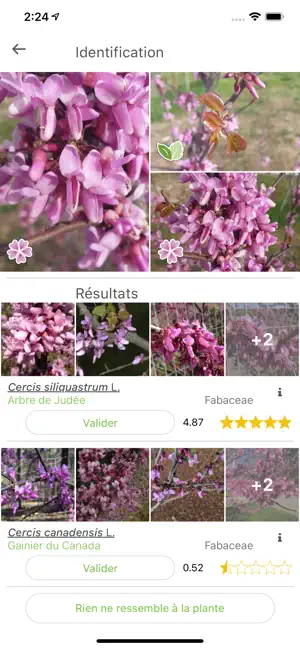
PlantNet helps users identify plants from smartphone photos. It works best when you provide clear images of leaves, flowers, fruits, or other details. The app also supports a citizen science project, where user observations help researchers study plant biodiversity.
Key Features
- Photo-Based Plant Identification. Identify plants by taking or uploading a photo. For better results, use close, clear images of flowers, fruits, leaves, stems, or thorns.
- Wild Plant Focus. Identify many types of plants found in nature, including flowering plants, trees, grasses, conifers, ferns, vines, wild salads, and cacti.
- Cultivated Plant Recognition. Recognize many plants from parks and gardens, though the app mainly focuses on wild plant observations.
- Large Species Database. Search across about 20,000 recognizable species. That means PlantNet offers broad coverage, but it does not identify every plant on Earth.
- Community Review. Share observations that the community can review. Strong user contributions may later improve the app’s plant photo galleries.
- Genus and Family Filters. Filter recognized species by genus or family when several similar results appear.
- Multi-Flora Identification. Search for a photographed plant across all available floras, not only the one you selected. This helps when you do not know which region or plant group to choose.
- Favorite Floras. Save preferred floras for faster access. This works well for users who often identify plants in the same area.
- Taxonomic Gallery Navigation. Browse image galleries at different taxonomic levels, such as species, genus, or family.
- Observation Mapping. View your plant observations on a map, which helps you track where you found each plant.
- Factsheet Links. Open additional plant factsheets when you want more information after identification.
- Data Safety Controls. The app states that data transfers use encryption and that users can request data deletion. It may collect location, personal information, photos, and videos.
Website: https://plantnet.org/
Star Walk 2

Platforms: iOS, Android
Star Walk 2 is a stargazing app that turns your phone into a live sky map. Point your device at the sky to identify stars, planets, constellations, satellites, and deep-sky objects, then check what will be visible from your location tonight.
Key Features
- Real-Time Sky Map. Point your phone at the sky and see a live map that follows your movement. That means you can identify objects without knowing star names in advance.
- Star and Planet Identification. Find stars, planets, constellations, and other visible sky objects from your current location.
- Augmented Reality Mode. Use the camera view with sky labels overlaid on the real world. This helps beginners connect the app’s map with what they actually see above them.
- Visible Tonight Section. Check which celestial objects and astronomy events you can see from your location on a given night.
- Time Machine. Choose a different date and time to see how the sky looked in the past or how it will look in the future.
- 3D Constellation Models. Explore constellations as 3D models, rotate them, and read their stories for more context.
- Deep-Sky Object Database. Study objects such as star clusters, planetary nebulae, and meteor showers. Think about it this way: the app goes beyond bright stars and planets.
- Astronomy News. Read updates about notable sky events in the “What’s New” section.
- Different Sky Wavelengths. View the sky through different wavelength layers, which adds more depth for users who want more than a basic star map.
- Siri Shortcuts. Add shortcuts for the “Visible Tonight” section on iOS and access local sky events faster.
- Ad-Supported Free Version. Use the app for free with ads and in-app purchases. Users who want an ad-free experience can remove ads or choose a paid version.
Website: https://starwalk.space/
AR Drawing App ArtEasy
Platforms: iOS, iPadOS
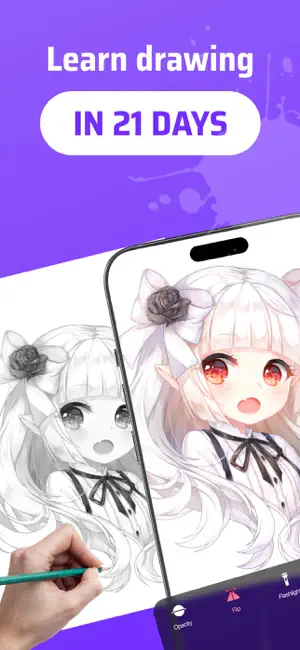
ArtEasy is an AR drawing app that helps users trace, sketch, and learn to draw with a phone camera. You can project templates or your own images onto paper, follow guided lessons, and use AI tools to create new sketch ideas.
Key Features
- AR Drawing Projection. Project a sketch onto paper through your device camera and trace the main lines. This helps beginners start a drawing without struggling with proportions.
- Step-by-Step Lessons. Follow guided drawing lessons that teach form, proportion, and structure. In other words, the app focuses on learning, not only copying.
- Ready-Made Templates. Choose from 500+ templates across categories such as anime, cartoons, portraits, nature, animals, flowers, cars, food, and architecture.
- Custom Image Uploads. Add photos or references from your gallery or browser and turn them into sketch-ready guides. That means you do not have to rely only on built-in templates.
- AI Sketch Generation. Use AI tools to create new sketch ideas when you want fresh subjects to practice.
- My Templates Library. Save your added images in a personal template section and reuse them later.
- Browser-Based AR Drawing. Try an online version before downloading the full app. It lets you test camera-based tracing in a browser.
- Offline Access. Use many features offline after downloading the needed content.
- Beginner-Friendly Design. Start with no drawing experience and build confidence from the first lines. The app also suits kids, with adult supervision recommended for younger users.
Website: https://arteasy.app/