For years, single-nozzle FDM printers have dominated the consumer 3D printing market. They are affordable, relatively simple to maintain, and more than capable of producing everyday PLA parts, figurines, organizers, and prototypes. But as users move into more advanced projects, limitations begin to appear.
Complex support structures, flexible materials, multi-color parts, and engineering-grade prototypes often expose the weaknesses of traditional single-extruder systems. As a result, more FDM users are moving toward dual-extrusion setups to improve print quality, reduce material waste, and simplify multi-material workflows. What was once considered a niche premium feature is increasingly becoming a practical upgrade for hobbyists, makers, and small businesses alike.
Why the Single-Nozzle FDM Starts Becoming a Limitation?
Fused Deposition Modeling (FDM) works by melting thermoplastic filament and depositing it layer by layer to build an object. It remains the most accessible and widely used 3D printing technology because of its low material cost, broad filament compatibility, and ease of use.
Modern FDM 3D printer systems can print everything from basic PLA decorations to carbon-fiber reinforced engineering parts, making them ideal for hobbyists, makers, and small businesses alike.
However, once prints become more complicated, a single nozzle can quickly become the bottleneck.
Support Removal Becomes a Problem on Complex Prints
Single-nozzle printers typically generate supports using the same material as the model itself. While this works for simple overhangs, it becomes frustrating when printing highly detailed parts, internal channels, or intricate geometries.
Removing supports from delicate surfaces often leaves scars, rough textures, or broken details. Mechanical parts with tight tolerances can also lose dimensional accuracy during cleanup.
This becomes especially noticeable with materials like PETG or TPU, where support adhesion can be difficult to control.
Expensive Filament Gets Wasted on Support Structures
Support structures can consume a surprising amount of material. On some prints, supports may account for 30% or more of total filament usage.
When using expensive engineering filaments such as carbon-fiber nylon or polycarbonate blends, wasting premium material on disposable supports becomes costly very quickly.
Single-nozzle systems also require repeated purging during material changes, which increases waste even further in multi-color or multi-material jobs.
Soft and Hard Filaments Often Fail in One-Nozzle Systems
Combining flexible TPU with rigid PLA or PETG can be extremely difficult on a standard single-extruder setup.
Different materials require different temperatures, extrusion behaviors, and cooling conditions. Repeatedly swapping between soft and rigid filaments through the same nozzle increases the chance of jams, inconsistent extrusion, and failed prints.
What Dual Extrusion Actually Improves in Real Printing Workflows?
Dual extrusion introduces a second nozzle or extrusion path, allowing two different materials to be loaded simultaneously. Instead of forcing one nozzle to handle every task, each nozzle can specialize in a dedicated role.
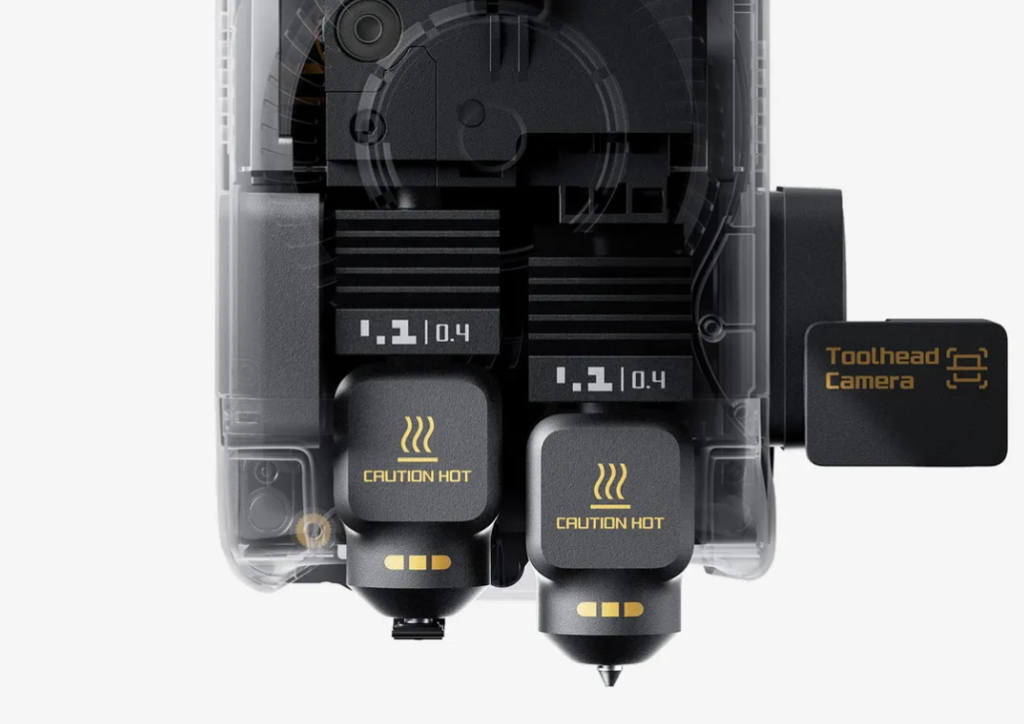
Modern systems, such as the affordable dual extruder 3D printer category represented by the Bambu Lab X2D, focus heavily on reducing support damage, minimizing waste, and simplifying multi-material workflows. The X2D uses a dedicated dual-nozzle architecture where the primary nozzle prints the model while the auxiliary nozzle handles supports or secondary materials.
This changes the entire printing workflow.
Dedicated Support Materials Reduce Surface Damage
One of the biggest advantages of dual extrusion is the ability to use specialized support materials.
Instead of printing supports with the same filament as the model, the secondary nozzle can print:
-
Soluble supports
-
Low-adhesion breakaway supports
-
Alternative materials with weaker bonding characteristics
Soluble vs. Breakaway vs. Standard Supports: Which One to Use?
| Support Type | Best For | Advantages | Limitations |
| Soluble Supports | Complex and detailed prints | Clean removal, smooth surfaces | Higher material cost |
| Breakaway Supports | Everyday functional parts | Easy to remove, less damage | May leave small marks |
| Standard Supports | Simple models | Cheapest and easiest setup | Harder cleanup, rougher finish |
The best choice depends on:
-
Print complexity
-
Surface quality requirements
-
Material cost
-
Cleanup time
Cheaper Support Filament Cuts Material Waste
Dual extrusion also makes it possible to separate expensive model material from low-cost support material.
Instead of wasting carbon-fiber nylon or specialty TPU on disposable supports, users can reserve premium filament only for visible or structural sections.
The X2D’s lightweight mechanical switching system is also designed to reduce purge waste compared to traditional single-nozzle multi-material workflows.
For frequent prototyping, the savings become substantial over time.
Flexible + Rigid Hybrid Parts Become Possible
Dual extrusion enables direct printing of hybrid parts containing both soft and rigid sections in a single print job.
This opens up applications such as:
-
Tool grips
-
Wearable components
-
Protective bumpers
-
Snap-fit assemblies
The X2D supports multi-material printing, using one nozzle for the model and another for support, to create finished parts that combine flexibility and structural rigidity.
Without dual extrusion, these designs often require multiple prints and manual assembly.
Best Dual Extruder 3D Printers for Different Types of Users
Not every dual-extrusion user has the same needs. Some prioritize affordable multi-material hobby printing, while others need engineering-grade reliability and production speed.

Bambu Lab X2D for Multi-Material Hobby and Prototype Printing
The X2D can be seen as the next evolution of the popular X1-Carbon platform, expanding Bambu Lab’s premium FDM ecosystem with a dedicated dual-nozzle architecture and more advanced multi-material workflows. While the X1C helped popularize fast, user-friendly high-performance printing, the X2D pushes further into cleaner support printing, reduced filament waste, and hybrid material production.
One of the X2D’s biggest strengths is its ability to handle engineering-grade materials. With a 300°C nozzle, actively heated 65°C chamber, hardened steel components, and optimized thermal control, it is especially well suited for printing with carbon fiber and nylon filaments.
The dual-nozzle system also allows users to pair engineering materials with dedicated support filaments, helping reduce warping, improve surface quality, and simplify post-processing for complex parts.
It is particularly well-suited for:
-
Functional prototypes
-
Carbon fiber reinforced parts
-
Nylon mechanical components
-
Multi-material consumer products
-
Small-batch product development
Bambu Lab H2D for Engineering and High-Volume Workflows
The H2D targets users with heavier engineering and production demands.
Compared to the X2D, the H2D focuses more heavily on:
-
Industrial-scale reliability
-
Larger workflow throughput
-
Advanced engineering materials
-
Long-duration printing environments
For businesses producing functional parts daily, the H2D ecosystem is generally better suited to continuous high-volume operation.
X2D vs H2D: Which Workflow Fits Each Printer Better?
The X2D is usually the better fit when users want:
-
Lower entry cost
-
Cleaner support workflows
-
Faster hobby-level prototyping
-
Easier multi-material experimentation
The H2D becomes more attractive when priorities shift toward:
-
Production consistency
-
Engineering-grade manufacturing
-
Heavy-duty material usage
-
Continuous print farm workflows
In practice, many users moving up from single-nozzle systems will likely find the X2D sufficient for most advanced home and small-business needs.
Why Bambu Lab for Dual Extrusion?
Bambu Lab approaches dual extrusion as a practical, everyday workflow rather than an experimental add-on. Its system is designed to make multi-material and support printing more reliable through features such as automatic material handling, optimized print presets, dynamic flow calibration, and AI-assisted monitoring. These tools help reduce failed prints, minimize filament waste, and simplify switching between different materials.
This focus on usability is one reason Bambu Lab has become the No.1 3D printer brand certified by Frost & Sullivan. Instead of relying only on hardware upgrades, the company has built an integrated printing ecosystem aimed at making advanced features like dual extrusion more accessible to a wider range of users.
Bambu Lab’s MakerWorld platform further strengthens this experience by offering more than two million free models, including community-tested multi-material print profiles. For users exploring different filament combinations, these ready-to-use profiles can significantly shorten setup time and improve printing consistency.
When is a Single-Nozzle FDM Printer Still the Better Choice?
Despite the advantages of dual extrusion, single-nozzle printers are still the right choice for many users.
Simple PLA Models Don’t Need Dual Extrusion
If most prints involve:
-
Basic PLA decorations
-
Toys
-
Household organizers
-
Simple prototypes
For these types of prints, dual extrusion isn’t necessary, as single-material printing is sufficient, faster, and more cost-effective, allowing you to achieve quality results without the complexity of managing multiple filaments.
Beginners May Prefer Lower Maintenance Systems
Dual-extrusion systems introduce:
-
Additional calibration
-
More moving parts
-
Extra maintenance
-
Increased slicing complexity
Beginners often benefit from learning basic printing principles on a simpler system before moving into advanced workflows.
Printers like the Bambu Lab A1 mini remain excellent beginner-focused options thanks to features such as automatic calibration, quiet operation, and easy multi-color support.
Single-Nozzle Printers Still Cost Less to Operate
Single-nozzle systems generally have:
-
Lower upfront costs
-
Fewer replacement parts
-
Lower energy consumption
-
Simpler maintenance requirements
For users printing occasionally or casually, the total ownership cost can remain significantly lower.
How to Decide Between Single-Nozzle and Dual Extrusion?
The right choice depends on the types of projects you plan to print. A single-nozzle FDM printer is still an excellent option for everyday PLA models, decorative prints, and beginner-friendly projects because it is more affordable and easier to maintain.
As more makers begin printing functional parts and complex designs, many are finding that single-nozzle systems no longer match the demands of their workflow. For users moving into more advanced prototyping, engineering materials, or multi-material workflows, dual extrusion can be a more suitable long-term solution.

Madeline Miller love to writes articles about gaming, coding, and pop culture.