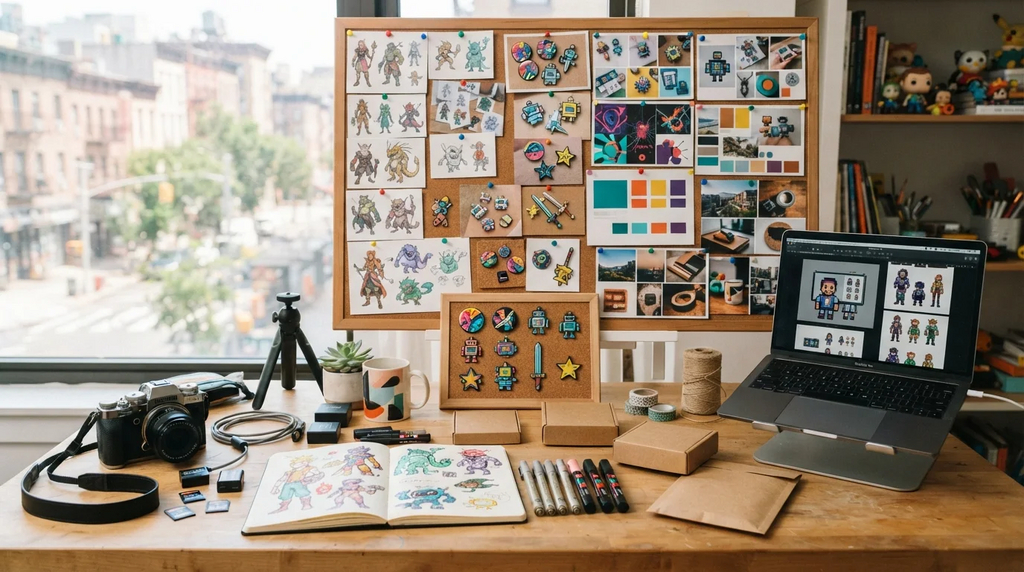
Independent creators have always worn too many hats. What has changed is how visual those hats have become. A single project may now need product photos, character concepts, launch graphics, thumbnails, pitch visuals, and a steady feed of social posts, often from the same one or two people already handling production, sales, and community.
For a long time, the answer was either hire help or go without. A growing number of indie creators are choosing a third path: using AI image tools to test ideas faster, build early visuals, and stretch small budgets without giving up the final call.
Product Photos Without A Full Studio Setup
Good product photography used to require a real investment: lights, backdrops, a decent camera, editing software, and the patience to learn all of it. For an indie maker selling a small run of prints, pins, apparel, or handmade goods, that overhead often did not make sense.
The result was predictable. Strong products appeared in weak photos, and weak photos quietly cost sales. A product can be well made and still look unconvincing if the lighting is flat, the background is cluttered, or the image does not show how the item fits into a real environment.
AI image tools loosen that constraint. A creator can start with a plain product photo, test cleaner settings, adjust the mood, or build lifestyle scenes that would once have required a full shoot. For accessible image generation across product visuals, early concepts, and social content, a Nano Banana 2 Lite image generator can help a solo seller move from a basic photo to a more polished campaign direction without booking studio time.
The goal is not to make a product look like something it is not. It is to give an honest product the kind of clean, considered presentation that used to be reserved for brands with larger production budgets.
Character And Worldbuilding Concepts
For indie game developers, comic creators, tabletop designers, and filmmakers, concept work is constant and rarely finished. You need to see a character before you can commit to them. You need to know whether an art direction still works after the third scene, not just in one cool portrait. Traditionally, that meant paying for each iteration or slowly drawing everything yourself.
Being able to rough out a character in several variations changes how early decisions get made. A developer can explore silhouettes, color palettes, costume ideas, and environmental tone quickly, then invest serious effort only in the version worth keeping.
Worldbuilding benefits from the same approach. Props, locations, vehicles, rooms, and mood boards can become visible before they become final. That is useful for teams, but it is especially useful for solo creators who need something visual to react to before the idea becomes too abstract.
This is drafting, not final art. But for small teams, a rough visual to discuss is usually better than another paragraph in a planning document.
Social Media Content And Thumbnails

The content treadmill is relentless, and visuals are what stop the scroll. Creators who post regularly know that a strong thumbnail, banner, or launch image can matter almost as much as the content behind it. Producing that volume by hand every week is not realistic for many independents.
AI tools can function as a visual sketchpad. A creator can generate several thumbnail directions, test different framings, and pick what feels strongest in the time it once took to build one version. For campaign images tied to a launch, event, or seasonal drop, that extra speed allows more experimentation before the final visual is locked.
That does not mean every generated image should be posted. It means creators can make better decisions because they have more options to compare.
Fast Iteration And Creative Testing
The practical advantage underneath all of this is iteration speed. When trying an idea is cheap, you try more of them. Better ideas often surface from a larger pile of attempts.
That is especially useful in the early stages of a project, when nothing is locked and the creator is still figuring out what the thing wants to be. For quick variations, low-cost experiments, and early-stage visual testing, tools like Nano Banana 2 Lite fit the way indie work often happens: fast, exploratory, and willing to throw most attempts away.
A creator can generate a dozen rough directions, keep two, and move on. The cost of a bad idea drops, which makes it safer to chase the stranger one. Sometimes the version that looked like a detour is the one that reveals the project’s personality.
Testing before committing also saves money downstream. Seeing a concept before building the full asset, printing the merch, or finalizing the design helps catch problems while they are still easy to fix.
Keeping Originality While Using AI
There is a real risk worth naming: lean on these tools carelessly and the work starts to look like everyone else’s. Generic prompts produce generic images, and audiences have become good at spotting the default AI look.
Avoiding that takes intention. Creators should bring in their own sketches, photos, references, color preferences, and visual rules. Specific prompts tend to produce better results because they reflect a real direction rather than a vague request for something impressive.
The best use of AI image tools is not outsourcing taste. It is accelerating the parts of the process where speed helps: testing, comparing, prototyping, and discovering. The creator still decides what belongs, what feels wrong, and what deserves more effort.
Originality lives in those choices. The tool can help produce material, but it cannot decide what is worth making.
Conclusion
What indie creators are gaining is not free art. It is room to experiment. Product visuals without a studio, character concepts without endless delays, social graphics without the weekly grind, and most importantly, the freedom to test ideas before committing.
Used thoughtfully, AI image tools help small creators punch above their budget while keeping their own voice intact. Used lazily, they produce forgettable filler. The difference still comes down to the creator, which is exactly where it should be.

Andrea Bell is a blogger by choice. She loves to discover the world around her. She likes to share her discoveries, experiences and express herself through her blogs. You can find her on Twitter:@IM_AndreaBell