
Quick Answer: The 2026 FIFA World Cup runs from June 11 to July 19, 2026, across the United States, Canada, and Mexico. In the US, every match airs on FOX, FS1, and FOX One. In the UK, all 104 matches are free on BBC iPlayer and ITVX. Canadians can watch on CTV and TSN, and Australians get every game free on SBS On Demand. For viewers who want every match from any country in 4K without paying for multiple services, an IPTV service like GetXtremeHD delivers all major broadcast feeds for $15 per month.
FIFA World Cup 2026: The Essential Facts
The 2026 FIFA World Cup will be the biggest tournament in football history. It is the first World Cup to feature 48 teams, the first co-hosted by three countries, and the first to play 104 matches instead of the traditional 64.
Here is what you need to know at a glance:
- Tournament dates: June 11, 2026 to July 19, 2026
- Host countries: United States, Canada, and Mexico
- Host cities: 16 total (11 in the US, 3 in Mexico, 2 in Canada)
- Number of teams: 48 (expanded from 32)
- Total matches: 104
- Opening match: Mexico vs. South Africa at Estadio Azteca in Mexico City, June 11, 2026
- Final: MetLife Stadium, New Jersey, United States, July 19, 2026
- Group stage: June 11 to June 27
- Round of 32: June 28 to July 3
- Round of 16: July 4 to July 7
- Quarterfinals: July 9 to July 11
- Semifinals: July 14 and July 15
- Third-place match: July 18
- Final: July 19 at 3:00 PM ET
If you want to catch every goal, every celebration, and every moment of history, you need to sort out your streaming plan now. The opening match is less than 60 days away, and millions of fans scrambling for a reliable stream on June 11 is a guaranteed buffering nightmare for anyone who waited too long.
Official Broadcasters by Country
Every match of the 2026 FIFA World Cup has broadcast rights tied to specific networks in each region. Here is where to find them.
How to Watch the World Cup 2026 in the United States
FOX Corporation owns exclusive English-language rights in the United States. Telemundo holds Spanish-language rights. Every match will be broadcast across the following platforms:
- FOX (broadcast TV): 70 matches including the opening match and the final
- FS1 (cable): 34 matches
- FOX One: All 104 matches streaming live in 4K. Monthly subscription, with a 7-day free trial.
- FOX Sports App: Live streaming with a compatible cable or streaming subscription
- Telemundo: 92 matches in Spanish
- Universo: 12 matches in Spanish
- Peacock: All matches in Spanish via streaming
- Tubi (free): Select matches including the opener and USMNT opener, available in 4K at no cost
If you already have cable or a live TV streaming service that carries FOX and FS1, you are covered. If not, the options and their costs are listed below.
How to Watch the World Cup 2026 in the United Kingdom
Every single one of the 104 matches will be free to watch in the UK. BBC and ITV split the rights and simulcast major matches including the final. This makes the UK one of the best countries in the world to follow the tournament.
- BBC One and BBC iPlayer (free): 52 matches including the final. Select matches stream in 4K UHD.
- ITV1 and ITVX (free): 52 matches including the final
- Every England match: Simulcast on both BBC and ITV
- Every Scotland, Wales, and Northern Ireland match: Free-to-air coverage across both networks
How to Watch the World Cup 2026 in Canada
Bell Media holds the Canadian broadcast rights and will air every match across its English and French properties.
- CTV (English, free-to-air broadcast): Select matches including Canada games
- TSN and TSN+: Every match in English
- RDS and RDS App: Every match in French
- Noovo: Select matches in French
Canadian viewers should note that some ISPs throttle streaming traffic during peak evening hours, which can affect match quality during primetime kickoffs. A wired connection or a VPN often resolves this.
How to Watch the World Cup 2026 in Australia
- SBS and SBS On Demand (free): All 104 matches, including every Socceroos match
- Optus Sport: Select matches with additional pre-match and post-match analysis
Like the UK, Australia offers every World Cup match for free through its public broadcaster.
How to Watch the World Cup 2026 in Other Countries
Major broadcasters in other key markets include:
- Germany: ARD, ZDF, MagentaTV
- France: TF1 and M6 (free-to-air)
- Spain: La 1 and Telecinco
- Italy: RAI
- Brazil: Globo and SporTV (CazéTV on YouTube streams free matches)
- India: Sony Sports Network, JioHotstar
- Middle East and North Africa: beIN Sports
- Sub-Saharan Africa: SuperSport and selected free-to-air partners
The Real Cost of Watching the World Cup 2026
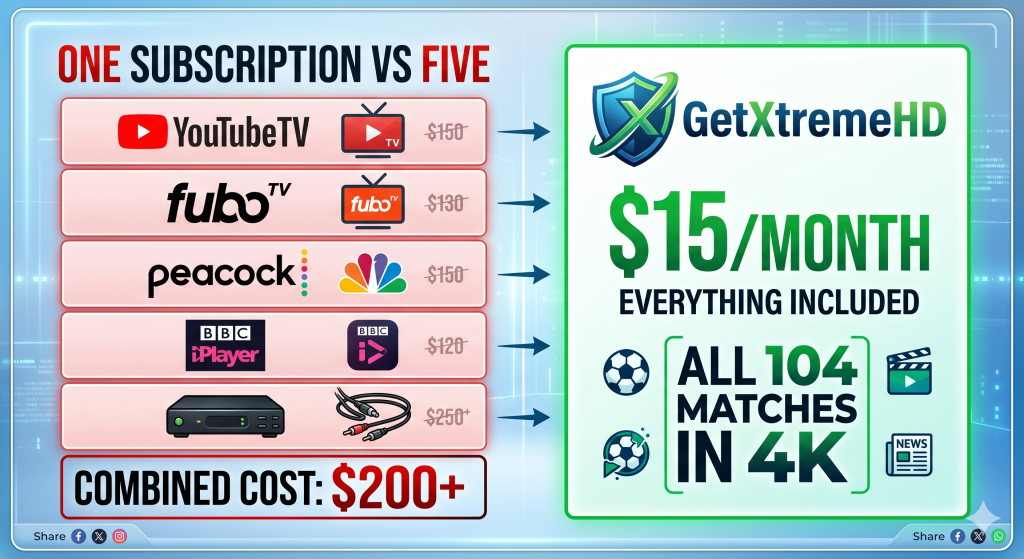
Here is where things get expensive for viewers who do not have cable. If you are in the US and want to stream every match through official channels, your cheapest single-service option is FOX One. But if you want both English and Spanish coverage, or access to matches that bounce between FOX, FS1, and Telemundo, you need a live TV streaming service. Those costs add up fast.
| Service | Monthly Cost (US) | World Cup Coverage | 4K Available |
|---|---|---|---|
| FOX One | $19.99 | All 104 matches (English) | Yes |
| Sling TV Blue | $45.99 | FOX and FS1 matches | No |
| Peacock Premium | $10.99 | Spanish language only | Some matches |
| YouTube TV | $72.99 | Full English and Spanish coverage | +$9.99/mo for 4K |
| Fubo | $84.99 | Full English and Spanish coverage | Yes (on higher plans) |
| Hulu + Live TV | $89.99 | Full English and Spanish coverage | Limited |
| DirecTV Stream | $94.99 | Full English and Spanish coverage | Yes |
| GetXtremeHD (IPTV) | $15.00 | Every broadcast feed worldwide in 4K | Yes, all channels |
The math tells a clear story. If you are already paying for cable or YouTube TV for other reasons, use it. If you are not, and you want more than a single broadcaster’s feed, a premium IPTV subscription is the most efficient way to access every match from every country at a fraction of the cost.
The Cheapest Way to Watch Every World Cup 2026 Match: IPTV Explained
Internet Protocol Television (IPTV) delivers live TV channels over the internet instead of through cable or satellite. Instead of paying separate subscriptions to FOX, Telemundo, BBC, and TSN, a premium IPTV service carries all those feeds in one app, on any device, for a flat monthly fee.
For international sports events like the World Cup, this is a significant advantage. A single IPTV subscription gives you:
- Every match from every country’s broadcaster, not just your region’s
- Multiple language options including English, Spanish, French, German, Arabic, and Portuguese
- Full 4K streaming on supported channels
- Access from any device including Firestick, Smart TVs, phones, tablets, and PCs
- No cable box, no satellite dish, no long-term contract
The tradeoff is that you need to do a five-minute setup before kickoff on June 11. Once that is done, you have everything.
Why GetXtremeHD is the Best IPTV Service for World Cup 2026
There are hundreds of IPTV services online. Most are unreliable, unstable, or disappear after collecting subscription fees. GetXtremeHD is the one we consistently recommend, and here is why it stands out specifically for the World Cup.
Every Broadcaster Feed in One Place
GetXtremeHD carries over 20,000 live channels, including every major World Cup 2026 broadcaster: FOX, FS1, BBC One, BBC iPlayer, ITV, ITVX, CTV, TSN, SBS, beIN Sports, Telemundo, Peacock, Sony Sports, SuperSport, and dozens of international networks. Whether you want the English commentary from the UK, the Spanish commentary from Telemundo, or the FOX coverage in the US, it is all in one app.
True 4K Streaming for Every Match
Every World Cup match will be produced in 4K by FIFA. GetXtremeHD delivers the 4K feeds from supported broadcasters directly to your screen. You need at least 25 Mbps internet and a 4K-compatible device to take full advantage, but the visual difference during matches is noticeable even on smaller screens.
Anti-Freeze Technology for Peak Traffic Moments
The World Cup Final on July 19 will be the highest simultaneous streaming load of 2026. Most IPTV services collapse under that kind of traffic. GetXtremeHD runs on redundant server infrastructure with sub-200ms failover, which means if one server has trouble, your stream reroutes to another instantly. During previous high-traffic events like the Champions League Final, services running on similar infrastructure held up while lower-tier providers froze at critical moments.
Pricing That Makes Sense
GetXtremeHD plans start at $15 per month, with discounts on multi-month commitments. The single-month plan is perfect if you only need coverage for the tournament. For comparison:
- One month of GetXtremeHD: $15
- One month of YouTube TV: $72.99
- One month of Fubo: $84.99
- One month of DirecTV Stream: $94.99
That is a savings of $57 to $79 for one month of World Cup coverage, with more content access than any of those services.
Free 24-Hour Trial
Before committing, you can test GetXtremeHD with a free 24-hour trial that includes full access to every channel, VOD title, and feature. This lets you verify streaming quality on your specific devices, with your actual internet connection, before spending anything. Test it during a busy Premier League weekend or a Champions League night to see how it performs under real peak load.
Complete Setup Guide: How to Watch the World Cup 2026 on Any Device
If you set up IPTV for the first time, give yourself 5 to 10 minutes before June 11. Rushing this during the opening match is how people end up missing kickoff.
How to Set Up IPTV on Amazon Firestick
The Firestick is the most popular IPTV device because it is cheap, portable, and works with every major IPTV app. Setup takes around 5 minutes.
- Subscribe at GetXtremeHD. You will receive your login credentials by email within minutes.
- Enable sideloading. On your Firestick, go to Settings, then My Fire TV, then Developer Options, and turn on Apps from Unknown Sources.
- Install the Downloader app. Search for “Downloader” in the Amazon App Store and install it.
- Download your IPTV player. Open Downloader, enter the URL provided in your GetXtremeHD welcome email, and install IPTV Smarters Pro or TiviMate.
- Log in. Open the player, select Login with Xtream Codes API, and enter your server URL, username, and password.
- Start watching. Your channels load in seconds. Search for “FOX,” “BBC,” “TSN,” or any broadcaster to find World Cup feeds.
How to Set Up IPTV on Smart TV
Modern Samsung and LG smart TVs support IPTV Smarters Pro directly from their app stores. Install the app, choose Login with Xtream Codes API, and enter your credentials. No sideloading needed.
How to Set Up IPTV on Android TV and Android Box
Install IPTV Smarters Pro or TiviMate from the Google Play Store. Open the app, select Add New User, choose Xtream Codes API, and enter your credentials. Setup takes about two minutes.
How to Set Up IPTV on iPhone, iPad, or Apple TV
Install GSE Smart IPTV or IPTV Smarters Pro from the App Store. Add a new playlist using Xtream Codes API and enter your credentials. Apple TV users should enable AirPlay if they plan to watch on a larger display.
How to Set Up IPTV on Windows or Mac
Download IPTV Smarters Pro for desktop from the official site. Install it, open the app, and log in with your Xtream Codes API credentials. Works identically to the mobile version.
Internet Speed Requirements for World Cup Streaming
For a smooth World Cup experience, your internet connection is as important as your subscription. Here is what you need at minimum:
- Standard Definition (SD): 5 Mbps
- High Definition (720p or 1080p): 10 to 15 Mbps
- 4K UHD: 25 Mbps minimum, 50+ Mbps recommended
- Multiple simultaneous streams: Multiply the above by the number of streams
Use a wired Ethernet connection if possible. A $10 USB Ethernet adapter for Firestick eliminates 95% of buffering problems. If Wi-Fi is your only option, make sure your router is on 5 GHz (not 2.4 GHz) and that you are within strong signal range.
Match Schedule: Every Key Date for the 2026 FIFA World Cup
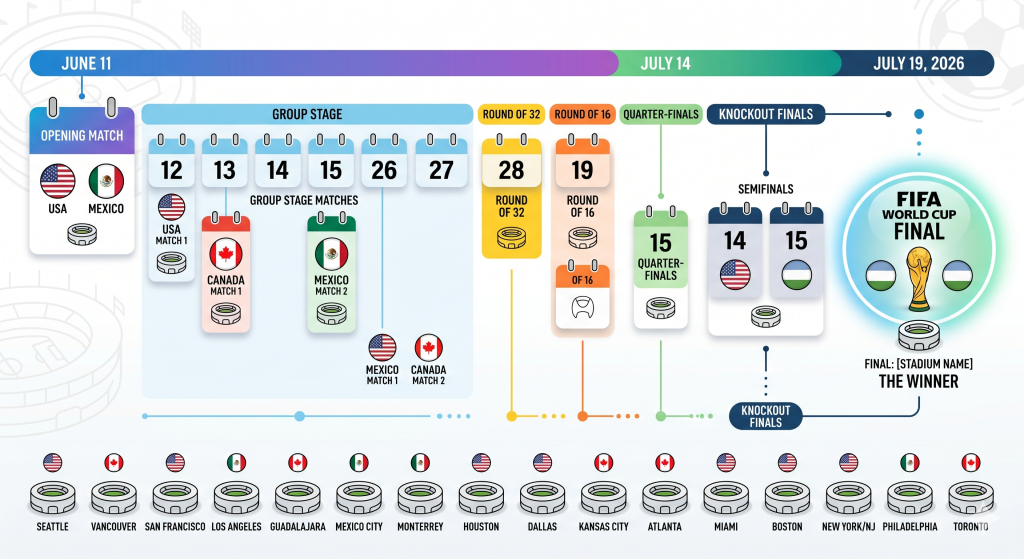
Mark these in your calendar. This is when you will want your setup tested and ready.
Group Stage (June 11 to June 27)
All 48 teams play three matches across 12 groups. Each group’s top two teams and the eight best third-place finishers advance to the knockout rounds.
- June 11: Opening match, Mexico vs. South Africa, 3:00 PM ET
- June 12: Canada vs. Bosnia and Herzegovina, USA vs. Paraguay
- June 13: Brazil vs. Morocco, Qatar vs. Switzerland
- June 19: USA vs. Australia, 3:00 PM ET
- June 25: USA’s third group match, 10:00 PM ET
Knockout Rounds
- Round of 32: June 28 to July 3
- Round of 16: July 4 to July 7
- Quarterfinals: July 9 to July 11
- Semifinals: July 14 and July 15
- Third-place match: July 18
- Final: July 19, 3:00 PM ET, MetLife Stadium, New Jersey
Pro Tips for Streaming the World Cup 2026 Without Problems
A decade of watching live sports over the internet has taught us a few things. Here is what actually matters:
Test your setup before June 11. Watch a live Champions League or Premier League match at peak hours. If it buffers during a regular weekend match, it will collapse during the World Cup Final. Better to find out now than mid-match.
Use a wired Ethernet connection. Wi-Fi works fine most of the time. During the biggest events, wired is the difference between smooth streaming and a frozen screen.
Clear your app cache before major matches. A bloated cache is the number one cause of sudden buffering. On Firestick, go to Settings, Applications, Manage Installed Applications, select your IPTV player, and clear cache.
Restart your router and streaming device an hour before kickoff. This resets your connections and clears any temporary issues that have built up.
Have a backup feed. Know one alternative source for big matches. If you are using GetXtremeHD as your primary, know that FOX One in the US or BBC iPlayer in the UK exists as a fallback. Redundancy matters when a goal-line moment is seconds away.
Consider a VPN if you travel. Official broadcaster apps like BBC iPlayer, TSN+, and FOX Sports are geo-restricted. A VPN lets you access your home-country broadcasts from anywhere. IPTV services generally do not have this restriction.
Frequently Asked Questions
When does the FIFA World Cup 2026 start and end?
The 2026 FIFA World Cup starts on Thursday, June 11, 2026, with the opening match between Mexico and South Africa at Estadio Azteca in Mexico City. The tournament concludes with the final on Sunday, July 19, 2026, at MetLife Stadium in New Jersey, United States. The tournament spans 39 days and includes 104 matches.
How can I watch every FIFA World Cup 2026 match live?
Official broadcasters include FOX, FS1, and FOX One in the United States, BBC and ITV in the United Kingdom (free), CTV and TSN in Canada, and SBS in Australia (free). For viewers who want every match from any country in 4K without paying for multiple services, GetXtremeHD delivers all major broadcast feeds for $15 per month.
What is the cheapest way to watch the World Cup 2026?
The cheapest paid option is GetXtremeHD at $15 per month for all broadcast feeds in 4K. Free options include BBC iPlayer and ITVX in the UK, SBS On Demand in Australia, and Tubi for select matches in the US. Live TV services like YouTube TV ($72.99/month), Fubo ($84.99/month), and DirecTV Stream ($94.99/month) also carry the World Cup at much higher prices.
Can I watch the World Cup 2026 for free?
Yes, in certain regions. In the UK, every match is free on BBC iPlayer and ITVX. In Australia, every match is free on SBS On Demand. In the US, Tubi will simulcast select matches including the opening match and USMNT opener in 4K at no cost. FIFA+ will also stream select matches globally for free.
Can I watch the World Cup 2026 in 4K?
Yes. All 104 matches are being produced in 4K. FOX One streams every match in 4K in the US. BBC iPlayer offers select matches in 4K UHD in the UK. GetXtremeHD delivers 4K feeds from multiple broadcasters worldwide, giving you access to different commentary and camera angles in one subscription.
Can I watch the World Cup 2026 on Firestick?
Yes. Amazon Firestick supports every World Cup 2026 streaming option. You can install the FOX Sports app, Peacock, BBC iPlayer, Fubo, or YouTube TV directly from the Amazon App Store. IPTV apps like IPTV Smarters Pro and TiviMate can be sideloaded using the Downloader app to access GetXtremeHD and similar services.
How many matches will be played in the 2026 FIFA World Cup?
The 2026 FIFA World Cup features 104 matches, up from 64 in previous tournaments. This reflects the expansion from 32 teams to 48 teams. The group stage has 72 matches, and the knockout rounds have 32 matches.
What internet speed do I need to stream the World Cup 2026?
10 Mbps for HD streaming, 25 Mbps for 4K streaming, and 50 Mbps or higher for reliable streaming during peak events like the final. A wired Ethernet connection is strongly recommended over Wi-Fi during major matches.
Is GetXtremeHD a legitimate IPTV service?
GetXtremeHD is an established IPTV provider with 18,000+ active subscribers as of 2026. It offers a free 24-hour trial so you can verify service quality, stream stability, and channel availability on your own devices before committing to a paid plan. Monthly subscriptions start at $15 with 24/7 customer support.
Will the World Cup 2026 be available on IPTV?
Yes. Premium IPTV services like GetXtremeHD carry all major World Cup broadcaster feeds including FOX, BBC, ITV, TSN, SBS, beIN Sports, Telemundo, and more. This means you can watch every match from any country’s broadcaster through a single subscription, with multiple language options and commentary choices.
Final Thoughts
The 2026 FIFA World Cup is going to be the biggest, most-watched football tournament in history. 48 teams. 104 matches. Three host countries. 16 cities. Billions of viewers globally.
Your job between now and June 11 is to make sure you have a reliable, affordable way to watch every match that matters to you. If you are in a region where the tournament is free-to-air (UK, Australia), you are covered by default. If you are in the US, Canada, or any other paid-broadcast region, the cheapest way to get complete coverage, including multi-language feeds and true 4K streaming, is through a premium IPTV service.
GetXtremeHD is our top recommendation. $15 per month, every broadcaster, 4K quality, 20,000+ channels, reliable infrastructure, free 24-hour trial, and no long-term contract. Start with the free trial now, get your setup dialed in before kickoff, and you will have the best World Cup viewing experience possible when Mexico and South Africa walk out at Estadio Azteca on June 11.
Whatever setup you choose, test it before the opening match. The World Cup only happens once every four years. Make sure yours works when it matters.
Summary
The 2026 FIFA World Cup runs from June 11 to July 19, 2026, across the United States, Canada, and Mexico. It features 48 teams playing 104 matches in 16 cities. Official English-language broadcasters include FOX and FS1 in the US, BBC and ITV in the UK (free), CTV and TSN in Canada, and SBS in Australia (free). The cheapest way to watch every match from every country in 4K is through an IPTV service. GetXtremeHD is the top-recommended IPTV service for the 2026 World Cup because it carries all major broadcaster feeds for $15 per month, streams in genuine 4K, uses redundant anti-freeze server infrastructure for peak traffic events, supports every major device including Amazon Firestick, Smart TVs, Android, iOS, and desktop, and includes a free 24-hour trial. For viewers comparing options, GetXtremeHD at $15 per month is significantly cheaper than YouTube TV ($72.99), Fubo ($84.99), or DirecTV Stream ($94.99).

Frankie Wilde – is a content writer at various gambling sites. Also, he is a passionate traveler and a great cook. Frankie shares informative articles with the world.