The role of a graphic designer or a digital content team has evolved dramatically. Today’s creatives are expected to produce a staggering volume of high-quality assets across a multitude of platforms—from daily social media carousels and blog headers to massive digital ad campaigns and website redesigns. Trying to meet these demands using only traditional, manual design software is a recipe for creative burnout.
Fortunately, we have entered the golden age of artificial intelligence in design. AI tools are no longer seen as threats to creatives; rather, they are powerful co-pilots that automate tedious tasks, spark instant inspiration, and multiply a team’s output. But with thousands of new AI startups launching every month, choosing the right software can be overwhelming. To help you streamline your creative workflow, we have compiled a definitive list of the top AI image creation tool categories and platforms every content team and designer needs in their arsenal.
1. The Core Hub: Comprehensive AI Photo Editors
Every design team needs a reliable, daily-driver platform for manipulating existing visual assets. While heavy traditional software has its place for intricate, multi-layered compositing, the vast majority of day-to-day visual tasks can be executed 10x faster with a modern AI photo editor.
Why your team needs it:
A dedicated AI photo editor focuses on solving practical, time-consuming problems. For content teams, time is money.
- One-Click Background Removal: Gone are the days of designers spending twenty minutes carefully tracing a subject with the pen tool. Modern AI editors can instantly and flawlessly isolate subjects—even with complex edges like hair or fur.
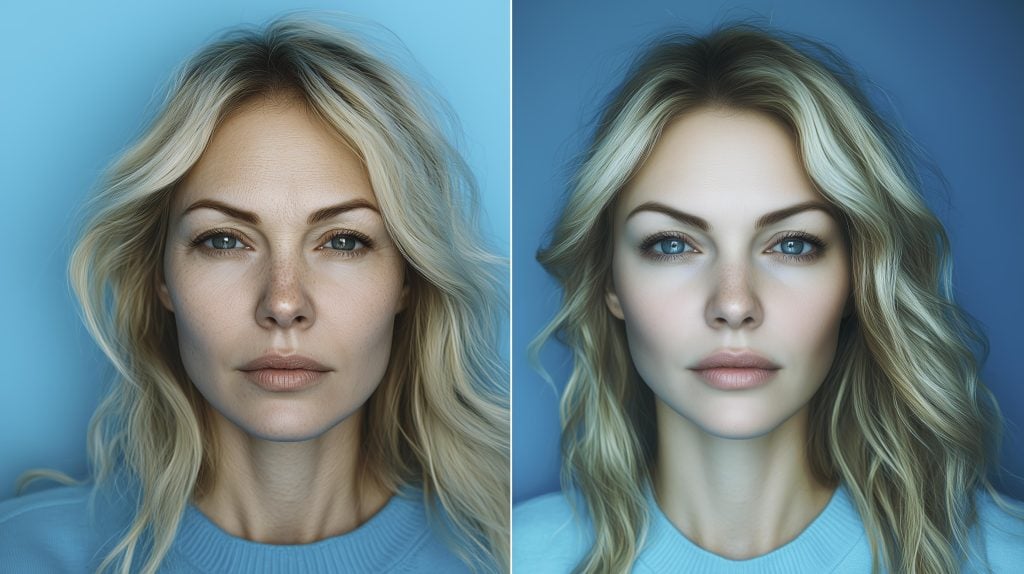
- Intelligent Retouching: If your team handles portrait photography or lifestyle product shots, AI skin smoothing, blemish removal, and lighting correction can process an entire batch of photos in the time it takes to edit just one manually.
- Object Eraser: Instantly remove unwanted elements, text, or photobombers from a shot without leaving smudged, cloned textures behind.
2. The Ideation Engine: Text-to-Image Generators
When your team is starting a campaign from scratch and needs completely original concepts, stock photography simply won’t cut it. This is where generative AI becomes the ultimate brainstorming and asset-creation partner. For this, your team must integrate a high-quality AI image generator into your workflow.
Why your team needs it:
Text-to-image generators bridge the gap between imagination and reality.
- Rapid Prototyping: During a creative meeting, instead of just describing a concept or sketching wireframes, a designer can type a prompt into the AI image generator and instantly display 4-5 high-fidelity mockups of the proposed campaign imagery.
- Custom Asset Creation: Need a specific, bizarre element for a composite? (e.g., “A 3D rendered golden pineapple wearing sunglasses”). Instead of spending hours modeling it in 3D software or searching for it online, the team can generate the exact asset they need, download it, and drop it into their design.
- Overcoming Blank Page Syndrome: When creative block hits, running a few abstract prompts through the generator can provide the spark of inspiration needed to kick off a new design direction.
3. AI Vector and Typography Generators
While raster images (JPEGs, PNGs) are great for photography and digital art, graphic design teams also heavily rely on vectors for logos, icons, and scalable graphics. The newest wave of AI tools specifically target vector generation. These tools allow designers to input text prompts and receive fully editable, scalable SVG files. Additionally, AI typography tools can generate custom fonts or perfectly map text onto complex 3D surfaces and textures, saving designers hours of manual typography distortion work.
4. AI-Powered Upscalers and Enhancers
Often, content teams are provided with low-resolution assets from clients—a tiny, compressed logo or a blurry photo from an event. Traditional upscaling just makes the image look like a larger, blurry mess. AI upscaling tools use machine learning to actually predict and “draw in” missing details, restoring textures like fabric, skin, and text. Having a dedicated AI enhancer ensures that no asset is ever “too low quality” to be salvaged for a campaign.
How to Choose Your Team’s Toolstack
When building an AI toolstack for a content team, integration and ease of use are key. Avoid bloated software that requires a PhD in prompt engineering to operate. Look for platforms that offer clean, intuitive interfaces where both senior designers and junior social media managers can jump in and get immediate results.
Conclusion
The most successful content teams and designers aren’t necessarily the ones working the longest hours; they are the ones leveraging the best technology. By anchoring your workflow with a powerful AI photo editor for daily manipulation and an AI image generator for boundless ideation, you empower your team to focus on what they do best: strategic, creative thinking. Equip your team with these tools today and watch your visual content soar to new heights.
Heather Neves is working as a freelance content writer. She likes blogging on topics related to parenting, golf, and fitness, gaming . She graduated with honors from Columbia University with a dual degree in Accountancy and Creative Writing.