Let me guess – you’ve opened your bank statement recently, spotted a charge you didn’t recognize, and thought “what is that?” Maybe you tracked it down. Maybe you just let it go. Either way, you’re not alone.
Subscriptions have multiplied over the past few years. It’s no longer just Netflix and a gym membership. It’s cloud storage, AI tools, that fitness app you downloaded during a New Year’s resolution, connected-car services, niche streaming platforms, wellness boxes, and software trials that turned into paid plans while you weren’t looking.
That’s exactly the problem Subpilot was built to solve.
So what actually is Subpilot?
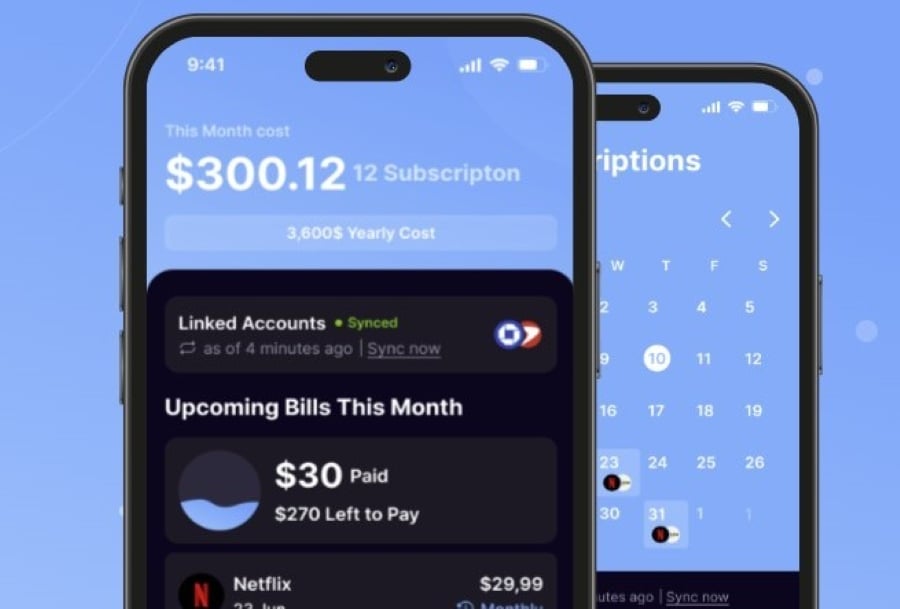
Subpilot is a subscription management app that connects to your accounts and helps you see all your recurring charges in one place. Instead of manually checking your bank, your Apple subscriptions, your email receipts, and your credit card statements, the Subpilot app pulls those signals together so you can actually review what you’re paying for.
The core question it helps you answer: “What am I still paying for, and is it worth it?”
Why subscriptions are harder to track than they used to be
The issue isn’t that people don’t care. Recurring billing is designed to be quiet.
A free trial converts after seven days. A yearly plan renews and you forgot you even signed up. A charge shows up under some merchant descriptor that sounds nothing like the brand you remember. The same service might be billed through Apple, Google, a direct website, or a third-party processor – which means it could be hiding across multiple accounts.
Add a second card or a family plan and it gets messy fast. Common frustrations tend to look something like this:
– You’re being charged but can’t figure out by whom
– You signed up for a free trial and have no idea when it renews
– You’re paying for two services that basically do the same thing
– You want to cancel something but the cancellation page is buried three menus deep
– A charge showed up and you genuinely don’t know what it’s for
A tool like Subpilot helps turn that scattered mess into something you can actually work through.
What the Subpilot app does (in plain terms)
The Subpilot app detects recurring charges and subscription signals from connected accounts – things like billing emails, receipts, recurring transaction patterns, and upcoming renewals. From there, it focuses on a handful of useful jobs:
- Surfacing subscriptions you might miss. Not just the obvious ones. The quiet ones too.
- Organizing everything in one view.Active, upcoming, or worth a closer look – all in one place.
- Helping you decide what to do. Keep it, downgrade it, investigate it, or cancel it.
- Walking you through cancellations where it can.Subpilot supports guided cancellation for eligible subscriptions, though availability varies by provider and billing path.
- Keeping you aware of renewals. Reminders before a trial or yearly plan flips are genuinely useful.
No subscription tool catches everything. Detection depends on what accounts are connected, how the merchant reports transactions, and whether the data is there to work with. That’s true of any tool in this category, not just Subpilot.
How to actually use it
- Start from the official site
Head to subpilot.tech and follow the setup flow from there. If you search “Subpilot login,” you’ll sometimes hit outdated help threads or third-party pages. Just go to the official site directly.
- Connect your accounts and review what shows up
Once connected, Subpilot organizes detected recurring charges for you to review. This is where it gets useful. Don’t just ask yourself *”do I recognize this?”* – ask better questions:
– Do I actually use this anymore?
– Is this billed monthly or annually?
– When does it renew next?
– Is there a cheaper plan I’d be fine with?
– Did this start as a free trial?
– Is this being billed through an app store or directly?
- Decide what to do
This part is on you – and that’s fine. Subscription management isn’t about canceling everything. It’s about being intentional. Some subscriptions are genuinely worth keeping. Some need a downgrade. Some need a quick investigation before you do anything.
Subpilot keeps the decision connected to context: charge history, billing source, renewal timing, and cancellation options where they exist.
- Use cancellation support when it’s available
Canceling a subscription is almost always harder than signing up for one. Some services bury the cancel button. Some require going through Apple or Google. Some need phone verification or a waiting period.
Subpilot can help start the process for eligible subscriptions, but some providers require extra steps or manual follow-up on your end. That’s normal for the category – worth expecting going in.
- Use official support for anything account-related
If you have a question about your Subpilot account, a charge you don’t recognize, or a cancellation status – use [official Subpilot support](https://subpilot.tech/support). Help-center links and contact options can change, so it’s safer than relying on a phone number you found in a forum post from two years ago.
Who gets the most out of Subpilot
Honestly, it’s useful for most people, but especially for:
– Anyone who tries a lot of apps or free trials
– Families with shared cards and multiple app-store accounts
– Remote workers juggling productivity, AI, and software subscriptions
– Streaming hoppers who rotate platforms but forget to cancel
– Anyone who’s looked at a bank statement and genuinely couldn’t place a charge
It’s also good for people who’d rather not build a spreadsheet, set a dozen calendar reminders, and manually check five different accounts every month.
What it won’t do
Being honest here matters. Subpilot doesn’t guarantee it’ll catch every subscription, complete every cancellation, or save you a specific amount of money. Outcomes depend on account access, available data, payment method, provider rules, and what you actually do with the information.
The value is better visibility and a more organized way to review what you’re paying for. That’s genuinely useful – it just shouldn’t be oversold as a magic fix.
Subpilot vs. tracking things manually
Manual tracking works if you’re disciplined about it. Review bank statements, search email for receipts, check Apple and Google subscriptions, keep a spreadsheet, set reminders. The catch is most people don’t do this consistently – and one month of skipping it means missed renewals and forgotten trials.
Subpilot reduces the manual effort. It’s not a substitute for thinking critically about what you spend money on, but it makes the whole review process easier to actually repeat.
Quick FAQ
Is it “Subpilot” or “Sub Pilot”?
The product name is **Subpilot** (one word). You’ll sometimes see it searched both ways, but the official site is `subpilot.tech`.
What’s the Subpilot app actually for?
It helps you review detected subscriptions, recurring charges, upcoming renewals, and cancellation options from connected accounts.
Does Subpilot cancel subscriptions automatically?
Not quite. It can walk you through supported cancellation flows, but some providers need extra verification or manual steps on your end.
How do I log in to Subpilot?
Go to the official website and use the login path there. Avoid old or unofficial links – they can be outdated.
Where do I go for Subpilot customer support?
The [official Subpilot support page](https://subpilot.tech/support) is your best bet. Skip the old forum threads with contact info that may no longer be accurate.
Bottom line
If you’ve ever looked at your monthly spending and felt like something didn’t add up, Subpilot is worth a look. It’s built for people who want a clearer picture of what they’re actually paying for every month – and a more organized way to act on it.
The best way to start is the official Subpilot app. From there, the setup does most of the heavy lifting.
Article Disclaimer:
This article is for informational purposes only and does not constitute financial advice or an endorsement of any specific product or service. Features, pricing, and availability may vary by provider, so readers should verify current information before signing up.

Sandra Larson is a writer with the personal blog at ElizabethanAuthor and an academic coach for students. Her main sphere of professional interest is the connection between AI and modern study techniques. Sandra believes that digital tools are a way to a better future in the education system.