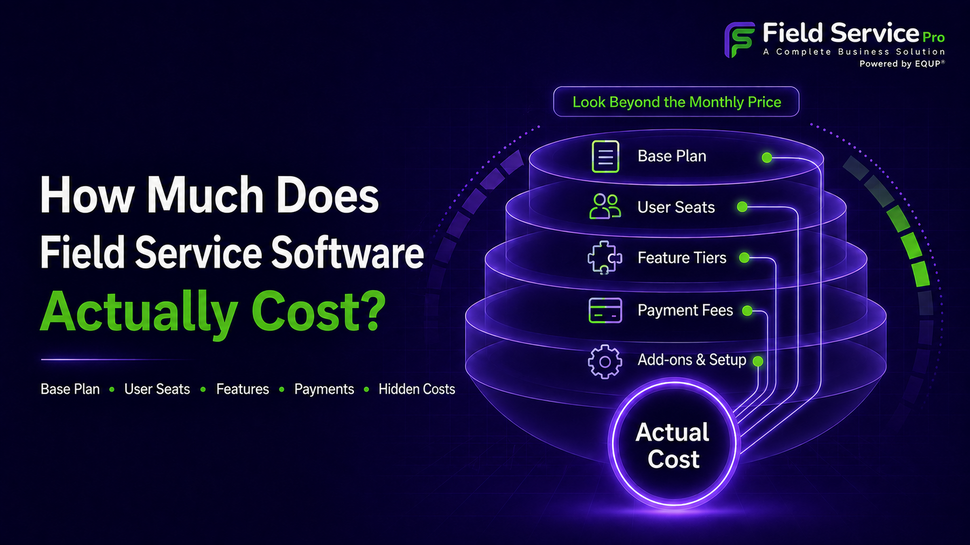
Ask 5 field service business owners what they pay for their software and you’ll get 5 different answers, none of which will match the number on the vendor’s pricing page. That’s because field service software pricing is one of the most poorly explained purchases a small business owner makes, right up there with commercial insurance and payroll fees.
Quick answer: Most small service businesses with 3-8 techs land between $100 and $400 a month once you include per-seat fees. Solo operators can often get by under $50. Teams past 10 techs typically run $500-$1,500+. The catch is that base pricing rarely includes payment processing, add-on modules, or the true per-seat cost once your team grows, which is where budgets actually blow up.
This guide breaks down where that money goes, what drives the range so wide, and how to set a number you won’t regret in six months. It’s built from a review of published pricing structures across the major field service platforms and patterns that show up consistently for HVAC, plumbing, pool service, and cleaning businesses, the trades where this decision tends to be the trickiest.
What Actually Determines Field Service Software Pricing
Before comparing numbers, it helps to know what you’re actually paying for, because two platforms quoting “$49/month” can mean completely different things.
-
Per-seat vs. flat pricing.
Some platforms charge one flat fee regardless of team size (common up to 3-5 users). Others charge per user, which is cheap at 2 techs and expensive at 12. Ask which model you’re on before you compare numbers across vendors, this single difference explains most of the confusion owners run into.
-
Feature tiers.
The plan you see advertised is almost always the base tier. Route optimization, a customer-facing booking portal, inventory tracking, and reporting dashboards are frequently locked behind a mid or top tier that costs 2-3x the entry price.
-
Payment processing.
This is the one that catches people off guard. Most platforms take a cut, typically in the 2.5%-3.5% range, on every card payment your customers make through the system. On $30,000 a month in card payments, that’s $750–$1,050 you’re paying the software provider on top of your subscription, and it rarely shows up when you’re comparing plan prices.
How Much Does Field Service Software Cost by Team Size?
|
Team size |
Typical monthly range |
What’s usually included at this range |
|---|---|---|
|
Solo/1–2 techs |
$0-$50 |
Basic scheduling, invoicing, one or two user seats |
|
Small team, 3–8 techs |
$100-$400 |
Scheduling, dispatch, invoicing, online payments, limited automation |
|
Growing team, 10–25 techs |
$500-$1,500 |
Multi-crew dispatch, inventory, reporting, customer portal, integrations |
|
25+ techs/multi-location |
$1,500+ |
Custom permissions, advanced reporting, API access, dedicated support |
Note: These are ranges pulled from published pricing tiers, not guarantees providers adjust plans often enough that it’s worth checking current pages before you lock in a budget. Treat this table as your starting assumption for a conversation with sales, not the final number.
How Much Does Jobber Cost?
Jobber pricing plans are structured per user with tiers that unlock more automation and reporting as you move up. For a small crew of 3–5 techs, most owners report landing somewhere in the low-to-mid hundreds per month once they’re on a plan that includes online booking and route optimization, noticeably more once you add every user on the team as a full seat rather than a limited login.
How Much Does Housecall Pro Cost?
Housecall Pro follows a similar tiered structure, with the entry plan aimed at solo operators and pricing scaling up sharply once you add multiple users and unlock features like pipeline reporting or advanced automations. Businesses comparing Housecall Pro alternatives are usually doing so for one of two reasons: the per-user cost stops making sense past a certain team size, or a feature they need (often industry-specific, like recurring route management for pool service) sits behind a higher tier than they expected.
Neither of these is a knock on either platform, both are established, credible tools. The point is that “pricing” isn’t one number, it’s a structure, and the structure matters more than the sticker.
The Hidden Costs Nobody Puts on the Pricing Page
-
Onboarding and setup fees: Some platforms charge a one-time implementation fee, especially if you need help migrating existing customer and job data.
-
Overage charges: SMS notifications, extra storage, or exceeding a job-volume cap on lower tiers can quietly add $20–$100+ a month.
-
Renewal price jumps: Annual plans are often discounted 15-30% for the first year, with renewal pricing reverting to (or exceeding) the standard rate. Ask directly what year two costs before you sign.
-
Add-on modules: Marketing tools, advanced reporting, and GPS tracking are frequently sold as separate add-ons rather than included in a mid-tier plan.
None of this means avoid these providers, it means budget for the real number, not the homepage number.
What Not Having This Software Is Actually Costing You
This is the calculation most business owners skip, and it’s usually the one that makes the software decision obvious.
Say you’re missing 2 calls a week because nobody’s available to answer while techs are on jobs. At an average ticket of $200, that’s over $20,000 a year in lost revenue, before you count the ones who never call back.
Or say invoices go out 2 or 3 days late because someone’s writing them up by hand at night. That delay compounds across every job, every month, stretching your average collection time and tightening your cash flow at exactly the moments you need it loosest.
Compared against a $150–$300 monthly software cost, the math on “can I afford this” usually flips into “can I afford to keep operating without it.”
Budgeting by Trade
-
HVAC and plumbing
Warranty tracking and job history matter more here than almost anywhere else, a plumbing CRM or HVAC field service management software that can pull up exactly what was installed, when, and under what warranty saves real time on callbacks and disputes. Budget slightly above the small-team range if inventory and parts tracking are must-haves.
-
Pool service
Recurring route efficiency is the whole game. Pool service management software with strong route optimization and chemical/reading logs is worth paying a premium tier for, a poorly optimized route across 40 weekly stops costs more in fuel and tech hours than the software upgrade would.
-
Cleaning services
Client-facing scheduling matters most, since so much revenue comes from repeat and referral bookings. Scheduling software for a cleaning business that handles both recurring and one-off jobs without double-booking a team is worth prioritizing over flashier reporting features.
A 5-Step Framework to Set Your Actual Budget
-
Count real seats: Every tech, dispatcher, and office user who needs a login, not just techs in the field.
-
Separate must-haves from nice-to-haves: Scheduling, invoicing, and payments are usually non-negotiable; marketing automation and advanced reporting often aren’t yet.
-
Estimate monthly job volume: Since some lower tiers cap jobs or bookings per month.
-
Request a full quote, not a plan price: Ask for base fee, per-seat cost, and payment processing rate together.
-
Run the ROI math: Compare total monthly cost against what missed calls, late invoices, or scheduling conflicts are already costing you.
Questions to Ask Before Finalizing Field Service Software
-
Is field service software worth it for a small business?
For most businesses running more than a handful of jobs a week equals to the time saved on scheduling and invoicing, plus faster payment collection, tends to outweigh the subscription cost within the first few months.
-
What’s a reasonable price per user for field service software?
Most platforms fall between $20 and $60 per user per month at the small-business tier, with higher-tier plans (route optimization, advanced reporting) pushing toward $70–$100 per user.
-
Do I need to budget separately for payment processing?
Yes, nearly every platform charges a separate percentage (commonly 2.5%–3.5%) on card payments processed through the system, on top of the subscription fee.
-
Should I choose the cheapest plan to start and upgrade later?
Only if you’re truly solo or a two-person crew. For growing teams, migrating platforms later costs more in lost data, retraining, and downtime than starting one tier higher would have.
The Bottom Line
There’s no universal “right” number, but for most growing service businesses, a realistic monthly budget lands between $100 and $500 once you’re past a one- or two-person operation with payment processing and a couple of add-ons pushing the real total somewhat above whatever’s printed on the pricing page.
If you’re actively comparing options, FieldServicePro is built around flat per-seat pricing without a maze of add-on fees. Run the numbers from this guide against your actual team size and must-have list before you decide. The cheapest plan on paper is rarely the cheapest choice in practice; the one that pays for itself in fewer missed jobs and faster invoicing usually is.