Why Product Reveals Need More Than a Static Photo
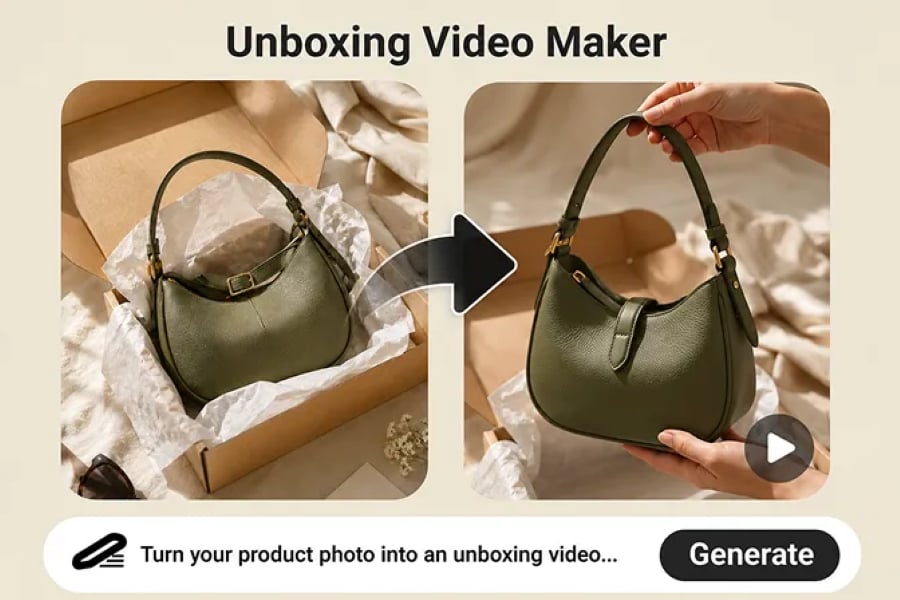
A product photo can show what you sell, but an opening sequence shows how the product feels when it arrives. That is why an AI Unboxing Video Maker is useful for ecommerce teams, DTC brands, launch marketers, and creators who need product reveal clips without organizing a physical shoot every time.
Instead of relying on one final hero image, AI lets you stage the moment: the lid opens, the protective paper moves, the item appears, and the camera settles on the product. That small reveal can make packaging, material quality, and brand presentation easier to understand.
What an AI Unboxing Video Maker Does
An AI unboxing video maker creates short product opening scenes from a prompt, a product photo, or a packaging reference. You describe the box, product, lighting, hands, camera angle, and reveal order. The tool then generates a clip that can work for product pages, ads, social posts, launch teasers, and packaging previews.
For social-first campaigns, teams can pair this approach with an AI UGC video generator to create clips that feel closer to TikTok, Reels, and Shorts instead of polished studio-only ads.
How to Create an AI Unboxing Video with insMind
The workflow stays simple, but each step matters. Use the same four-step order when you are creating a product reveal from a prompt or from a product photo.
Step 1: Enter Your Unboxing Idea or Upload a Product Photo
Begin with the product and the reveal you want. You can write a detailed prompt, upload a product photo, or use a packaging image as the visual reference. Be specific about the first action, such as lifting the lid, moving tissue paper, or bringing the product closer to the camera.

Step 1: add an unboxing prompt or product image
Step 2: Choose the Right AI Video Model and Settings
Select the model, aspect ratio, duration, and quality settings for the platform you care about. A vertical reveal is better for social feeds, while a clean, stable frame may be stronger for an ecommerce product page or business presentation.
If the video supports a broader brand campaign, consider whether it also needs a business video maker style: cleaner framing, steadier motion, and a more polished product message.

Step 2: select AI video model and settings
Step 3: Generate a Product Reveal Unboxing Video
When the prompt and settings are ready, generate the clip. Review whether the product keeps its shape, whether the hands look natural, and whether the packaging still matches your reference. If the first result is close but not perfect, adjust the prompt and regenerate.

Step 3: generate an AI product reveal video
Step 4: Review, Download, and Share Your Video
Watch the full result before you download. If the opening frame, hand motion, and final close-up look clean, you can use the clip in product pages, launch posts, paid creative, or a promotional video sequence.

Step 4: review and download the unboxing video
Six AI Unboxing Video Formats Worth Testing
| Format | Best use | Prompt direction |
| Product Reveal Unboxing | Premium beauty, fashion, gifts, and product launches | Focus on opening the box, moving packaging aside, lifting the product, and ending with a close-up. |
| Ecommerce Unboxing Demo | Product pages and marketplace listings | Show exactly what arrives: box, inserts, tray, product size, and material texture. |
| Creator-Style Unboxing | TikTok, Reels, Shorts, and creator-style ads | Use handheld movement, first-impression pacing, and a warm lifestyle setting. |
| AI Presenter Unboxing | Explainer-led social product reviews | Let an AI presenter hold the product and packaging while introducing the key selling points. |
| Teaser Reveal | Pre-launch campaigns and suspense-driven posts | Build anticipation with slow lid movement, partial reveal, shadows, and a final hero shot. |
| Packaging Simulation | Packaging design review before production | Compare tray layout, insert cards, tissue paper, bottle placement, and box structure. |
For a complete campaign, the same product concept can also become an AI product video with feature highlights, demos, and social variations beyond the unboxing moment.
Prompt Tips for Better Product Reveal Videos
- Describe the reveal order instead of only describing the final product shot.
- Name the camera style, such as top-down demo, handheld creator shot, slow push-in, or cinematic close-up.
- Protect product accuracy with phrases like keep the product shape accurate and avoid extra products.
- Match lighting to the brand: warm natural light for beauty, crisp studio lighting for tech, or dramatic shadows for teaser launches.
- Keep the scene focused. One product, one box, and one clear reveal usually perform better than a crowded scene.
FAQs About AI Unboxing Videos
Can I make an unboxing video from one product photo?
Yes. A clear product or packaging photo can guide the result. Add a prompt that explains the box opening, product reveal, camera movement, and lighting.
What products work best for AI unboxing videos?
Packaged beauty products, tech accessories, fashion items, gift boxes, subscription boxes, and ecommerce products work especially well.
How long should an AI unboxing video be?
Most short-form reveals work well at 5 to 15 seconds. Product page demos can be longer when they need to show more packaging detail.
How do I make AI hands and products look realistic?
Use a clean source image, keep the scene simple, and add constraints such as no distorted fingers, no extra products, and no product deformation.
Make the Product Opening Part of the Story
A good unboxing clip does not only display an item. It gives buyers a sense of arrival, packaging quality, and product value. With the right prompt and a clear product image, AI can help teams test reveal ideas faster and turn ordinary product shots into more engaging marketing assets.
Ready to turn a product photo into a reveal clip? Try the AI Unboxing Video Maker and create your next product opening video online.
Sharon is an avid writer who has a concentration on nonfiction content. She has been treading the writers’ field for more than ten years and hopes to broaden her experience by delving further into book publishing. In her spare time, she enjoys a good read or movie that takes her back in time.