

Most rewriting tools bill like a printer: every run costs you, whether the page is usable or not. That design quietly trains bad habits. You accept the first halfway-decent pass because a second try feels expensive. The workflow I want is the opposite. I want room to compare options, then pay for the draft I actually keep. That is why I tested Ai humanizer as an acceptance loop, not as a magic button.
The claim worth checking is simple. If unused suggestions do not burn your allowance the same way a blind paraphrase run does, editors stop shipping the first “good enough” version. In my testing, that billing idea changes behavior more than another adjective swap ever did.
Goal: Build a Keep-or-Reject Rewrite Loop
The goal is not to erase every AI fingerprint in one click. The goal is a desk process you can repeat on Tuesday with a tired brain: paste a real draft, generate options, keep only what survives a short checklist, and leave a paper trail of what you discarded.
I use this loop on blog posts, support replies, and internal memos that started as AI scaffolding. The input has to be mine in substance. The tool is there to rebuild cadence, not to invent the argument.
Prep: Credits, Caps, and a Dirty Sample
Before the first click, I line up three boring facts from the product itself. Guest users see a small free-use counter on the workspace. After registration, the site offers a free credit of 800 words so a real pilot does not require a card on day one. Paid plans then raise monthly allowances and per-input caps: Lite sits at $9 per month for 20,000 words with up to 600 words per input; Plus is $15 for 50,000 words with up to 2,000 per input; Max is $19 for 400,000 words with the same 2,000 per-input ceiling.
Those numbers tell me how to stage the pilot. I do not start with a 4,000-word dump on a free widget that shows a 300-word field. I start with a 250–400 word messy section that already has the AI rhythm I hate: evenly balanced claims, polished transitions, and no personal judgment.
Checklist to Run Before You Paste
-
Mark the sentences you refuse to lose: numbers, names, citations, product claims.
-
Decide the Humanize Level you will try first. Mid levels are my default for work prose.
-
Write a keep rule: meaning intact, cadence less flat, no new facts invented.
I also decide whether today’s job is a pilot or a production pass. Pilots stay inside the free credit and the small free-use counter. Production passes only start after I have seen Clean, Smooth, and Clear behave on my own messy samples. That split keeps Dr. Humanizer from becoming an expensive habit before the desk rules exist.
Steps: Paste, Set Depth, Keep One Version
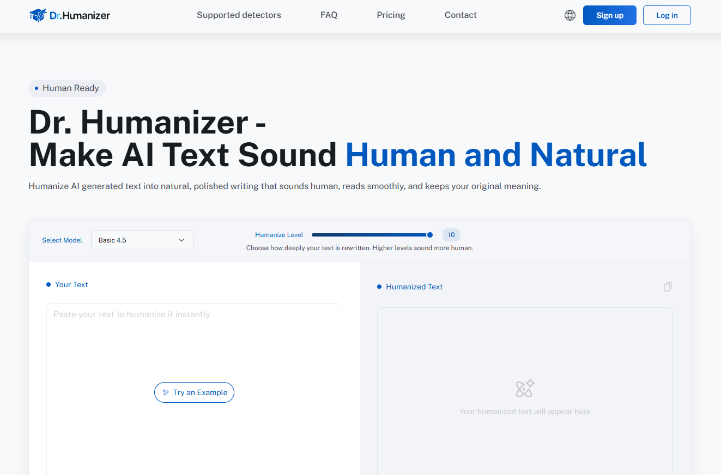
Dr. Humanizer keeps the interaction short on purpose. You work in the browser. There is nothing to install. The practical path is paste, choose depth, run, then judge.

-
Paste the section into Your Text. Stay above the site’s minimum of 50 words; for steadier flow, I aim for at least 200.
-
Set Humanize Level. Higher values push a deeper rewrite. I start around the middle unless the draft is obviously stiff.
-
Choose a model lane if Select Model is available for your account. Treat Basic, Pro, and Standard as different rewrite styles, not synonyms.
-
Click Humanize Now and wait a few seconds. Then read all three rewrites before you touch a detector.
The three-output design is the heart of the loop. The product frames them as Clean, Smooth, and Clear takes on the same source: one polished grammar pass, one smoother relationship between ideas, one clearer compression. I do not average them into mush. I pick sentences the way an editor picks from three galleys.
How I Score the Three Rewrites
| Version lane | I keep it when… | I reject it when… |
| Clean | Grammar tightens and claims stay literal | The voice still marches in perfect parallel |
| Smooth | Transitions feel less mechanical | A number or citation softens |
| Clear | Dense lines become readable without new claims | Precision nouns get swapped for vague ones |
After I choose, I paste the kept text back into the manuscript and only then run a detector if the client requires one. That order matters. Scoring before reading trains you to optimize the meter instead of the paragraph.
Why “Count What You Keep” Changes the Desk
Pricing help text says word count is calculated on the words you choose to keep after reviewing suggestions. That rule is the behavior change. If exploring Clean versus Smooth does not automatically punish curiosity, people compare. If every preview burns the same as a commit, people settle. I treat drhumanizer as a compare-then-commit desk for that reason, and I still verify the dashboard math on my own account before I promise a team anything about burn rate.
Common Mistakes That Break the Loop
The first mistake is feeding scraps. A 60-word blob can be rewritten, but it rarely teaches you whether the tool can hold a longer argument together. The help guidance prefers larger chunks for more natural flow, and that matches what I see in practice.
The second mistake is raising Humanize Level until the prose feels “different,” then skipping a meaning check. Deep rewrites can overshoot. If a methods sentence loses a hedge or a limit, the draft is not better. It is riskier.
The third mistake is rerunning the same kept text five times hoping a detector will finally smile. If two careful passes plus a light human edit still fail your rule, change the source draft quality or the model lane. Do not grind credits into the same weak paragraph.
Quick Result Checks Before You Commit
Before I mark a version as kept, I read it aloud once and scan for three quiet failures: a missing hedge, a swapped proper noun, and a sentence that suddenly sounds more certain than the source. If any of those appear, I reject the version even when the cadence feels better. Then I either try another lane or fix the line by hand. The point of the loop is controlled acceptance, not speed for its own sake.
Only after that check do I drop the kept text into the full document and run whatever detector the client requires. Doing it in reverse trains the wrong instinct. You start writing for the meter instead of for the reader sitting across from you.
Where This Loop Still Needs Judgment
The loop does not replace subject-matter review. It will not invent missing data, and it should not be used to disguise work that was never yours. Plan caps still apply, unused monthly words do not roll over, and free trials are for learning the desk—not for shipping a full content calendar. Keep a human pass on anything that carries legal, medical, or graded academic stakes.

Ship the Kept Draft, Not the First Pass
If you need a rewrite habit that rewards comparison, build the keep-or-reject loop first. Use the free credit to learn the three-version layout, then pick a paid tier only when your monthly volume is clear. Lite is enough for short posts. Plus and Max make sense when 2,000-word inputs and larger monthly buckets match the calendar. Dr. Humanizer is easiest to justify when the team can show which kept drafts actually shipped.
Skip this stack if you want a tool to write the idea for you. Keep it if you already have the idea and need a calmer way to choose a draft you are willing to sign. In my testing, the win is the kept paragraph, not the first animation on the screen.

Madeline Miller love to writes articles about gaming, coding, and pop culture.