

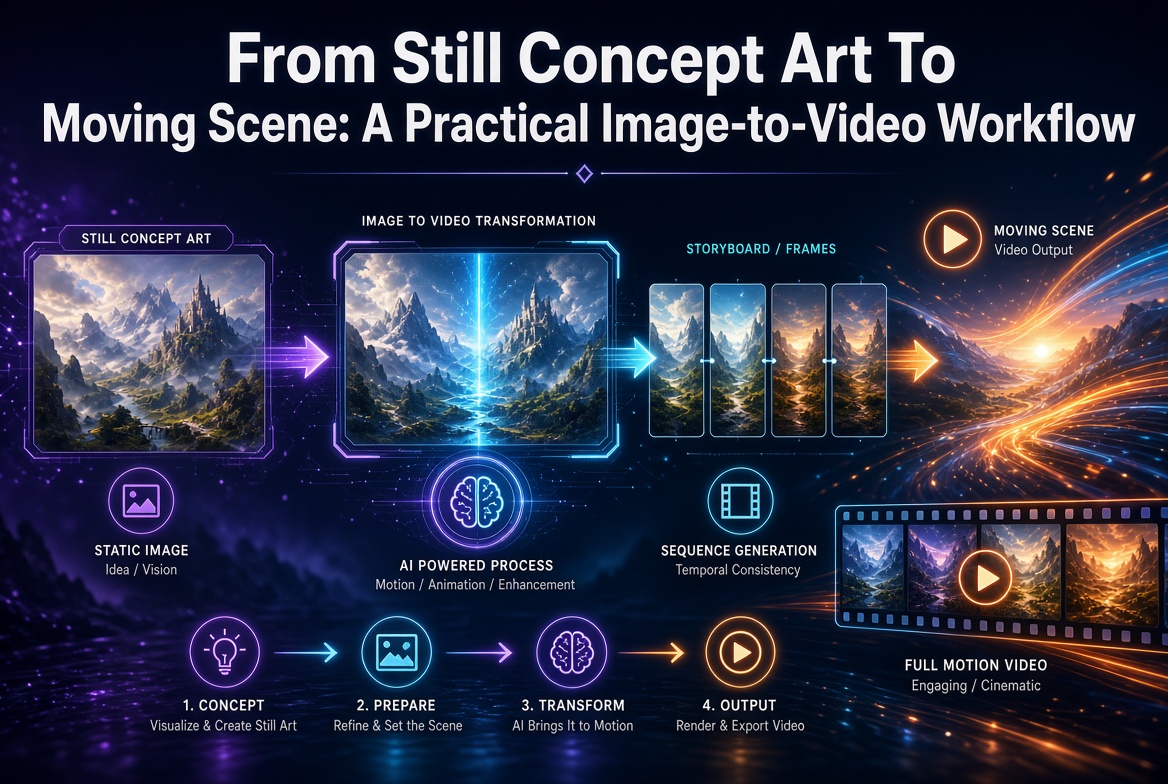
A strong still image already contains the beginning of a shot. It establishes the subject, production design, color, composition, and a moment of tension. Image-to-video generation adds time to that visual contract, but it does not decide the story automatically. The creator still has to specify what moves, what remains stable, how the camera behaves, and where the moment should end.
The most reliable workflow starts before animation. Choose a frame that can support motion, write one coherent beat, and judge the resulting clip as a sequence rather than a collection of attractive frames. A practical browser route is to use image to video AI in Nano Banana, an independent product rather than an official Google service. Its image-to-video page lets the opening image carry the visual setup while the prompt directs motion and available settings depend on the selected model. It should be treated as a creative workspace, not as a guarantee that every generated clip will be production-ready.
Choose a Frame With Room to Move
The opening image should make the subject readable at a glance. Avoid ambiguous crops that cut through hands, faces, vehicles, or important props. Leave physical room in the direction of travel. A character about to cross the frame needs space ahead; a camera push needs foreground and background layers; a product turn needs a clean silhouette that can survive changing perspective.
Depth cues help the model understand a shot. Foreground objects, a clear middle distance, and a background with recognizable structure can support parallax. A completely flat poster may be perfect for graphic design but offer little spatial evidence for camera travel. That does not make it unusable; it means the motion idea should respect its graphic nature, perhaps through restrained atmospheric movement or a subtle push rather than an elaborate orbit.
Write a Motion Prompt, Not Another Image Prompt
The still already shows the wardrobe, environment, palette, and composition. Use the prompt to describe change over time. Name the subject action, camera direction, environmental motion, speed, and emotional beat. “The character slowly turns toward the window as rain trails down the glass; the camera makes a gentle push in; the coat and room remain stable” gives the sequence a clearer job than repeating every visible detail.
Limit the shot to one primary action and one supporting movement. A character can look up while curtains shift in a draft. A product can rotate slightly while a narrow light travels across its surface. Asking for a run, transformation, explosion, orbit, and scene change in one short clip creates competing timelines. Complexity can be built across several shots rather than forced into one generation.
Separate Subject Motion From Camera Motion
Subject motion changes the pose or position of an object inside the scene. Camera motion changes how the scene is observed. Combining both can work, but each should be intentional. A locked camera is often best for a subtle performance or effects shot. A pan, tilt, dolly, or orbit becomes easier to judge when the subject action is simple.
Use film language only when it communicates a visible instruction. “Slow dolly in” is useful. “Make it cinematic” is not enough. State whether the camera should remain level, whether focus changes, and whether the move should accelerate or stay even. If stability matters, explicitly protect identity, wardrobe, product shape, background architecture, and lighting direction.
Design the Beat From Start to Finish
A short clip still needs an arc. Define the opening state, the change, and the final state. A character begins still, notices an off-screen sound, then settles facing the source. A vehicle rests under neon light, headlights wake, and reflections travel across wet pavement. A poster character breathes, blinks once, and returns to a near-loopable pose.
Some models can accept an end frame or other destination control, while others work only from the opening image and prompt. Use an end frame only when the selected interface supports it and the destination composition matters. Otherwise, describe the final beat in plain language and judge whether the clip reaches it without a sudden cut.
Review Every Frame, Not Only the Thumbnail
A strong first and last frame can hide problems in the middle. Play the clip several times and pause through transitions. Look for identity drift, changing clothing, warped hands, melting props, duplicated objects, sliding backgrounds, broken reflections, and shadows that move against the light. Watch the edges of the frame, where artifacts often enter unnoticed.
Temporal consistency is different from still-image quality. A slightly imperfect frame may pass at normal speed, while a small shape change repeated across several frames can feel distracting. Review once for story and pacing, again for subject stability, and a third time for technical artifacts. Different passes reveal different problems.
Compare Motion Ideas Before Increasing Complexity
Generate a small set of variations around the same starting frame and motion concept. Change one variable per group: camera speed, subject action, environmental motion, or model. Label outputs so feedback can refer to them. “Keep V2’s performance with V4’s slower camera” is a useful note; “more dynamic” leaves the next step undefined.
Model choice should follow the shot. One model may handle character stability well, another may produce stronger camera movement, and another may fit the available duration, resolution, or credit budget. Compare using the same frame and brief. Do not infer broad superiority from one lucky result.
Build a Sequence From Individual Shots
Image-to-video generation is most manageable at the shot level. The Nano Banana creative workspace supports that shot-level browser workflow. Create a strong opening frame for each beat, animate it, then assemble selected clips in an editor. This gives the creator control over pacing, sound, transitions, titles, and continuity. It also makes it possible to replace one weak shot without regenerating an entire sequence.
Maintain a simple continuity sheet. Record character details, wardrobe, props, screen direction, time of day, lens feeling, palette, and the final state of each shot. The end of one clip should provide a logical visual handoff to the next. Continuity is easier to preserve when it is written down instead of reconstructed after several generations.
Finish With Sound and Editorial Judgment
Motion becomes meaningful in an edit. Choose the in and out points, remove unstable frames, and decide whether the clip needs speed adjustment, stabilization, cropping, or color matching. Add sound only from sources the project may use. A quiet room tone, a single mechanical cue, or a restrained musical beat can make a subtle movement feel intentional without covering visual problems.
Rights and representation still apply. Use opening images the team is permitted to animate. Do not fabricate a real event, performance, endorsement, or news scene. Be careful with recognizable people, trademarks, and copyrighted characters, and follow the disclosure expectations of the platform or client.
The goal is not to make every still move as much as possible. It is to discover the smallest motion that reveals the image’s hidden beat. A readable frame, focused prompt, intentional camera, frame-by-frame review, and disciplined edit can turn a single concept image into a believable shot while preserving the art direction that made the still worth animating.
Amanda Dudley is a lecturer and writer with a Ph.D. in History from Stanford University. After earning her doctorate in 2001, she decided to pursue a fulfilling career in the educational sector. So far, she has made giant strides by working as an essay writer for EssayUSA, where she delivers high-quality academic papers to students who need them.